
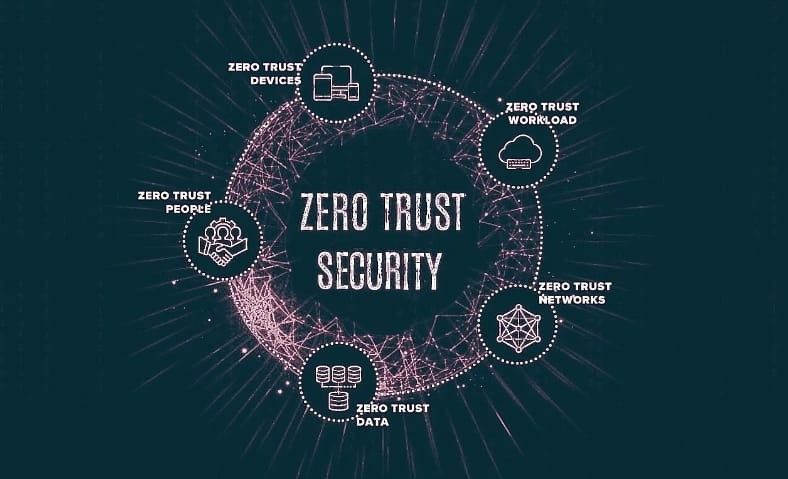
Zero Trust

Cloud Computing and Technology, cybersecurity

Beyond the Perimeter: The Ultimate Guide to Zero Trust Network Access (ZTNA)

Introduction:-   For decades, enterprise security relied on a simple, comforting analogy: the castle and the moat. The castle was your local server room, the moat was your firewall, and the drawbridge was your Virtual Private Network (VPN). If you were outside the moat, you were untrusted. If you managed to cross the drawbridge with the right credentials, you were let inside the castle walls and granted free rein to roam the courtyard. But then the world changed. Applications left the local server room for the public cloud. Employees packed up their desktops and started working from home, coffee shops, and airports. Suddenly, the castle was empty, and the moat was protecting nothing but air. Continuing to rely on traditional, perimeter-based security in a hybrid, cloud-first era isn’t just inefficient—it is an open invitation to modern cyber criminals. When a malicious actor or a compromised device gains access to a traditional VPN, they inherit “lateral mobility,” allowing them to scan your entire network and compromise sensitive data at will. To survive this landscape, organizations are shifting toward a radically simple, uncompromising philosophy: Never Trust, Always Verify. This is the core engine behind Zero Trust Network Access (ZTNA). 1. Demystifying ZTNA: What is it Exactly? Zero Trust Network Access (ZTNA) is a category of security technologies designed to provide secure, seamless remote access to specific applications and data based on clearly defined access control policies. Unlike a legacy VPN, which grants broad network-level entry, ZTNA works on a strict need-to-know basis. It treats every single user, device, and connection request as a potential threat until proven otherwise. The Core Pillars of Zero Trust To truly understand ZTNA, it helps to look at the three foundational principles established by the National Institute of Standards and Technology (NIST): Explicit Verification: Always authenticate and authorize based on all available data points—including user identity, geographic location, device health, service or workload context, and data classification. Least Privilege Access: Limit user access with Just-In-Time (JIT) and Just-Enough-Access (JEA) models. Give users access only to the specific applications they need to do their jobs, and absolutely nothing else. Assume Breach: Micro-segment your network, minimize your attack surface, encrypt all digital sessions end-to-end, and use real-time analytics to detect anomalies and continuously improve your defenses. 2. Why the Traditional VPN is Failing the Modern Enterprise To appreciate why ZTNA is taking over the tech landscape, we have to look closely at the architectural cracks in the traditional VPN armor. TRADITIONAL VPN (Castle-and-Moat) [User] —> [VPN Gateway/Firewall] —> [Access Granted to the ENTIRE Corporate Network] ZTNA ARCHITECTURE (Micro-Perimeters) [User] —> [ZTNA Trust Engine] —> [Strict Verification] —> [Access Granted ONLY to App A] X-> [App B Hidden/Invisible] The Inherent Flaw of Lateral Movement The biggest vulnerability of a standard VPN is implicit trust. Once an employee logs in via a VPN client, they are functionally dropped directly into the corporate network segment. If an attacker steals that employee’s credentials via a sophisticated phishing attack, the attacker can move laterally across the infrastructure. They can hop from an innocent marketing portal to the critical financial database without triggering secondary alarms. Poor User Experience and Bottlenecks Traditional VPNs were designed when only a small fraction of the workforce worked remotely. In a modern hybrid enterprise, routing thousands of employees’ daily traffic through a central data center creates massive bandwidth bottlenecks. Employees experience sluggish connection speeds, dropped video calls, and overall frustration, which often tempts them to bypass corporate security measures entirely. The Problem of Visibility A VPN makes an open port visible to the public internet so that remote users can discover it. Unfortunately, if an authorized user can see it, a hacker scanning the internet for vulnerabilities can see it too. 3. How ZTNA Works Under the Hood ZTNA completely flips the script on network visibility. Instead of dropping users onto a network, ZTNA creates an isolated, encrypted “micro-perimeter” around each individual application. Here is a step-by-step breakdown of how a typical ZTNA connection request occurs: Step 1: The Request. A user attempts to access an internal corporate application (e.g., a private CRM or source code repository) from their laptop. Step 2: The Context Check. Before the connection is established, the ZTNA controller analyzes a multitude of contextual signals. It doesn’t just ask, “Does this person have the right password?” It asks: Is the device running an updated operating system? Is the corporate antivirus active? Is the user logging in from an expected geographic location? Does this request match their normal behavioral patterns? Step 3: The Dark Cloud Effect. While this verification occurs, the application remains completely hidden from the public internet. It does not respond to external pings or network scans, making it effectively invisible to attackers. Step 4: Micro-Segmented Access. Once the ZTNA controller verifies the user and device, it establishes a secure, isolated tunnel directly between that specific user and that specific application. The user has zero awareness of, or access to, any other applications hosted on the same network infrastructure. Step 5: Continuous Assessment. The trust is never permanent. The ZTNA engine continuously monitors the session. If the user suddenly disables their local firewall or changes locations dramatically mid-session, the connection is instantly revoked. 4. Architectural Models: Endpoint vs. Service-Initiated ZTNA When implementing ZTNA, organizations generally choose between two primary deployment styles, depending on their infrastructure and device fleet. Feature Endpoint-Initiated ZTNA Service-Initiated ZTNA Agent Requirement Requires a dedicated software agent installed on the user’s device. Clientless; typically accessed securely through a standard web browser. Best Used For Corporate-managed laptops and heavy engineering workloads. BYOD (Bring Your Own Device), contractors, and third-party vendors. Application Coverage Supports both web-based and legacy desktop applications. Primarily optimized for web-based (HTTP/HTTPS) applications. Security Control Deep device posture checking (inspecting registry files, patch levels). Standard identity validation and browser-level security checks. Endpoint-Initiated ZTNA In this model, a lightweight software agent sits on the user’s endpoint. The agent communicates device health and identity data to a centralized ZTNA controller. The controller

Digital padlock representing cybersecurity and data protection.
cybersecurity, Data Privacy & Security

Cybersecurity in the Digital Age: Protecting Data in a Connected World

Introduction We live in an age where data travels faster than thought — from cloud storage to smartphones, from online banking to social media. But as our digital world expands, so do the cyber threats lurking behind every connection. From global ransomware attacks to phishing scams and data breaches, cybercrime has evolved into one of the biggest challenges of the 21st century. In 2024 alone, the global cost of cybercrime was estimated to surpass $10 trillion, making it more profitable than the illegal drug trade. In this digital age, cybersecurity isn’t optional — it’s essential for individuals, businesses, and governments alike. What Is Cybersecurity? Cybersecurity refers to the practice of protecting systems, networks, and data from unauthorized access, attacks, and damage. It involves technologies, processes, and best practices designed to secure: Computers and servers Mobile devices Networks Cloud environments User data Core Objectives of Cybersecurity — The CIA Triad: Element Meaning Purpose Confidentiality Keeping data private Prevent unauthorized access Integrity Maintaining data accuracy Ensure data isn’t altered maliciously Availability Ensuring accessibility Keep systems online and functional Together, these principles form the foundation of all cybersecurity systems. ⚙️ Types of Cybersecurity Cybersecurity covers a wide range of protection layers designed to defend different parts of the digital ecosystem. 1. Network Security Protects internal networks from intruders using firewalls, intrusion detection systems, and VPNs. 2. Information Security (InfoSec) Ensures data privacy and protects sensitive information from leaks or misuse. 3. Cloud Security Secures cloud-based infrastructure, applications, and data stored in remote servers. 4. Endpoint Security Defends devices such as laptops, phones, and IoT gadgets that connect to a network. 5. Application Security Prevents vulnerabilities during software development through encryption, code testing, and patch management. 6. Operational Security (OpSec) Focuses on the policies and procedures to handle data and protect assets. 7. Disaster Recovery and Business Continuity Ensures systems can recover quickly from attacks or data loss events. Common Cyber Threats Cyberattacks come in many forms — some target individuals, others target global corporations. Here are the most common types of cyber threats: Type Description Example Phishing Fraudulent emails trick users into revealing credentials Fake bank alerts Ransomware Encrypts data and demands payment WannaCry, LockBit Malware Software designed to damage or steal information Viruses, Trojans Denial of Service (DoS/DDoS) Overloads servers to make them crash Attacks on websites or networks Man-in-the-Middle (MitM) Intercepts data during transmission Wi-Fi eavesdropping SQL Injection Inserts malicious code into databases Web form exploits Zero-Day Exploit Targets unpatched vulnerabilities Newly discovered software flaws Insider Threats Employees misuse access privileges Data theft by insiders The increasing sophistication of cyberattacks means no organization is immune — prevention and vigilance are key. Essential Cybersecurity Tools Modern cybersecurity strategies rely on a mix of software, AI, and human expertise. Commonly Used Tools: Antivirus Software: Protects against malware and viruses (e.g., Bitdefender, Norton) Firewalls: Blocks unauthorized access to networks Encryption Tools: Secures data in transit and at rest Password Managers: Protects user credentials VPNs: Masks IP addresses for secure browsing Intrusion Detection Systems (IDS): Monitors networks for suspicious activity Multi-Factor Authentication (MFA): Adds an extra security layer beyond passwords The Role of Artificial Intelligence in Cybersecurity AI is becoming a game-changer in the fight against cyber threats. How AI Helps: Detects anomalies in real-time Predicts potential attacks before they occur Automates incident response Reduces false alerts and improves accuracy Example: AI-driven tools like Darktrace and CrowdStrike use machine learning to identify unusual network behavior and block cyberattacks instantly. Cybersecurity in Business Organizations of all sizes — from startups to multinationals — are prime targets for hackers. Key Areas of Focus for Businesses: Employee Awareness Training: Human error is the top cause of breaches. Data Encryption: Sensitive data must be encrypted at all stages. Regular Security Audits: Identify vulnerabilities before hackers do. Zero-Trust Architecture: Verify every access attempt, even inside the network. Incident Response Plans: Prepare for attacks with structured recovery strategies. Example:In 2023, several global firms adopted Zero Trust Security Models, ensuring users and devices are verified every time they access company data — drastically reducing internal breaches. Cybersecurity in the Cloud With more organizations migrating to cloud services like AWS, Azure, and Google Cloud, securing cloud infrastructure is vital. Cloud security ensures: Data encryption Identity and access management (IAM) Secure APIs and regular patching Providers also follow shared responsibility models, meaning both the provider and the client share the duty of maintaining security. Cybersecurity for Individuals Cybersecurity isn’t just for corporations — individuals must also stay alert. Personal Cyber Hygiene Tips: Use strong and unique passwords for every account. Enable two-factor authentication (2FA). Avoid clicking on suspicious links or attachments. Update software and systems regularly. Use secured Wi-Fi networks. Regularly back up important data. The Future of Cybersecurity The coming years will see cybersecurity evolve alongside AI, quantum computing, and the Internet of Things (IoT). 🔮 Key Future Trends: AI-powered threat detection Quantum encryption for unbreakable security Zero Trust Architecture becoming the global standard Biometric authentication (face, fingerprint, voice) Cyber resilience — not just prevention but rapid recovery Cybersecurity is no longer about building walls — it’s about creating adaptive, intelligent systems that learn and evolve faster than attackers. Conclusion In the digital era, data is power, and protecting it is non-negotiable. Cybersecurity is the first line of defense against a world of invisible threats. Whether it’s an individual securing personal data or a multinational corporation safeguarding billions of records, awareness and preparation are the strongest shields. As technology advances, so must our commitment to cybersecurity — ensuring a safer, more resilient digital future for everyone. FAQs 1. What is cybersecurity in simple terms?Cybersecurity is the protection of computers, networks, and data from digital attacks or unauthorized access. 2. Why is cybersecurity important?It prevents data theft, financial loss, and system damage caused by hackers or malware. 3. What are common cyber threats?Phishing, ransomware, malware, DDoS attacks, and insider threats are among the most common. 4. How can individuals improve cybersecurity?Use strong passwords, enable two-factor authentication, and avoid suspicious emails or downloads. 5.

Scroll to Top