software development

Artificial Intelligence, Digital Transformation, Software development, Technology

Navigating the Next Tech Horizon: A Human Guide to the Innovations Reshaping Our Digital World

Introduction:- Remember when “the future” meant having a computer in your pocket? Today, we carry the processing power of a mid-90s supercomputer in our jeans, and yet we find ourselves standing on the precipice of an even more radical shift. The tech world isn’t just evolving; it’s rewriting its foundational code. As we navigate through 2026, the conversations around technology have shifted from basic automation to deep, systemic intelligence. We are no longer just building better tools; we are co-authoring a new reality with our machines. From the way developers write software to how global enterprises secure their data in the cloud, the digital landscape is undergoing a massive paradigm shift. Let’s pull back the curtain on the massive shifts defining the tech world today—broken down not just in code, but in human terms. 1. The Future of AI: Beyond the Chatbot Hype For a couple of years, the world was obsessed with generative AI that could write poems or generate quirky images. But the honeymoon phase is over. The future of AI isn’t about chatbots that mimic human speech; it’s about Agentic AI—autonomous systems capable of reasoning, planning, and executing complex workflows without constant human hand-holding. From Prompting to Partnering Early AI required meticulous prompting. If you didn’t phrase your question perfectly, the output was useless. Today, AI has developed contextual awareness. We are moving from a “command-and-control” dynamic to a truly collaborative partnership. Autonomous Agents: Imagine an AI assistant that doesn’t just book a flight when asked, but monitors your calendar, anticipates a business conflict, negotiates a rescheduled meeting with a client’s AI assistant, and books the optimal flight based on your historical preferences—all in the background. Multimodal Maturity: AI now naturally processes voice, video, text, and physical gestures simultaneously. This has broken down the barriers between digital intent and physical execution. The Human Element: Emotional Intelligence (EQ) Meets AI As AI handles the heavy analytical lifting, the premium on human emotional intelligence has skyrocketed. The most successful implementations of AI aren’t those that replace humans, but those that augment human empathy, creativity, and ethical judgment. We are the directors; AI is the ultimate crew. 2. Next-Gen Software Development: The Democratization of Code The software engineering landscape is experiencing its most significant disruption since the invention of high-level programming languages. Next-gen software development is defined by a symbiosis between human intuition and AI-driven development engines. The Rise of the “Architect” Mindset Writing syntax—the actual typing of loops, brackets, and boilerplate code—is increasingly being handled by AI co-pilots. Does this mean software engineers are obsolete? Absolutely not. Instead, their role has elevated. [Traditional Development] ──> Focus on Syntax, Debugging, & Boilerplate [Next-Gen Development] ──> Focus on Architecture, System Design, & Security Developers are transitioning from code writers to system architects. The value shifts from knowing how to write a function to understanding how systems interact, scale, and remain secure. Low-Code, No-Code, and the Citizen Developer We are seeing a massive democratization of technology. Business analysts, healthcare professionals, and educators are now building sophisticated enterprise applications using natural language interfaces. By bridging the gap between an idea and a working application, innovation is no longer bottlenecked by the availability of software engineering teams. 3. Cloud Computing Trends: The Distributed Cloud and Edge Renaissance The cloud is no longer a distant, centralized data center owned by a tech giant. Current cloud computing trends point toward a hyper-distributed model where data processing happens exactly where it makes the most sense. Edge Computing Comes of Age With the proliferation of IoT devices, smart cities, and autonomous vehicles, sending data back to a central cloud server introduces unacceptable latency. Example: An autonomous vehicle traveling at 60 mph cannot wait 200 milliseconds for a cloud server to process a “stop” command. The decision must happen at the “edge”—directly within the vehicle’s onboard processing unit. Sovereign Clouds and Data Privacy Geopolitics has firmly entered the cloud space. Nations and regions are demanding that their citizens’ data remain within geographical boundaries, governed by local laws. This has led to the rise of sovereign clouds, forcing global enterprises to rethink their infrastructure to ensure compliance without sacrificing performance. 4. Cyber Resilience: Shifting from Defense to Survival In the modern tech ecosystem, a data breach is no longer a matter of if, but when. Because of this harsh reality, the conversation has shifted from traditional cybersecurity (building taller walls) to cyber resilience (how well you can take a punch and keep standing). The Zero Trust Imperative The old security model assumed that everything inside a corporate network was safe. Today’s decentralized workforce has thoroughly shattered that perimeter. “Zero Trust” operates on a simple, human-like skepticism: Never trust, always verify. Every user, device, and connection must continuously prove its identity and authorization. Preparing for the Quantum Leap While practical quantum computers are still on the horizon, the cryptographic threat they pose is already reshaping current security strategies. Bad actors are actively harvesting encrypted data today, intending to decrypt it years later when quantum computing matures. Progressive organizations are already implementing Post-Quantum Cryptography (PQC) to ensure their data remains secure tomorrow. 5. Digital Transformation 2026: The Cultural Revolution True digital transformation 2026 isn’t about buying new software or migrating to the cloud just to tick a box. It is fundamentally a cultural shift that requires organizations to fundamentally reimagine how they deliver value to humans. Breaking Down Silos For decades, IT departments lived in isolation, speaking a language the rest of the business couldn’t comprehend. True digital transformation breaks these walls down. Technology is now deeply woven into every department—from HR using predictive analytics for talent retention, to marketing utilizing real-time AI generation for hyper-personalized campaigns. The Sustainability Metric Modern digital transformation is no longer just measured in ROI (Return on Investment), but also in its environmental impact. Data centers consume massive amounts of electricity and water. Forward-thinking companies are auditing their “digital carbon footprint,” optimizing their code for energy efficiency, and choosing cloud providers that run entirely on renewable

Artificial Intelligence

AI Agents vs Traditional Automation: What’s Changing in 2026?

Introduction:- Automation has been a cornerstone of digital transformation for decades. Businesses have long relied on software to eliminate repetitive tasks, reduce operational costs, and improve efficiency. From manufacturing lines to customer relationship management systems, traditional automation has helped organizations streamline workflows and maintain consistency. However, the technological landscape in 2026 is undergoing a significant shift. Organizations are no longer satisfied with systems that simply follow predefined rules. They increasingly require software that can understand context, adapt to changing situations, make informed decisions, and collaborate with humans. This demand has accelerated the adoption of AI agents, one of the most influential developments in modern artificial intelligence. Unlike traditional automation, AI agents are designed to reason, plan, and act toward specific goals. They can analyze large amounts of information, interact with multiple applications, learn from feedback, and even coordinate with other AI systems. Rather than replacing simple automation, AI agents expand what automation can achieve by handling more dynamic and complex tasks. This article explores how AI agents differ from traditional automation, why organizations are investing in intelligent systems, and how businesses can prepare for the next generation of digital operations. Understanding Traditional Automation Traditional automation refers to software that performs predefined actions based on fixed rules. These systems execute workflows exactly as they were programmed, making them highly reliable for repetitive processes. Examples include: Automated invoice generation Payroll processing Scheduled email campaigns Data backups Manufacturing assembly lines Basic customer support chatbots Rule-based approval workflows The primary advantage of traditional automation is consistency. Once configured correctly, it performs the same task repeatedly with minimal errors. It is ideal for environments where processes rarely change. However, these systems have clear limitations. They cannot interpret ambiguous information, adapt to unexpected scenarios, or make decisions beyond their programmed rules. If the business process changes, developers often need to redesign or update the automation. What Are AI Agents? AI agents are intelligent software systems capable of perceiving information, reasoning about it, making decisions, and taking actions to achieve defined objectives. Unlike conventional automation tools, AI agents do not rely solely on fixed rules. They use technologies such as large language models, machine learning, natural language processing, retrieval systems, and external tools to solve problems dynamically. For example, an AI customer support agent can: Read a customer’s email. Identify the issue and urgency. Search internal documentation. Check order status. Draft a personalized response. Escalate complex cases when necessary. Learn from user feedback over time. Instead of executing a single scripted workflow, the agent evaluates the situation and chooses the most appropriate action. Traditional Automation vs AI Agents Feature Traditional Automation AI Agents Decision-making Rule-based Context-aware Learning No Yes, through AI models and feedback Flexibility Low High Handles unstructured data Limited Excellent Human-like communication Minimal Advanced Adaptability Requires reprogramming Can adjust to changing inputs Best suited for Repetitive tasks Complex, evolving workflows Why 2026 Marks a Turning Point Several technological trends have converged to make AI agents practical at scale. Large language models have become significantly more capable, enabling agents to understand natural language and generate useful responses. Cloud infrastructure now provides the computing power needed to run advanced AI workloads efficiently. Businesses have also accumulated vast amounts of digital data, creating opportunities for AI systems to deliver meaningful insights and automation. At the same time, organizations are under pressure to improve productivity, reduce costs, and respond faster to customer expectations. AI agents address these needs by automating tasks that previously required human judgment. Real-World Business Applications Customer Service Modern AI agents can resolve support tickets, summarize conversations, translate languages, and personalize responses while maintaining a consistent customer experience. Software Development Development teams use AI agents to generate code, review pull requests, identify bugs, write documentation, and automate testing. These capabilities accelerate delivery while allowing engineers to focus on architecture and innovation. Cybersecurity Security operations centers increasingly deploy AI agents to monitor logs, detect anomalies, investigate suspicious behavior, and recommend remediation steps. This helps analysts respond more quickly to emerging threats. Cloud Operations Cloud management platforms benefit from AI agents that optimize infrastructure, monitor resource utilization, predict outages, and recommend cost-saving opportunities. They can assist administrators in maintaining reliable and scalable environments. Healthcare Hospitals and healthcare providers use intelligent agents to organize patient records, assist with appointment scheduling, summarize clinical notes, and support administrative workflows, enabling staff to spend more time on patient care. Benefits of AI Agents Organizations adopting AI agents are seeing improvements in several areas: Increased productivity through intelligent task automation. Faster decision-making based on real-time data. Improved customer experiences with personalized interactions. Reduced operational costs by minimizing manual work. Better scalability across departments. Continuous learning and optimization through AI-driven feedback loops. These advantages make AI agents an important part of digital transformation strategies across industries. AI Governance in 2026: Balancing Innovation and Regulation  

Artificial Intelligence, Software development, Technology

How Generative AI Is Reshaping Software Development

How Generative AI Is Reshaping Software Development Software development has always evolved alongside technological innovation. From the early days of manual coding to the rise of integrated development environments (IDEs), cloud computing, and DevOps practices, every advancement has aimed to make building software faster, more efficient, and less error-prone. Today, another major transformation is underway, driven by Generative Artificial Intelligence (AI). Generative AI is no longer a futuristic concept limited to research labs or tech giants. It has become a practical tool that developers, businesses, and organizations are actively using to accelerate software creation, automate repetitive tasks, improve code quality, and streamline entire development lifecycles. What once required hours of manual effort can now be accomplished in minutes with the assistance of AI-powered tools. As businesses continue their digital transformation journeys, Generative AI is emerging as one of the most influential technologies reshaping how software is designed, developed, tested, and maintained. Understanding Generative AI in Software Development Generative AI refers to artificial intelligence systems capable of creating new content based on patterns learned from large datasets. While many people associate Generative AI with text, images, and videos, its impact on software development is equally significant. Modern AI coding assistants can understand natural language instructions and generate functional code snippets, entire functions, documentation, test cases, and even complete applications. Developers can describe what they want in plain English, and AI tools can suggest code that accomplishes the task. Rather than replacing developers, Generative AI acts as an intelligent collaborator that helps teams work faster and focus on higher-value problem-solving activities. Accelerating Code Generation One of the most visible impacts of Generative AI is its ability to generate code quickly. Developers often spend a significant portion of their time writing repetitive code structures, configuring frameworks, or implementing common functionalities. AI-powered coding assistants can automate these tasks by generating code suggestions in real time. For example, instead of manually creating API endpoints, authentication modules, or database queries, developers can provide a prompt and receive ready-to-use code within seconds. This dramatically reduces development time and allows teams to focus on innovation rather than repetitive implementation work. The result is increased productivity, shorter development cycles, and faster delivery of software products. Enhancing Developer Productivity Software engineers frequently switch between coding, researching solutions, reviewing documentation, and troubleshooting issues. These context switches can impact efficiency and slow progress. Generative AI helps reduce these interruptions by providing instant assistance directly within development environments. Developers can ask questions, request code explanations, generate examples, or seek alternative implementation approaches without leaving their workflow. This immediate access to information enables developers to spend more time building solutions and less time searching for answers. For junior developers, AI also serves as a valuable learning companion, helping them understand complex concepts and best practices while coding. Improving Code Quality and Consistency Maintaining code quality is essential for building reliable and scalable software applications. Poor coding practices can lead to technical debt, security vulnerabilities, and maintenance challenges. Generative AI contributes to better software quality by identifying potential issues, suggesting improvements, and promoting coding standards. AI tools can analyze existing codebases and recommend cleaner, more efficient implementations. Organizations can also use AI to enforce coding guidelines across development teams, ensuring consistency in naming conventions, architecture patterns, and documentation practices. By reducing human errors and encouraging best practices, AI helps create more maintainable and robust software systems. Revolutionizing Software Testing Testing remains one of the most time-consuming phases of software development. Writing test cases, identifying edge cases, and validating application behavior often require extensive effort. Generative AI is transforming this process by automatically generating test scenarios, unit tests, integration tests, and regression testing scripts. AI can analyze application logic and identify areas that require testing, reducing the likelihood of overlooked bugs. Furthermore, AI-powered testing tools can predict potential failure points and suggest additional test coverage based on historical data and code changes. This leads to faster testing cycles, improved software reliability, and reduced quality assurance costs. Simplifying Debugging and Error Resolution Debugging can consume countless hours, especially when dealing with large and complex applications. Generative AI helps developers identify the root causes of errors more efficiently. By analyzing logs, error messages, and source code, AI systems can suggest likely solutions and explain why issues are occurring. Instead of manually searching through documentation or forums, developers can receive contextual recommendations tailored to their specific problem. This capability significantly reduces troubleshooting time and accelerates software maintenance activities. Streamlining Documentation Creation Documentation is critical for software success, yet it is often neglected due to time constraints. Generative AI can automatically create technical documentation, API references, user guides, code comments, and onboarding materials. As developers write code, AI tools can generate accompanying explanations and documentation in real time. This ensures that projects remain well-documented throughout their lifecycle rather than requiring documentation efforts at the end of development. Better documentation improves collaboration, simplifies maintenance, and accelerates knowledge transfer within teams. Supporting Low-Code and No-Code Development Generative AI is also contributing to the growth of low-code and no-code development platforms. Business users who may not have extensive programming expertise can describe application requirements using natural language. AI-powered systems can then generate workflows, interfaces, databases, and business logic automatically. This democratization of software development enables organizations to build applications faster while reducing dependency on specialized development resources. Although professional developers remain essential for complex projects, Generative AI is making software creation more accessible than ever before. Strengthening DevOps and Deployment Processes Modern software development extends beyond writing code. Continuous integration, deployment, monitoring, and infrastructure management are equally important. Generative AI is helping DevOps teams automate configuration management, deployment scripts, infrastructure provisioning, and incident response workflows. AI can analyze deployment patterns, predict infrastructure requirements, and recommend optimizations for cloud environments. It can also identify anomalies before they become critical issues, improving system reliability and performance. By automating operational tasks, organizations can achieve faster releases and more resilient software systems. Enhancing Cybersecurity in Development Security has become a top priority as cyber threats continue

Software development

Low-Code vs No-Code vs Traditional Development: Which One Should Businesses Choose?

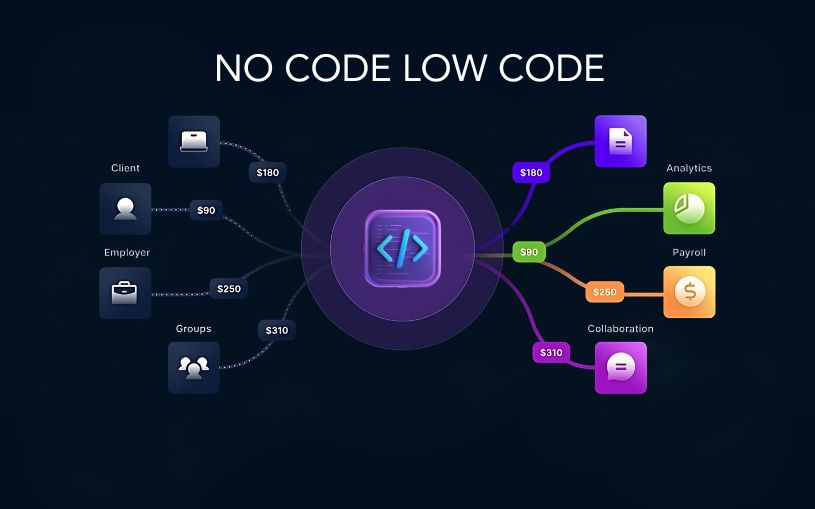
Low-Code vs No-Code vs Traditional Development: Which One Should Businesses Choose? Technology is evolving faster than ever, and businesses today have more options than ever when it comes to building software. Not long ago, developing an application meant hiring a team of developers and spending months writing code from scratch. Today, organizations can choose between traditional development, low-code platforms, and no-code solutions depending on their goals, budget, and technical expertise. As companies accelerate their digital transformation efforts in 2026, understanding these three development approaches has become essential. Each offers unique advantages, and selecting the right one can directly impact project success, operational efficiency, and long-term growth. Understanding Traditional Development Traditional software development remains the most powerful and flexible way to build applications. In this approach, developers write code manually using programming languages such as Python, Java, JavaScript, or C#. This method gives businesses complete control over every aspect of an application, from user experience and functionality to security and scalability. Organizations that require highly customized solutions, advanced integrations, or enterprise-grade systems often rely on traditional development because it can handle virtually any business requirement. However, this flexibility comes at a cost. Traditional development typically requires larger budgets, experienced developers, longer project timelines, and ongoing maintenance efforts. What is Low-Code Development? Low-code development bridges the gap between traditional coding and visual application building. Instead of writing every feature manually, developers can use drag-and-drop components, pre-built modules, and automated workflows to speed up the development process. The biggest advantage of low-code platforms is efficiency. Businesses can launch applications significantly faster while still retaining the ability to customize features through code whenever necessary. Many organizations use low-code platforms to create internal business applications, workflow automation systems, customer portals, and operational dashboards. This approach allows development teams to focus on solving business challenges rather than spending time on repetitive coding tasks. What is No-Code Development? No-code development takes simplicity to the next level by allowing users to create applications without writing any code at all. These platforms are designed for business users, entrepreneurs, marketers, and department managers who may have little or no programming experience. Through visual interfaces, templates, and drag-and-drop tools, users can create websites, mobile applications, forms, databases, and automated workflows. The growing popularity of no-code platforms reflects a larger trend toward democratizing technology. Businesses no longer need to depend entirely on software developers for every digital solution. For startups and small businesses, no-code tools offer an affordable and fast way to turn ideas into functional products. Comparing Speed and Development Time When speed is the primary concern, no-code platforms often come out on top. Applications can sometimes be built within days instead of months. Low-code platforms also provide impressive development speed by reducing the amount of manual coding required. Teams can quickly build prototypes, test ideas, and deploy solutions without lengthy development cycles. Traditional development generally requires more time because every feature must be designed, coded, tested, and optimized from the ground up. While slower, it provides unmatched flexibility and customization. Cost Considerations for Businesses Budget plays a major role in choosing a development approach. No-code solutions usually have the lowest initial costs because they eliminate the need for large development teams. Businesses can often create and manage applications using existing staff members. Low-code development offers a balance between affordability and flexibility. Organizations can reduce development costs while still creating sophisticated applications. Traditional development tends to involve the highest investment due to developer salaries, infrastructure requirements, quality assurance processes, and long-term maintenance expenses. Customization and Flexibility Customization is where traditional development shines. Businesses can create exactly what they need without being limited by platform restrictions. Whether it’s advanced analytics, complex integrations, or unique customer experiences, traditional coding provides complete freedom. Low-code platforms offer substantial customization capabilities and can handle many complex business requirements. Developers can extend functionality whenever needed through custom code. No-code platforms, while highly convenient, often have limitations. Users must work within the framework and capabilities provided by the platform, which can become challenging for more advanced projects. Scalability and Long-Term Growth As businesses grow, scalability becomes increasingly important. Traditional applications can be designed to handle large user bases, complex workflows, and significant data volumes. This makes them ideal for enterprises expecting substantial growth. Modern low-code platforms also support scalability and are increasingly being adopted by large organizations for mission-critical applications. No-code solutions can support growth to a certain extent, but highly complex or large-scale requirements may eventually require migration to more flexible platforms. The Impact of AI on Software Development Artificial intelligence is reshaping all three development approaches. Low-code and no-code platforms now include AI-powered features that can generate workflows, recommend automation processes, and simplify application design. These capabilities allow businesses to build solutions even faster than before. Traditional development is also benefiting from AI-assisted coding tools that help developers write cleaner code, identify errors, and accelerate project delivery. As AI technology continues to mature, the boundaries between traditional, low-code, and no-code development are becoming increasingly blurred. Which Option Should Your Business Choose? There is no universal answer because every organization has different needs. If your goal is rapid deployment with minimal technical involvement, no-code platforms may be the best choice. If you need a balance between speed, flexibility, and customization, low-code development can deliver excellent results. For businesses requiring complete control, advanced functionality, and enterprise-level scalability, traditional development remains the strongest option. Many successful organizations are now adopting a hybrid approach, using no-code tools for simple workflows, low-code platforms for internal applications, and traditional development for customer-facing products and mission-critical systems. Conclusion The debate between low-code, no-code, and traditional development is not about finding a single winner. Instead, it is about selecting the right tool for the right business challenge. As digital transformation continues to accelerate in 2026, organizations that understand the strengths and limitations of each approach will be better positioned to innovate faster, reduce costs, and remain competitive in an increasingly technology-driven world. The future of software development will not belong exclusively to traditional

Artificial Intelligence, Educational Technology, Software development

Vibe Coding: Can AI Really Build Software from Natural Language Prompts?

Vibe Coding: Can AI Really Build Software from Natural Language Prompts? Introduction Imagine building an entire software application simply by describing what you want in plain English. No complicated syntax. No hours spent debugging code. No need to memorize programming languages. Sounds like science fiction, right? Well, welcome to the world of Vibe Coding, one of the most talked-about trends in artificial intelligence and software development today. Over the past few years, AI-powered coding assistants have evolved from simple autocomplete tools into sophisticated development partners capable of generating entire applications from natural language instructions. This new approach to software creation is changing how developers, entrepreneurs, startups, and even non-technical professionals build digital products. But can AI truly create software from simple prompts? Is Vibe Coding the future of development, or is it just another tech buzzword riding the AI wave? In this article, we’ll explore what Vibe Coding is, how it works, its advantages, limitations, real-world applications, and what it means for the future of software engineering. What is Vibe Coding? Vibe Coding refers to the process of building software primarily through natural language prompts instead of manually writing every line of code. Rather than spending hours coding features, developers describe what they want: Create a user login system Build a dashboard for analytics Design a responsive e-commerce website Connect a payment gateway Generate a customer support chatbot The AI interprets these instructions and generates the required code automatically. The term gained popularity as AI coding tools became increasingly capable of understanding context, software architecture, user requirements, and development workflows. In simple words: Traditional Coding Human writes code → Computer executes Vibe Coding Human describes idea → AI writes code → Human reviews and refines The focus shifts from coding every detail to communicating intentions clearly. The Rise of AI-Powered Development Software development has always evolved alongside technology. First came assembly language. Then high-level programming languages like C, Java, and Python. After that, low-code and no-code platforms emerged. Now, AI-driven development is pushing automation even further. Modern AI models are trained on vast amounts of programming knowledge, enabling them to: Generate code Explain code Fix bugs Create documentation Build user interfaces Write test cases Suggest optimizations As a result, developers can move from idea to prototype significantly faster than ever before. This shift has laid the foundation for Vibe Coding. How Vibe Coding Actually Works At the heart of Vibe Coding lies Large Language Models (LLMs). These AI systems have been trained on billions of lines of code and programming-related content. When a user enters a prompt such as: “Create a task management web application with user authentication and dark mode.” The AI breaks down the request into smaller development tasks: Design database schema Create authentication system Build frontend interface Implement task management logic Add dark mode functionality Generate API endpoints Create responsive design The AI then produces the necessary code components and integrates them together. Developers review the output, make adjustments if necessary, and continue refining through additional prompts. This iterative workflow resembles a conversation rather than traditional programming. Why Vibe Coding is Becoming Popular 1. Faster Development One of the biggest advantages is speed. Tasks that once required days can now be completed in hours. Developers spend less time writing repetitive code and more time solving business problems. For startups, this speed can make a significant difference in launching products before competitors. 2. Lower Entry Barrier Many people have brilliant software ideas but lack programming knowledge. Vibe Coding helps bridge that gap. Entrepreneurs, marketers, designers, and business owners can create prototypes without deep technical expertise. This democratizes software development. 3. Increased Productivity Developers often spend large portions of their day writing boilerplate code. AI can automate: CRUD operations API integrations Form validation Database queries Documentation This allows developers to focus on architecture and innovation. 4. Rapid Prototyping Companies can test ideas quickly. Instead of investing months in development, teams can build MVPs in days and gather user feedback early. 5. Continuous Learning Developers can learn new frameworks and technologies faster by observing AI-generated solutions. The AI acts as both a coding assistant and an educational tool. Popular Tools Driving the Vibe Coding Movement Several AI-powered development platforms have contributed to this trend. GitHub Copilot One of the earliest mainstream AI coding assistants. It suggests code in real time and helps developers write faster. Cursor Cursor has become a favorite among developers because it combines coding, debugging, and AI-assisted development in a single environment. Replit AI Allows users to create applications directly from prompts while handling much of the setup automatically. Bolt Focused on creating full-stack applications using conversational instructions. Lovable Designed to turn ideas into web applications with minimal coding effort. Windsurf An AI-native development environment helping developers build software through collaborative interactions with AI. These platforms continue to push the boundaries of what AI-assisted development can achieve. Real-World Use Cases of Vibe Coding Startup MVP Development Startups frequently need to validate ideas quickly. Vibe Coding enables founders to: Build prototypes Test markets Gather user feedback Secure investors Without hiring large development teams initially. Internal Business Tools Companies often require custom dashboards, workflow systems, and reporting tools. AI-generated solutions can significantly reduce development costs. Educational Projects Students can transform concepts into working applications rapidly, helping them understand software architecture and functionality. E-commerce Websites Businesses can create: Product catalogs Shopping carts Checkout systems Inventory management tools Much faster than traditional development cycles. Automation Systems Organizations can build tools that automate repetitive tasks and improve operational efficiency. Can AI Really Build Complete Software? The answer is both yes and no. What AI Can Do Well AI excels at: Generating code quickly Creating standard application structures Building user interfaces Writing documentation Creating APIs Automating repetitive tasks For many common applications, AI can generate a surprisingly large percentage of the codebase. What AI Still Struggles With Complex software projects involve: Business logic Security requirements Scalability planning System architecture Regulatory compliance Performance optimization These areas still require human expertise. AI may generate

Business, Digital Transformation, Technology

Industry Solution Blogs

The Ultimate Guide to Industry Solution Blogs: Driving B2B Authority and Conversions Imagine walking into a massive B2B tech convention. The room is buzzing. Thousands of booths are flashing neon lights, throwing free t-shirts at you, and shouting technical jargon about “cloud-native, AI-driven paradigms.” Now, imagine walking past all that noise into a quiet, structured room where an expert sits down with you, looks at your specific business problem, and says: “I know exactly why your supply chain is lagging, and here is a three-step blueprint to fix it using automated workflows.” Where would you spend your money? That quiet room is the digital equivalent of an Industry Solution Blog. While generic tech blogs scratch the surface of what a technology is, industry solution blogs dive deep into the how and why for specific sectors—whether that’s healthcare, logistics, retail, or finance. In this comprehensive guide, we will break down exactly how to craft these high-value pieces of content to build unstoppable authority, educate your audience, and turn casual readers into high-ticket B2B clients. 1. What Exactly is an Industry Solution Blog? To understand what an industry solution blog is, we first need to look at what it isn’t. It isn’t a press release about your company’s latest funding round. It isn’t a dry, academic whitepaper that requires a PhD to decode. And it certainly isn’t a superficial listicle generated by a basic AI prompt. An Industry Solution Blog is a highly targeted, deeply researched piece of content that addresses a specific business pain point within a distinct vertical and offers a clear, technology-driven remedy. The Anatomy of the Solution Framework When you write a solution blog, you are essentially guiding the reader through a transformative journey: [Current Fragmented State] ➔ [The Complication/Cost] ➔ [The Technological Bridge] ➔ [The Optimized Future State] Instead of simply explaining a tool like “Predictive Analytics,” an industry solution blog explains “How Predictive Analytics Reduces Equipment Downtime in Automotive Manufacturing by 34%.” It bridges the gap between raw technological capability and real-world business outcomes. 2. Why Generic Content is Dying (and Verticals are Winning) The internet is drowning in generic content. If you write an article titled “Top 5 Benefits of Cloud Computing,” you are competing with millions of legacy websites, massive tech publications, and AI search engines that can summarize those points in three seconds. Generic content no longer builds authority. Specificity builds authority. The Shift to Account-Based & Vertical Marketing Modern B2B buyers don’t buy software; they buy solutions to their industry-specific problems. A hospital administrator doesn’t care if a CRM has “great API integrations.” They care if it is HIPAA-compliant and can seamlessly sync with Epic EHR systems to reduce patient check-in times. When you pivot your content strategy toward industry solutions, several magical things happen: Higher Conversion Rates: Readers feel seen. When a retail executive reads about solving “last-mile delivery bottlenecks during peak holiday seasons,” they realize you understand their exact world. Lower Keyword Competition: Competing for “Machine Learning” is an uphill battle. Competing for “Machine Learning for Fraud Detection in Neo-Banking” is highly winnable. Shorter Sales Cycles: Your blog functions as a silent salesman, answering complex compliance, integration, and ROI questions before a sales call even happens. 3. How to Identify High-Value Industry Pain Points You cannot write a compelling industry solution blog from an ivory tower. You have to get your hands dirty and find out what keeps your target audience awake at 2:00 AM. Here is a humanized toolkit for uncovering those hidden pain points. Talk to Your Sales and Customer Success Teams Your internal teams are a goldmine of data. Sit down with them and ask: What are the top three objections prospects raise during demo calls? Where do clients typically get stuck during the onboarding phase? What specific phrases or jargon do they use when describing their frustrations? Mine Niche Forums and Communities B2B professionals don’t complain on TikTok; they complain on specialized forums. Spend time lurking in: Subreddits: e.g., r/sysadmin, r/healthit, r/logistics, r/devops. Quora & Industry Networks: Look for recurring technical roadblocks. LinkedIn Groups: Analyze the comments section of industry influencers to see what questions people are asking. Reverse-Engineer Competitor Case Studies Look at your competitors’ case studies. Don’t look at their successes—look at the problems their clients had before buying. Those “before” states are the exact topics you should be writing comprehensive solution blogs about. 4. Structure of a High-Converting Solution Blog A great industry solution blog balances storytelling with analytical depth. Here is a proven structural framework you can adapt for any vertical. +———————————————————–+ | 1. The Hook (Relatable, industry-specific scenario) | +———————————————————–+ | v +———————————————————–+ | 2. The Bleeding Wound (The real financial/operational cost)| +———————————————————–+ | v +———————————————————–+ | 3. The Paradigm Shift (Introducing the modern solution) | +———————————————————–+ | v +———————————————————–+ | 4. The Deep Dive (Tactical steps, architecture, features) | +———————————————————–+ | v +———————————————————–+ | 5. Proof & Real-World Impact (Data points, case studies) | +———————————————————–+ | v +———————————————————–+ | 6. The Actionable Conclusion & Contextual CTA | +———————————————————–+ The Hook (The Relatable Scenario) Start by painting a picture that proves you belong in the room. Bad: “In today’s fast-paced world, logistics is very important.” Good: “It’s 4:00 PM on Friday before Cyber Monday. Your warehouse management system suddenly drops connection with your primary shipping API. Orders are backing up, and every minute of downtime is costing you $12,000. If this sounds like a nightmare, it’s because legacy infrastructure isn’t built for modern e-commerce surges.” The Bleeding Wound (The Cost of Inaction) Don’t just mention the problem; quantify it. Explain what happens if the business decides to do nothing. Talk about compliance fines, employee burnout, customer churn, or lost revenue. The Paradigm Shift Introduce the core concept or technology that solves the issue. This isn’t where you pitch your specific product yet—this is where you educate them on the category of the solution (e.g., migrating from monolithic architecture to microservices). The Deep Dive (Tactical Execution) This is the meat of

cybersecurity, DEVOPs

DevSecOps Best Practices

DevSecOps Best Practices: The Ultimate Blueprint for Secure, High-Velocity Software Delivery In the traditional software development lifecycle, security was often treated as the “final gate.” Developers would spend months building a product, operations would prepare the infrastructure, and just before launch, the security team would sweep in to perform a vulnerability audit. The result? A massive bottleneck. Security teams were viewed as the “Department of No,” pushing deadlines back by weeks or months to fix critical flaws discovered at the eleventh hour. In today’s hyper-accelerated digital landscape—where organizations deploy updates multiple times a day—this siloed approach is no longer sustainable. Enter DevSecOps. By embedding security directly into every stage of the continuous integration and continuous delivery (CI/CD) pipeline, DevSecOps ensures that software is not just fast, but inherently secure from the very first line of code. This comprehensive guide breaks down the core pillars, essential phases, actionable best practices, and real-world implementation strategies required to build a mature, human-centric DevSecOps culture. 1. Demystifying DevSecOps: Shift-Left and Shift-Right To successfully implement DevSecOps, it is critical to understand its two defining operational philosophies: Shifting Left and Shifting Right. [ Plan ] ──> [ Code ] ──> [ Build ] ──> [ Test ] ──> [ Deploy ] ──> [ Monitor ] │ │ │ │ │ │ └────────────┴────────────┴─────────────┴────────────┴───────────────┴──────── Security Focus Shifting Left: Proactive Security Shifting left means moving security practices earlier in the development lifecycle. Instead of waiting for a compiled build or a staged environment to run security scans, shift-left introduces security during the Planning, Coding, and Building phases. Why it matters: Fixing a software vulnerability during the design or coding phase can be up to 60 times cheaper than fixing it after it has been deployed to production. Core activities: Threat modeling, secure code reviews, IDE-integrated linting, and Static Application Security Testing (STAST). Shifting Right: Continuous Resilience While shifting left prevents bugs from reaching production, shifting right focuses on security during the Deployment, Operation, and Monitoring phases. It acknowledges that no system is entirely impenetrable and that runtime threats require continuous vigilance. Why it matters: Real-world exploits, zero-day vulnerabilities, and configuration drifts only happen in live environments. Shifting right ensures you spot and contain breaches instantly. Core activities: Runtime Application Self-Protection (RASP), penetration testing, chaos engineering, and continuous compliance monitoring. 2. The Cultural Pillar: Fostering a Shared-Responsibility Mindset The greatest misconception about DevSecOps is that it is purely a tooling problem. You can purchase the most expensive scanning software on the market, but if your organizational culture remains siloed, your DevSecOps initiative will fail. Breaking Down the Silos Historically, developers were incentivized purely by speed and functionality, while security teams were incentivized by risk mitigation. This created conflicting goals. DevSecOps requires a cultural alignment where security becomes a shared responsibility. Developers must accept ownership of the code’s security posture. Security Teams must transition from “gatekeepers” to “enablers,” providing the tools, automation, and guidance that developers need to work securely without losing velocity. Implementing a Security Champions Program A highly effective way to bridge the gap between engineering and security is by appointing Security Champions. What they are: Security Champions are regular software engineers, QA testers, or product managers who possess a keen interest in security. They remain embedded within their respective product teams. Their role: They act as the primary point of contact for security matters, help scale security knowledge across the engineering department, and ensure that security considerations are brought up during initial sprint planning sessions. 3. The DevSecOps Lifecycle: Step-by-Step Integration Integrating security into the CI/CD workflow requires tailored security gates at every single phase of the delivery pipeline. Let’s look at how to embed security seamlessly from planning to production. Phase 1: Plan (Threat Modeling & Risk Assessment) Security starts before a single line of code is written. During the planning phase, product teams map out features alongside potential attack vectors. Threat Modeling: Use frameworks like STRIDE (Spoofing, Tampering, Repudiation, Information Disclosure, Denial of Service, and Elevation of Privilege) to visually map out application architecture and discover architectural flaws early. Defining Security Requirements: Establish clear cryptographic standards, data classification rules, and compliance mandates (e.g., GDPR, HIPAA, PCI-DSS) during user story creation. Phase 2: Code (Secure Coding & IDE Assistance) When developers begin writing code, immediate feedback loops prevent vulnerable patterns from ever leaving their local workstations. Pre-Commit Hooks: Use lightweight scripts (like Git hooks) to prevent developers from accidentally committing sensitive data, such as plain-text API keys, AWS tokens, or private certificates, to version control. IDE Plugins: Equip developers with tools like SonarLint or Snyk extensions directly within VS Code or IntelliJ. These operate like spell-checkers for security, highlighting risky functions or outdated packages in real time. Phase 3: Build (Automated Code & Dependency Analysis) Once code is pushed to a shared repository, automated CI servers (like Jenkins, GitHub Actions, or GitLab CI) take over to build the application and trigger deeper security analyses. Static Application Security Testing (SAST): SAST tools analyze the source code or compiled binaries without executing the program. They look for classic vulnerabilities like SQL injection, Cross-Site Scripting (XSS), and buffer overflows. Software Composition Analysis (SCA): Modern applications are heavily built on open-source libraries. SCA tools scan your package.json, pom.xml, or requirements.txt files against databases of known public vulnerabilities (CVEs) to ensure you aren’t inheriting compromised third-party code. Phase 4: Test (Dynamic Evaluation & Testing) In the testing phase, the application is deployed into a staging or QA environment, allowing security tools to interact with it dynamically. Dynamic Application Security Testing (DAST): Unlike SAST, DAST tests the application from the outside-in by simulating a malicious hacker. It probes active endpoints, forms, and APIs to find vulnerabilities that only manifest when the application is running (e.g., authentication flaws or session management issues). Interactive Application Security Testing (IAST): IAST combines the benefits of both SAST and DAST. By deploying an agent within the application runtime, it monitors code execution while simultaneously running functional automated testing suites, yielding incredibly accurate results with fewer false positives.

IT consulting, Software development, Technology & Business

Beyond the Code: A Human Guide to Choosing the Right Software Outsourcing Partner

Introduction Outsourcing often gets a bad rap as a “cost-cutting” measure, but in 2026, it’s evolved into something far more personal. It’s about bridging the gap between an idea and a reality by finding a team that acts as an extension of your own. However, with thousands of firms claiming to be the “best,” how do you find the one that is actually right for you? 1. Look for Shared Values, Not Just Skills Technical expertise is the baseline—everyone has it. But what sets a great partner apart is cultural alignment. You want a team that communicates in a way you understand and shares your work ethic. The Litmus Test: During your first few calls, pay attention to their questions. Are they asking about your budget, or are they asking about your users? A partner who tries to understand your “why” is far more valuable than one who just says “yes” to every feature request. 2. Prioritize Transparency Over Promises In the early stages, it’s easy for a firm to promise the moon. The right partner will be honest about what is difficult, what might take longer, and what might not work at all. The Sign of Quality: Look for “Product Owners” rather than just “Project Managers.” You want someone who will challenge your ideas to make them better, not someone who just checks boxes. Ask for a peek into their project management tools (like Jira or Slack) to see how they handle real-time updates and roadblocks. 3. The “Stability” Factor A common mistake is looking at a company’s logo list rather than their team’s history. You aren’t hiring a logo; you’re hiring people. Dig Deeper: Ask how long their core developers have been with the company. High turnover in an outsourcing firm is a red flag for your project’s consistency. You want a dedicated team model where the same faces start and finish your project, ensuring that the tribal knowledge of your software stays intact. 4. Security is a Relationship, Not a Checklist In an era of AI-driven threats, security isn’t just about a signed NDA. It’s about their daily habits. Ensure your partner follows modern standards like Zero Trust architectures and regular security audits. If they handle your data, they should treat it with the same (or more) reverence as you do. 5. The “Culture Fit” and Communication Software development is rarely a smooth, linear path. There will be bugs and shifting deadlines. In those moments of high pressure, your relationship with the team is what determines success. The Midnight Test: You don’t necessarily need a team in your backyard, but you do need an overlap of at least 3–4 hours. This allows for “synchronous” collaboration where ideas can be brainstormed in real-time, rather than waiting 24 hours for a reply to a simple email. Language & Tone: Do they speak “business” or just “code”? You need a partner who can translate complex technical debt into risks you can actually understand. 6. Transparency: Seeing “Under the Hood” If an outsourcing firm tells you everything is “perfect” every single week, you should be worried. Real development is messy. The right partner offers radical transparency. * Direct Access: You should have access to their project management boards (Jira or Trello) and their code repositories (GitHub). The Honest “No”: The best partners are the ones who say, “We can build that, but it will delay the launch. Is it worth it?” If they never push back, they aren’t thinking about your success; they are just billing hours. Conclusion: The Long Game Choosing a software development partner is like choosing a co-pilot. The “right” choice isn’t necessarily the cheapest one or the one with the most employees—it’s the one that makes you feel confident that your project is in safe, capable hands. Focus on building a partnership, not just a contract, and the results will speak for themselves. Beyond the VPN: Why Zero Trust (ZTNA) is the Future of Remote Work

Future trends shaping the software development industry
Software development

Future Trends in Software Development: What to Expect in the Coming Years

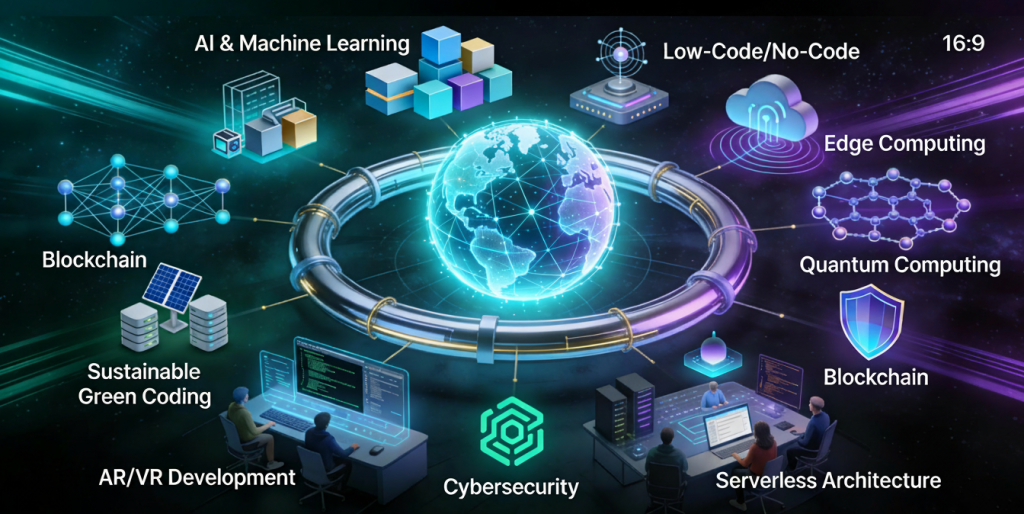
Introduction Software development is evolving at an unprecedented pace. Rapid advancements in artificial intelligence, cloud computing, automation, and development tools are reshaping how applications are built, deployed, and maintained. Organizations that fail to adapt risk falling behind in an increasingly competitive digital world. Understanding future trends in software development helps developers, businesses, and technology leaders prepare for upcoming challenges and opportunities. In this blog, we explore key trends that will define the future of software development and how they will impact the industry. Artificial Intelligence in Software Development AI is transforming every stage of the software development lifecycle. Key Applications AI-powered code generation Intelligent debugging Automated testing AI tools improve productivity and reduce human error. Low-Code and No-Code Development Low-code and no-code platforms enable faster application development with minimal coding. Benefits Faster time to market Reduced development costs Empowered non-technical users These platforms are ideal for rapid prototyping and internal tools. Cloud-Native Development Cloud-native applications are designed specifically for cloud environments. Key Technologies Containers Microservices Serverless computing Cloud-native development improves scalability and resilience. DevOps and Automation Automation continues to play a vital role in software development. Trends AI-driven CI/CD pipelines Automated infrastructure Continuous monitoring Automation enhances efficiency and reliability. Cybersecurity-First Development Security is becoming a core development priority. Emerging Practices Zero trust architecture DevSecOps Continuous security testing Security-first development protects applications from evolving threats. Microservices Architecture Microservices allow applications to be built as independent, scalable services. Advantages Better scalability Faster updates Improved fault isolation Microservices support modern, distributed systems. Edge Computing Edge computing processes data closer to the source. Use Cases IoT devices Real-time analytics Autonomous systems Edge computing reduces latency and improves performance. Remote and Distributed Development Teams Remote work is becoming the norm in software development. Benefits Access to global talent Improved flexibility Reduced operational costs Collaboration tools enable seamless teamwork. Sustainable Software Development Green software engineering focuses on energy-efficient applications. Key Goals Reduced carbon footprint Efficient resource usage Sustainability is becoming a strategic priority. Continuous Learning and Skill Evolution Developers must continuously update their skills to remain competitive. In-Demand Skills Cloud platforms AI and ML Cybersecurity Lifelong learning is essential in modern software development. Conclusion The future of software development is shaped by innovation, automation, and continuous improvement. AI, cloud-native technologies, security-first practices, and sustainability will define the next generation of applications. By embracing these trends, organizations and developers can stay competitive and build software that meets future demands. Frequently Asked Questions (FAQs) 1. What is the biggest trend in software development? AI and automation are the most impactful trends. 2. Will low-code platforms replace developers? No, they will complement developers by improving productivity. 3. Is cloud-native development the future? Yes, cloud-native approaches are becoming the industry standard. 4. How important is cybersecurity in future development? Cybersecurity is critical and must be integrated from the start. 5. Will DevOps continue to grow? Yes, DevOps will remain essential for modern software delivery. 6. How can developers prepare for the future? By continuously learning new technologies and adapting to change. Connect With Us:https://www.facebook.com/profile.php?id=61555452386126

DevOps and CI/CD pipeline in software development.
Software development

DevOps and CI/CD in Software Development: Accelerating Delivery and Quality

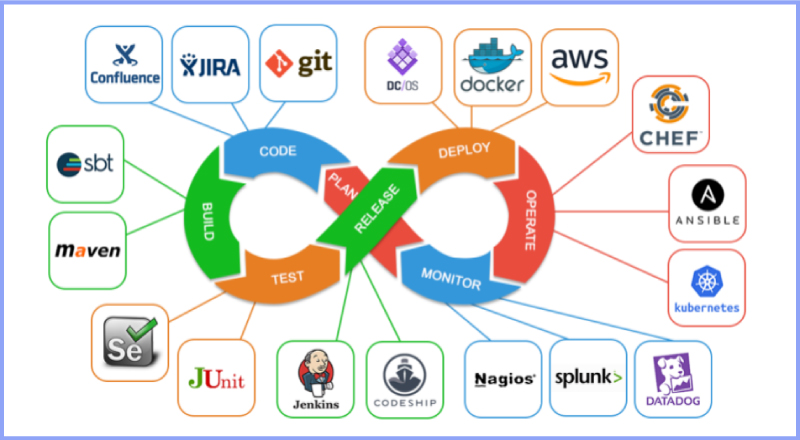
Introduction Modern software development demands speed, reliability, and continuous improvement. Traditional development approaches often struggled with slow releases, manual deployments, and communication gaps between development and operations teams. To overcome these challenges, organizations adopted DevOps and Continuous Integration/Continuous Deployment (CI/CD) practices. DevOps and CI/CD aim to automate workflows, improve collaboration, and deliver high-quality software faster. Together, they form the backbone of modern software engineering and cloud-native development. In this blog, we will explore DevOps and CI/CD, understand their importance, key concepts, tools, benefits, and how they transform software development. What Is DevOps? DevOps is a cultural and technical approach that integrates software development (Dev) and IT operations (Ops). It focuses on collaboration, automation, and continuous feedback. Core Principles of DevOps Collaboration between teams Automation of workflows Continuous monitoring and feedback Rapid delivery DevOps breaks down silos and improves efficiency across the development lifecycle. What Is CI/CD? CI/CD stands for Continuous Integration and Continuous Deployment (or Delivery). Continuous Integration (CI) CI involves frequently merging code changes into a shared repository and automatically testing them. Continuous Deployment (CD) CD automates the release of tested code into production. Together, CI/CD ensures faster and safer software releases. DevOps Lifecycle The DevOps lifecycle consists of several stages: Planning Development Integration Testing Deployment Monitoring Each stage is automated and continuously improved. Benefits of DevOps and CI/CD 1. Faster Time to Market Automation reduces manual work and accelerates releases. 2. Improved Software Quality Continuous testing detects issues early. 3. Enhanced Collaboration DevOps fosters teamwork across departments. 4. Reliable Deployments Automated pipelines reduce human errors. Popular DevOps and CI/CD Tools Version Control Git GitHub GitLab CI/CD Tools Jenkins GitHub Actions GitLab CI/CD Containerization Docker Kubernetes Monitoring Prometheus Grafana DevOps and Agile Relationship DevOps complements Agile by extending continuous delivery beyond development into operations. Together, they enable faster feedback loops and continuous improvement. Security in DevOps (DevSecOps) DevSecOps integrates security into the DevOps pipeline. Automated security testing ensures vulnerabilities are identified early. Challenges in Implementing DevOps Cultural resistance Tool complexity Skill gaps Overcoming these challenges requires training, leadership support, and gradual adoption. Future of DevOps DevOps continues to evolve with AI-driven automation, cloud-native technologies, and serverless computing. Conclusion DevOps and CI/CD are essential for modern software development. By automating workflows, improving collaboration, and enabling continuous delivery, organizations can build reliable and scalable applications faster than ever. Frequently Asked Questions (FAQs) 1. What is DevOps in simple terms? DevOps is a practice that improves collaboration between development and operations teams. 2. What is the difference between CI and CD? CI focuses on code integration, while CD focuses on deployment. 3. Is DevOps only for large companies? No, DevOps benefits organizations of all sizes. 4. Can DevOps be used without CI/CD? CI/CD is a core component of DevOps. 5. What skills are needed for DevOps? Automation, cloud computing, and scripting skills. 6. Is DevOps a tool or a methodology? DevOps is a culture supported by tools and practices. Connect with us: https://www.facebook.com/profile.php?id=61555452386126

Scroll to Top