

Mobile Development Best Practices

android devlopment

22 Best Android Libraries for 2025

Introduction Android app development is continuously evolving, with new libraries and tools that streamline coding, improve app performance, and enhance user experience. For developers aiming to create state-of-the-art Android applications in 2025, leveraging the right libraries is essential to save time, reduce bugs, and adopt best practices. This blog highlights the 22 best Android libraries for 2025 trusted by developers to accelerate their workflows and build powerful, scalable apps. These libraries also integrate well with AI, modern workflows, and cross-platform strategies embraced by companies featured on TechOTD AI Services and TechOTD Blog. 1. Jetpack Compose Google’s modern UI toolkit enables declarative UI design with Kotlin, reducing boilerplate and improving development speed. Compose tightly integrates with other Jetpack components like ViewModel and Navigation. 2. Hilt A dependency injection library built on Dagger, Hilt simplifies managing object lifecycles and reduces boilerplate, improving code modularity and testability. 3. WorkManager Manages deferrable background tasks, ensuring jobs run under specified constraints, even if the app is closed or the device restarts. 4. Room Google’s SQLite object-mapping library streamlines database interactions with type-safe queries and compile-time checks. 5. Retrofit A type-safe HTTP client for Android and Java, Retrofit simplifies API calls and network communication. 6. Coil An image loading library optimized for Kotlin and Jetpack Compose with efficient memory handling and easy integration. 7. EventBus Offers publisher/subscriber pattern implementation to decouple app components and simplify event-driven communication. 8. RxKotlin Extends RxJava’s reactive programming capabilities with Kotlin idioms, enabling streamlined asynchronous programming. 9. Navigation Component Android Jetpack library that supports efficient in-app navigation and back stack management. 10. Glide Image loading and caching library for smooth scrolling with large or complex images. 11. Timber A logger with enhanced capabilities, making debugging easier in production and development. 12. Lottie Library to render Adobe After Effects animations natively on Android, improving app storytelling. 13. Gson Google’s library to parse JSON into Java/Kotlin objects and vice versa. 14. Koin Lightweight dependency injection framework focused on Kotlin, offering a simpler alternative to Dagger. 15. Espresso UI testing library maintaining app stability with automated interaction simulation. 16. Mockito Popular mocking framework aiding unit testing by simulating complex objects. 17. Timber Logging utility to replace native Android Log with better usability and customization. 18. LeakCanary Memory leak detection tool that helps identify and fix leaks during development. 19. Espresso Idling Resource Helps synchronize asynchronous events during Espresso UI tests. 20. Stetho Debug bridge for Android applications enabling rich debugging capabilities using Chrome Developer Tools. 21. Kotlin Coroutines Enables smooth asynchronous programming with simplified syntax for concurrency. 22. Material Components for Android Google’s official UI component library implementing Material Design guidelines. Conclusion In 2025, Android development demands efficient, robust libraries that empower developers to build modern applications quickly and efficiently. Combining these 22 libraries equips your development toolkit with powerful tools to handle UI, networking, data, testing, and performance optimization.
React native doveploment

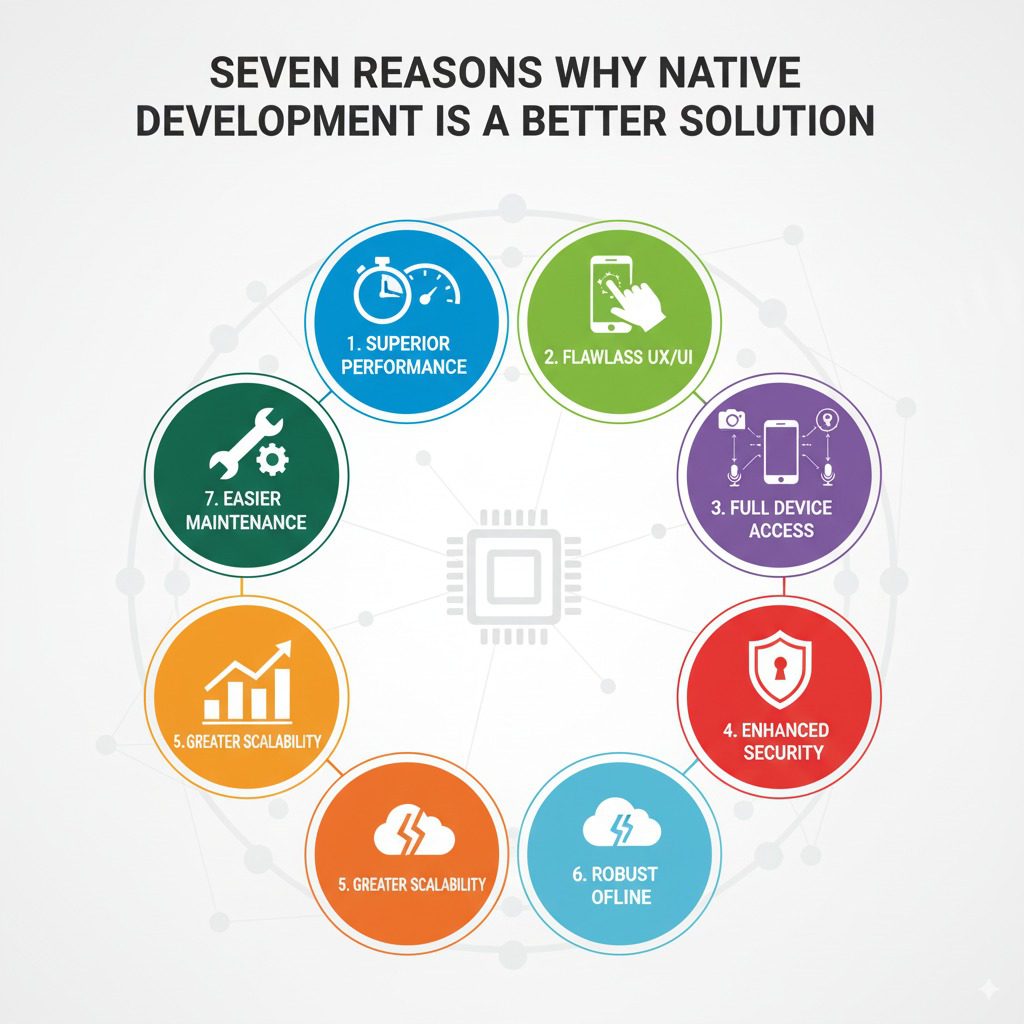
Seven Reasons Why Native Development is a Better Solution

Introduction As the mobile app ecosystem continues to evolve, businesses face a critical decision when choosing app development approaches. Among the various methodologies—native, hybrid, cross-platform—native app development remains the gold standard for delivering superior performance, user experience, and long-term scalability. Native development focuses on building apps specifically for a particular operating system (iOS or Android) using platform-specific languages and tools. This in-depth blog explores seven compelling reasons why native development is the better choice for businesses aiming to create impactful, resilient mobile applications. It integrates insights on AI integration, blockchain, and emerging technologies from TechOTD AI Services, along with best practices and strategic guidance drawn from TechOTD’s vast repository of technology leadership content. Reason 1: Superior Performance and Responsiveness Native apps benefit from direct access to device-specific hardware and OS features, resulting in high-performance apps with smooth animations and quick responsiveness. Native code executes faster than cross-platform or hybrid frameworks that rely on webviews or interpreters. Real-time processing of graphics, gestures, and touch inputs offers a fluid user experience critical for gaming, multimedia, and complex enterprise apps. Explore AI-powered performance optimizations within native applications at TechOTD AI Blog. Reason 2: Access to Device Features and Latest APIs Native development provides full access to device capabilities such as cameras, GPS, biometric sensors, and advanced APIs updated regularly by Apple and Google. This ensures apps leverage new hardware innovations like Face ID, LiDAR, or motion controls immediately without waiting for third-party framework updates. Native apps can utilize platform-specific SDKs and tools for push notifications, payment integration, and security enhancements. Learn about seamless multi-technology integration, including blockchain, at TechOTD Blockchain Integration. Reason 3: Enhanced Security and Compliance Native apps benefit from robust security implementations underpinning mobile operating systems, ensuring compliance with stringent data protection regulations. Developers can implement platform-specific encryption, secure key storage, and biometric authentication. Native apps are less vulnerable to common web-based security threats impacting hybrid apps. For advanced AI-driven security and data privacy, visit TechOTD AI Services. Reason 4: Better User Experience (UX) Alignment Native development ensures adherence to design guidelines and UX principles specific to each platform, enhancing user familiarity and satisfaction. App navigation, gestures, interface elements, and typography are optimized for iOS or Android standards. Native app experiences feel more intuitive and seamless, directly affecting user retention and engagement. Discover how predictive analytics can further tailor UX at TechOTD Predictive Analytics. Reason 5: Scalability and Maintainability While cross-platform tools promise faster initial development, native apps provide long-term scalability, maintainability, and stability. Native codebases facilitate easier debugging, upgrades, and integration of complex features evolving with business needs. Platform-specific updates, SDKs, and emerging technologies can be incorporated without compatibility issues. Understand structured software development approaches from TechOTD How We Work. Reason 6: Superior Offline Capabilities and Connectivity Native apps handle offline scenarios and incremental sync with greater precision using local data storage and background processing capabilities. This is crucial for industries like banking, healthcare, and travel where connectivity may be intermittent. Native apps can better manage push notifications, background tasks, and real-time updates with optimized battery consumption. AI-powered backend optimizations enhancing connectivity experiences are explored on TechOTD AI Blog. Reason 7: Future-Proofing with Emerging Technologies Native platforms serve as primary environments for rapid innovations involving 5G, AR/VR, machine learning, blockchain, and IoT integrations. Early access and native SDK support ensure apps capitalize on new tech leaps for competitive differentiation. Examples include AI-based real-time voice assistants, blockchain-secured transactions, and AR-powered customer experiences. Stay updated with cutting-edge developments at TechOTD Blog. Comparative Insights: Native vs Cross-Platform Aspect Native Cross-Platform/Hybrid Performance High, optimized for platform Moderate, especially for graphics Access to Device Features Full Limited or delayed support Security Platform-grade Increased vulnerabilities UX Quality Platform-consistent, polished Sometimes generic or inconsistent Development Speed Longer per platform Faster for multi-platform Maintenance Easier long-term Can become complex over time Emerging Tech Support Immediate Often delayed Real-World Case Studies and Success Stories Globally recognized enterprises including banks, manufacturers, and retailers choose native development to power critical apps, mitigate risks, and innovate rapidly. AI integrations in native apps have delivered breakthrough improvements in operational efficiency and customer engagement. Explore comprehensive AI and blockchain implementations at TechOTD AI and Blockchain Services. Implementation Best Practices for Native Development Define clear platform-specific requirements and target demographics. Embrace Agile development cycles with continuous testing and feedback. Leverage native performance profiling and analytics tools for iterative improvements. Ensure cross-functional collaboration among UX/UI, developers, and business teams. Plan for ongoing updates to support OS evolution and emerging technologies. Conclusion Choosing native app development is a strategic investment in superior performance, security, and long-term innovation potential. It aligns closely with platform advancements and emerging technologies, helping enterprises deliver exceptional mobile experiences that stand the test of time.

Scroll to Top