mobile app development

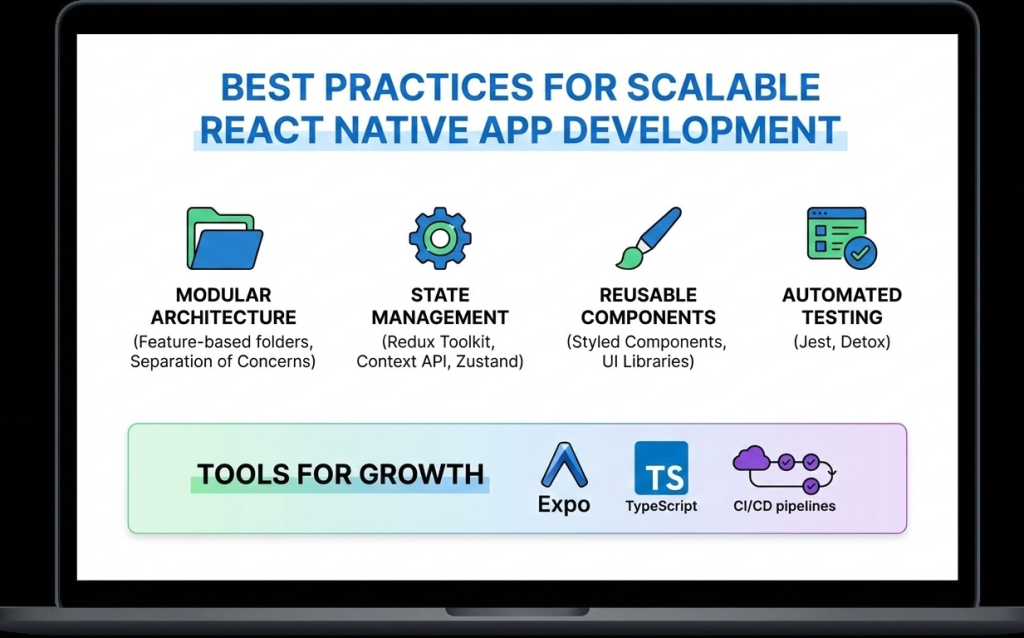
Best practices for scalable React Native app development
React native doveploment

Best Practices for Scalable and High-Performance React Native App Development

Introduction As mobile applications continue to grow in complexity and scale, developers must focus not only on building features but also on maintaining performance, scalability, and code quality. React Native development makes cross-platform mobile app creation faster and more efficient, but long-term success depends heavily on following proven best practices. Without proper architecture and optimization, React Native apps can become difficult to maintain, slow to scale, and prone to performance issues. On the other hand, applications built with best practices in mind remain stable, secure, and adaptable to future requirements. In this blog, we’ll explore the best practices for scalable and high-performance React Native app development, covering architecture, performance optimization, state management, security, and maintainability. 1. Use a Clean and Scalable Project Architecture A well-structured architecture is the foundation of any successful React Native application. Best practices include: Organizing code by features instead of file types Separating UI, business logic, and services Keeping reusable components in a shared directory A clean architecture improves collaboration, simplifies debugging, and makes scaling easier. 2. Break UI into Reusable Components React Native is built around a component-based architecture. Reusable components: Reduce code duplication Improve readability Speed up development Components should be small, focused, and reusable across the application. 3. Optimize Performance from the Start Performance optimization should not be an afterthought. Key techniques include: Using FlatList instead of ScrollView for long lists Avoiding unnecessary re-renders with React.memo Minimizing heavy computations on the UI thread Optimizing images and assets Using the Hermes engine also improves startup time and memory usage. 4. Choose the Right State Management Strategy State management plays a crucial role in scalability. Options include: Context API for small apps Redux for large and complex applications Zustand for lightweight and modern state handling Choosing the right approach prevents unnecessary complexity. 5. Handle API Calls and Data Caching Efficiently Efficient data handling improves performance and user experience. Best practices: Use Axios or Fetch consistently Implement error handling and retries Cache data when possible Avoid unnecessary API calls Libraries like React Query can simplify data fetching and caching. 6. Follow Platform-Specific Design Guidelines While React Native is cross-platform, Android and iOS users have different design expectations. Best practices include: Using platform-specific components when needed Handling gestures and navigation appropriately Testing UI on multiple screen sizes Respecting platform guidelines improves user satisfaction. 7. Secure Your React Native Application Security is critical in mobile app development. Best practices include: Avoid storing sensitive data in plain text Use secure storage solutions Implement authentication and authorization properly Use HTTPS and encrypted APIs Security should be integrated into every stage of development. 8. Write Tests and Automate Quality Assurance Testing ensures long-term stability. Important testing methods: Unit testing with Jest Component testing with React Native Testing Library End-to-end testing for critical flows Automated testing reduces bugs and improves release confidence. 9. Monitor Performance and Errors Monitoring helps identify issues before they affect users. Tools such as: Flipper Sentry Firebase Performance Monitoring These tools provide insights into crashes, performance bottlenecks, and user behavior. 10. Keep Dependencies Updated Outdated dependencies can cause security vulnerabilities and compatibility issues. Best practices: Regularly update React Native versions Remove unused libraries Review changelogs before upgrades Keeping dependencies updated ensures stability and security. Future-Ready React Native Development React Native continues to evolve with improved architecture, better performance, and stronger community support. Following best practices ensures your application remains adaptable to future updates and scaling requirements. Conclusion React Native development offers immense potential for building scalable and high-performance mobile applications. However, success depends on following best practices related to architecture, performance, security, and maintainability. By implementing these best practices from the beginning, developers can build robust React Native apps that deliver excellent user experiences and stand the test of time. Frequently Asked Questions (FAQs) 1. Why are best practices important in React Native development? Best practices ensure scalability, performance, maintainability, and long-term success of React Native applications. 2. How can I improve React Native app performance? Optimizing lists, avoiding unnecessary re-renders, using Hermes, and monitoring performance tools can significantly improve performance. 3. Which state management is best for React Native apps? It depends on app complexity. Context API works for small apps, while Redux or Zustand suits larger applications. 4. Is React Native secure for enterprise apps? Yes, when proper security measures like encrypted storage, secure APIs, and authentication are implemented. 5. How do I scale a React Native app efficiently? Using clean architecture, modular components, proper state management, and performance optimization ensures smooth scalability. 6. Are React Native apps future-proof? Yes, with continuous updates, strong community support, and best practices, React Native apps are future-ready. Connect with us: https://www.facebook.com/profile.php?id=61555452386126  
Essential tools and libraries for React Native development
React native doveploment

Essential Tools and Libraries for React Native Development

Introduction React Native development has gained massive popularity due to its ability to build cross-platform mobile applications using a single JavaScript codebase. However, the real strength of React Native lies not only in the framework itself but also in its rich ecosystem of tools and libraries that enhance productivity, performance, and scalability. From UI components and navigation to state management and testing, React Native offers a wide range of tools that help developers build high-quality applications efficiently. Choosing the right tools and libraries is crucial for maintaining clean code, improving performance, and ensuring long-term scalability. In this blog, we’ll explore the essential tools and libraries for React Native development, explain their use cases, and help you select the best stack for your next mobile app project. Why Tools and Libraries Matter in React Native React Native provides the foundation for building mobile apps, but real-world applications require much more than basic components. Tools and libraries help developers: Speed up development Maintain clean and modular code Improve UI and user experience Handle complex state and data flow Debug and test applications efficiently Using well-maintained and community-supported tools reduces technical debt and ensures better app stability. Core Development Tools for React Native 1. Node.js and Package Managers Node.js is required to run React Native projects. Developers typically use: npm Yarn These package managers help install dependencies, manage versions, and run scripts efficiently. 2. React Native CLI The React Native CLI provides full control over native code and project configuration. It is ideal for developers building production-ready apps that require custom native modules or advanced configurations. 3. Expo Expo simplifies React Native development by providing preconfigured tools and APIs. It is excellent for beginners and rapid prototyping. Key benefits of Expo include: Minimal setup Built-in APIs for camera, sensors, and notifications Fast development and testing UI Component Libraries UI libraries save time by offering ready-made, customizable components. 1. React Native Paper A Material Design-based UI library that provides consistent and visually appealing components. 2. NativeBase A flexible UI library that supports both Android and iOS with customizable components. 3. React Native Elements A cross-platform UI toolkit with reusable components and simple theming. Navigation Libraries Navigation is a core feature of mobile applications. React Navigation The most popular navigation library for React Native, supporting: Stack navigation Tab navigation Drawer navigation It is flexible, well-documented, and widely adopted. State Management Libraries As applications grow, managing state becomes complex. 1. Redux A predictable state container ideal for large-scale applications. 2. Zustand A lightweight and modern alternative to Redux with minimal boilerplate. 3. Context API Built-in solution suitable for small to medium-sized apps. Networking and API Handling Efficient API communication is critical for modern apps. Axios – Simplifies HTTP requests and error handling Fetch API – Built-in but less feature-rich than Axios Axios is widely preferred for React Native development. Testing Tools for React Native Testing ensures app reliability and stability. 1. Jest Used for unit testing JavaScript logic and components. 2. React Native Testing Library Helps test UI components from a user’s perspective. Debugging Tools Debugging tools help identify and fix issues quickly. 1. Flipper A powerful debugging tool supported by Meta for inspecting layout, network requests, and logs. 2. React DevTools Helps inspect component hierarchy and props. Performance Optimization Tools To ensure smooth performance: Why Did You Render – Detects unnecessary re-renders Hermes Engine – Improves app startup time and memory usage Best Practices for Choosing Tools Prefer well-maintained libraries Check community adoption Avoid overloading the project with unnecessary dependencies Ensure compatibility with the latest React Native version Conclusion React Native development becomes significantly more powerful when paired with the right tools and libraries. From UI components and navigation to testing and debugging, the React Native ecosystem offers everything needed to build scalable, high-performance mobile applications. Choosing the right combination of tools not only speeds up development but also ensures better code quality, maintainability, and long-term success. Frequently Asked Questions (FAQs) 1. What are the most important tools for React Native development? Essential tools include Node.js, React Native CLI or Expo, React Navigation, state management libraries, and testing tools like Jest. 2. Is Expo better than React Native CLI? Expo is great for rapid development and beginners, while React Native CLI offers more control for advanced and production-level apps. 3. Which UI library is best for React Native? Popular choices include React Native Paper, NativeBase, and React Native Elements, depending on design needs. 4. Do I need Redux for every React Native app? No, Redux is best for complex apps. Smaller apps can use Context API or Zustand. 5. How can I debug React Native apps effectively? Using Flipper, React DevTools, and proper logging practices helps debug apps efficiently. 6. Are third-party libraries safe to use in React Native? Yes, as long as they are actively maintained, well-documented, and widely adopted. Connect with us: https://www.facebook.com/profile.php?id=61555452386126

React Native development for cross-platform mobile applications
React native doveploment

React Native Development: A Complete Guide to Building High-Performance Cross-Platform Mobile Apps

Introduction In today’s fast-paced digital world, mobile applications have become essential for businesses, startups, and enterprises alike. Users expect apps to be fast, reliable, and available across multiple platforms. This growing demand has given rise to cross-platform mobile app development, and among all available frameworks, React Native development stands out as one of the most powerful and popular choices. React Native allows developers to build mobile applications for both Android and iOS using a single JavaScript codebase, significantly reducing development time and cost. Backed by Meta (Facebook) and supported by a massive developer community, React Native has been adopted by companies like Facebook, Instagram, Airbnb, Shopify, and Tesla. This blog provides a complete guide to React Native development—covering what it is, how it works, its benefits, tools, best practices, and why it’s a smart choice for modern mobile app development. What Is React Native Development? React Native is an open-source JavaScript framework used to build native mobile applications. It is based on React, a popular JavaScript library for building user interfaces. Unlike traditional hybrid frameworks that rely on WebViews, React Native uses real native components. This means applications built with React Native look, feel, and perform like native apps written in Swift, Objective-C, Java, or Kotlin. With React Native, developers write most of the code once and deploy it across platforms, while still having the flexibility to write native code when required. How React Native Works React Native works by running JavaScript code in a separate thread and communicating with native modules through a bridge. This architecture allows JavaScript logic to interact with native UI components efficiently. Key concepts include: JavaScript Thread: Handles business logic and app behavior Native Thread: Renders native UI components Bridge: Enables communication between JavaScript and native code Modern versions of React Native have introduced improvements like the New Architecture, including Fabric and TurboModules, which significantly enhance performance and reduce latency. Why Choose React Native for Mobile App Development? 1. Cross-Platform Development One of the biggest advantages of React Native development is the ability to build apps for both Android and iOS using a single codebase. This dramatically reduces development effort and speeds up time-to-market. 2. Faster Development Cycle React Native supports Hot Reloading, allowing developers to see changes instantly without recompiling the entire app. This feature boosts productivity and simplifies debugging. 3. Near-Native Performance Because React Native uses native components, apps deliver smooth animations, fast load times, and excellent user experience comparable to fully native apps. 4. Cost-Effective Solution Maintaining one codebase instead of two separate native apps lowers development and maintenance costs, making React Native ideal for startups and MVPs. 5. Strong Community and Ecosystem React Native has a massive ecosystem of libraries, plugins, and tools. Developers can quickly integrate features like navigation, authentication, payments, and analytics. Popular Use Cases of React Native React Native is suitable for a wide range of applications, including: E-commerce mobile apps Social networking platforms On-demand service apps Fintech and banking apps Healthcare and fitness apps Educational platforms Its flexibility allows businesses to scale applications as user demand grows. Essential Tools for React Native Development To build efficient React Native applications, developers rely on several tools: Development Tools Node.js & npm/yarn – Package management React Native CLI – Full control over native code Expo – Faster development with minimal configuration UI and Navigation React Navigation – Routing and navigation React Native Paper / NativeBase – UI components State Management Redux Zustand Context API Testing and Debugging Jest – Unit testing React Native Testing Library Flipper – Advanced debugging Best Practices for React Native Development 1. Use Reusable Components Break UI into reusable components to improve maintainability and consistency. 2. Optimize Performance Use FlatList instead of ScrollView for large lists Avoid unnecessary re-renders Memoize components where needed 3. Maintain Clean Folder Structure Organize files by features rather than type to improve scalability. 4. Secure Sensitive Data Never store sensitive information in plain text. Use secure storage and encrypted APIs. 5. Follow Platform Guidelines Ensure your app follows Android and iOS design standards for better user experience. React Native vs Native Development While native development offers full platform control, React Native provides an excellent balance between performance and efficiency. For most applications, React Native delivers everything needed without the complexity of maintaining two separate codebases. Native development may be preferred for extremely performance-intensive apps, but React Native is more than sufficient for the majority of business and consumer applications. Future of React Native React Native continues to evolve with strong backing from Meta and the open-source community. Improvements in performance, architecture, and tooling make it a future-proof choice for mobile app development. With growing demand for cross-platform solutions, React Native is expected to remain a top framework for years to come. Conclusion React Native development has transformed the way mobile applications are built. By enabling cross-platform development with near-native performance, it saves time, reduces costs, and delivers exceptional user experiences. Whether you’re a startup building an MVP or an enterprise scaling a mobile solution, React Native offers the flexibility, performance, and community support needed to succeed in today’s competitive mobile ecosystem. Frequently Asked Questions (FAQs) – React Native Development 1. What is React Native development used for? React Native development is used to build cross-platform mobile applications for Android and iOS using a single JavaScript codebase. It allows developers to create high-performance apps with native look and feel while reducing development time and cost. 2. Is React Native suitable for large-scale applications? Yes, React Native is suitable for large-scale and enterprise-level applications. Companies like Facebook, Instagram, and Shopify use React Native for production apps. With proper architecture, state management, and performance optimization, React Native apps can scale efficiently. 3. How does React Native differ from React.js? React.js is a JavaScript library used for building web applications, whereas React Native is a framework designed specifically for mobile app development. React Native uses native components instead of HTML elements, allowing apps to run on Android and iOS platforms. 4. Does React Native

Hands holding a tablet displaying the words "Mobile Apps Development" surrounded by digital icons representing technology and app functions.
Mobile App Development

Mobile App Development: A Complete Guide for 2025

Introduction Mobile app development has become one of the most dynamic and in-demand fields in today’s digital world. With more than 6.5 billion smartphone users globally, mobile applications are now the bridge between businesses and consumers. From e-commerce and social media to healthcare and education, every industry is investing in mobile technology to provide better accessibility and user engagement. In this comprehensive guide, we’ll explore the mobile app development process, latest frameworks, industry trends for 2025, and strategies to build successful apps that deliver exceptional user experiences. What is Mobile App Development? Mobile app development is the process of creating software applications designed to run on mobile devices such as smartphones and tablets. These apps can be native (built for a specific platform like Android or iOS), hybrid (built using web technologies), or cross-platform (single codebase for multiple platforms). The key stages of mobile app development include: Idea and Research Planning and Wireframing UI/UX Design Development and Coding Testing and Quality Assurance Deployment and Maintenance Types of Mobile Applications a) Native Apps Native apps are built for a specific operating system (like iOS using Swift or Android using Kotlin). They deliver the best performance and user experience. b) Hybrid Apps Hybrid apps use a combination of web and native technologies. Tools like Ionic and Cordova help developers create apps quickly for both platforms. c) Cross-Platform Apps These apps are developed using frameworks like Flutter, React Native, and Xamarin. The single codebase runs smoothly on both Android and iOS. d) Progressive Web Apps (PWAs) PWAs are web applications that behave like native apps. They’re lightweight and don’t require installation from an app store. The Mobile App Development Process Step 1: Idea and Research The first step is identifying the problem your app will solve. Conduct market research to understand user pain points and analyze competitors. Step 2: Planning and Strategy Define your app’s purpose, target audience, and features. Create a roadmap and choose the right tech stack. Step 3: UI/UX Design Design is the soul of any app. Focus on user-friendly interfaces, minimalistic layouts, and intuitive navigation. Step 4: App Development Developers start coding based on design prototypes. This includes backend APIs, front-end development, and database integration. Step 5: Testing Testing ensures that the app functions as expected on all devices. QA engineers test for bugs, usability, security, and performance. Step 6: Deployment Once the app passes testing, it’s submitted to the Google Play Store or Apple App Store. Step 7: Maintenance Continuous updates, performance optimization, and feature enhancements keep your app relevant and secure Top Mobile App Development Frameworks in 2025 Flutter – Google’s UI toolkit for building beautiful, natively compiled apps. React Native – Developed by Meta, it allows JavaScript developers to create native-like apps. SwiftUI – Apple’s modern framework for iOS app development. Kotlin Multiplatform – Ideal for Android developers who want to expand cross-platform. Ionic & Xamarin – Great options for hybrid development. Key Mobile App Development Trends for 2025 AI and Machine Learning IntegrationSmart recommendations, chatbots, and predictive analytics are reshaping mobile UX. 5G ConnectivityFaster speed and lower latency enable richer app experiences. Augmented Reality (AR) and Virtual Reality (VR)Used in gaming, retail, and education to enhance interactivity. Wearable App DevelopmentSmartwatches and fitness bands require lightweight, synchronized mobile apps. Low-Code/No-Code PlatformsBusinesses can now build simple apps without extensive coding. App Security FocusBiometric authentication, encryption, and data privacy laws are top priorities. Cost of Mobile App Development The cost depends on factors such as app complexity, features, platform choice, and developer expertise. Basic App: $5,000 – $20,000 Mid-Level App: $20,000 – $50,000 Complex App: $50,000+ Choosing offshore or freelance developers can also impact pricing. Monetization Strategies Freemium Model – Free app with paid premium features. In-App Advertising – Revenue from displayed ads. Subscriptions – Recurring payments for continuous use. One-Time Purchases – Paid download model. Sponsorships & Partnerships – Collaborations with brands. Challenges in Mobile App Development Device fragmentation Security vulnerabilities Battery optimization App store approval delays Keeping up with OS updates Overcoming these challenges requires continuous learning, testing, and optimization. Conclusion Mobile app development in 2025 is evolving faster than ever. Whether you’re an entrepreneur, developer, or business owner, understanding the latest tools, frameworks, and trends will help you build successful mobile applications. Focus on user experience, performance, and security — and your app will stand out in the crowded marketplace. FAQs 1. What programming languages are best for mobile app development?Swift, Kotlin, JavaScript (React Native), and Dart (Flutter) are among the top languages used. 2. How long does it take to develop a mobile app?On average, simple apps take 2–3 months, while complex apps may take 6–12 months. 3. Can I build an app without coding skills?Yes. Low-code/no-code platforms like Adalo, Glide, and AppyPie make it possible. 4. How do I choose between native and cross-platform development?Choose native if performance is critical; go for cross-platform if you want faster, cost-efficient development. 5. How can I ensure my app is secure?Implement encryption, secure APIs, two-factor authentication, and regular updates. 6. What’s the future of mobile app development?AI-driven apps, IoT integration, AR/VR experiences, and blockchain-based apps will dominate the next decade.

Developer coding React Native mobile application on laptop with smartphone displaying app interface
React native doveploment

React Native Development: Complete Guide to Cross-Platform Apps 2025

Introduction React Native development has revolutionized how developers approach mobile app creation. Instead of maintaining separate codebases for iOS and Android, developers can now write once and deploy everywhere. This powerful framework, created by Meta (formerly Facebook), has become the go-to solution for businesses and developers seeking efficient, cost-effective mobile app development. In this comprehensive guide, we’ll explore everything you need to know about React Native development, from fundamentals to advanced techniques that will help you build production-ready applications. What is React Native? React Native is an open-source mobile application framework that allows developers to build native mobile apps using JavaScript and React. Unlike hybrid frameworks that render apps in a WebView, React Native creates truly native components, resulting in performance that’s nearly indistinguishable from apps built with Swift, Objective-C, Java, or Kotlin. The framework bridges JavaScript code with native platform APIs, enabling developers to access device features like the camera, GPS, and accelerometer while writing primarily in JavaScript. Why Choose React Native Development? 1. Code Reusability The most compelling advantage of React Native development is code reusability. Developers can share 70-90% of code between iOS and Android platforms, significantly reducing development time and costs. This shared codebase doesn’t compromise on quality – apps maintain native performance and look-and-feel on both platforms. 2. Fast Development Cycle React Native’s hot reloading feature allows developers to see changes instantly without recompiling the entire application. This rapid feedback loop accelerates development and makes debugging more efficient. Combined with a vast ecosystem of pre-built components, developers can prototype and iterate faster than ever. 3. Strong Community and Ecosystem With thousands of contributors and millions of users worldwide, React Native boasts one of the strongest communities in mobile development. This translates to abundant resources, libraries, and solutions to common problems. Popular apps like Facebook, Instagram, Airbnb, and Tesla have all leveraged React Native at various points. 4. Cost-Effective Solution Maintaining a single codebase requires fewer developers and less time compared to building separate native apps. For startups and businesses with limited resources, React Native development offers a pathway to market without sacrificing quality. 5. Native Performance React Native renders using native components, not web views. The framework uses a bridge to communicate with native modules, ensuring your app performs smoothly and feels natural to users on each platform. Getting Started with React Native Development Prerequisites Before diving into React Native development, ensure you have: Basic knowledge of JavaScript and React Node.js and npm installed on your system Understanding of mobile app concepts A code editor (VS Code recommended) For iOS development: macOS with Xcode For Android development: Android Studio and Java Development Kit Setting Up Your Environment React Native offers two primary ways to start: Expo CLI – Perfect for beginners, Expo provides a managed workflow with minimal setup. It includes a suite of tools and services built around React Native, making it ideal for quick prototyping and learning. React Native CLI – Offers more flexibility and direct access to native code. This approach is better for complex apps requiring custom native modules or extensive platform-specific code. Your First React Native App Starting a new project is straightforward: bash # Using Expo npx create-expo-app MyFirstApp # Using React Native CLI npx react-native init MyFirstApp The basic structure includes JavaScript files for your components, native folders (ios and android), and configuration files. A simple component looks familiar to React developers: javascript import React from ‘react’; import { View, Text, StyleSheet } from ‘react-native’; const WelcomeScreen = () => { return ( <View style={styles.container}> <Text style={styles.text}>Welcome to React Native!</Text> </View> ); }; const styles = StyleSheet.create({ container: { flex: 1, justifyContent: ‘center’, alignItems: ‘center’, }, text: { fontSize: 24, fontWeight: ‘bold’, }, }); export default WelcomeScreen; Core Concepts in React Native Development Components React Native provides a set of core components that map to native UI elements: View: The fundamental container, similar to div in web development Text: For displaying text content Image: For rendering images ScrollView: For scrollable content TextInput: For user text input Button: For touchable buttons FlatList: For efficient, scrollable lists Styling React Native uses a JavaScript-based styling approach similar to CSS but with camelCase properties. Instead of classes, styles are applied directly to components using the StyleSheet API. Flexbox is the primary layout system, making responsive designs achievable across different screen sizes. Navigation Navigation is crucial for multi-screen apps. React Navigation is the most popular library, offering: Stack Navigator: For hierarchical navigation Tab Navigator: For bottom tab interfaces Drawer Navigator: For side menu navigation State Management For managing application state, React Native developers use various solutions: React Hooks: useState and useContext for simple state Redux: For complex, application-wide state MobX: For reactive state management Context API: For prop drilling solutions Best Practices for React Native Development 1. Optimize Performance Use FlatList for long lists instead of ScrollView Implement proper key props for list items Avoid unnecessary re-renders with React.memo and useMemo Use native driver for animations Optimize images and assets 2. Follow Component Architecture Structure your app with reusable, modular components. Separate business logic from presentation components. This separation makes testing easier and code more maintainable. 3. Handle Platform Differences While React Native promotes code sharing, some platform-specific adjustments are necessary. Use the Platform module to detect the operating system and apply platform-specific code when needed. 4. Implement Proper Error Handling Use error boundaries to catch JavaScript errors and prevent app crashes. Implement proper loading states and user feedback for asynchronous operations. 5. Test Thoroughly Combine different testing approaches: Unit tests with Jest Component tests with React Native Testing Library End-to-end tests with Detox or Appium Manual testing on actual devices Advanced React Native Development Techniques Native Modules When JavaScript capabilities aren’t enough, you can write native modules in Swift/Objective-C or Java/Kotlin and bridge them to JavaScript. This allows access to platform-specific features not available through React Native’s core APIs. Animation React Native provides two complementary animation systems: Animated API: For detailed, interactive animations LayoutAnimation: For simple layout transitions For complex animations,

how will android 16 feature impact your mobile application
android devlopment

How Will Android 16 Feature Impact Your Mobile Application

Introduction Android 16 marks a significant transformation in the mobile ecosystem, introducing advanced performance tools, privacy enhancements, and seamless cross-device experiences for developers and businesses alike. Businesses looking to build competitive digital products must understand how these changes will affect their apps, user experience, and long-term growth. 10 Reasons You Need a CDP for Your Retail Business Key Features of Android 16 for Mobile Applications AI-Powered App Experiences: On-device machine learning lets apps deliver smarter recommendations, predictive shortcuts, and natural language features without sacrificing privacy. Built-in AI APIs make tasks like image recognition, voice processing, and content prediction easier for developers to implement. Performance and Battery Optimization: Apps launch faster, run smoother, and use less power thanks to system-level improvements and advanced profiling tools. Features like adaptive refresh rates and better background job handling ensure an enhanced experience for heavy app users. Privacy and Security Upgrades: Granular background location permissions allow users more control over data sharing, aligning with regulations globally. The new Advanced Protection Mode includes safeguards against scam calls, unsafe websites, and risky mobile networks. Notification and Multitasking Enhancements: Dynamic notification trays prioritize messages using AI, reducing clutter and improving engagement. Live progress notifications, grouped alerts, and predictive back navigation provide a more user-friendly interface. Multi-Device and Large Screen Support: The multi-device SDK syncs user activity across phones, tablets, wearables, and even desktop-mode displays. Adaptive apps are mandatory for large screens, meaning responsive layouts and orientation changes are essential for future-proofing. Developer Impacts: Best Practices and Opportunities Adopt Adaptive Design: Responsive UIs, constraint layouts, and Jetpack Compose guidelines are now essential for compatibility with tablets, foldables, and desktop windowing modes. Apps must support orientation changes and flexible multi-window behavior. Leverage New APIs: Use Notification.ProgressStyle for live updates, camera scene-detection for media-rich apps, and Health Connect FHIR APIs for healthcare products. Take advantage of system-triggered profiling and job introspection to monitor app performance and minimize startup latency. Enhance User Privacy: Update permission dialogues to reflect Android 16’s background location and network access requirements. Test media access and device-pairing flows with new privacy defaults before releasing updates. Optimize for Cross-Device and Multi-Window: Implement seamless handoff, session continuity, and state sharing for connected device experiences. Audit legacy apps to replace deprecated orientation locks and opt-outs for edge-to-edge layouts. Real-World Examples & Benefits E-commerce Apps: Smarter recommendations and predictive actions boost conversion rates and in-app engagement. Health & Fitness: Adaptive layouts ensure consistent experience across smartphones, tablets, and wearables. Productivity Tools: Desktop mode, window resizing, and custom keyboard shortcuts turn tablets into full-fledged workstations for power users. Travel & Navigation: Granular background location makes user journeys safer and more transparent. Conclusion Android 16 presents significant opportunities for businesses and developers to deliver faster, safer, and smarter mobile experiences. By embracing adaptive design, AI integration, new privacy standards, and robust multi-device features, organizations can ensure their applications remain competitive and future-ready in an evolving digital landscape. Prepare your apps for Android 16 today: audit, update, and innovate—your users will thank you for the thoughtful upgrade. FAQ Q1: Do I need to update my app to support Android 16? Yes, targeting Android 16 becomes mandatory for app updates and new releases on the Play Store. Q2: Will Android 16 affect my app’s privacy settings? Absolutely. Expect to update permission request flows—especially for location and local network access. Q3: How does Android 16 improve performance? App launches are faster; background work and resource management see major optimizations. Q4: What happens to legacy apps with fixed layouts? Apps that restrict screen orientation or do not support adaptive layouts must be reworked for compatibility, especially on tablets and foldables. Q5: Are there new tools for developers? Yes, Android Studio Hedgehog, new APIs, and advanced profiling features support modern development and app performance tuning.

Restaurent

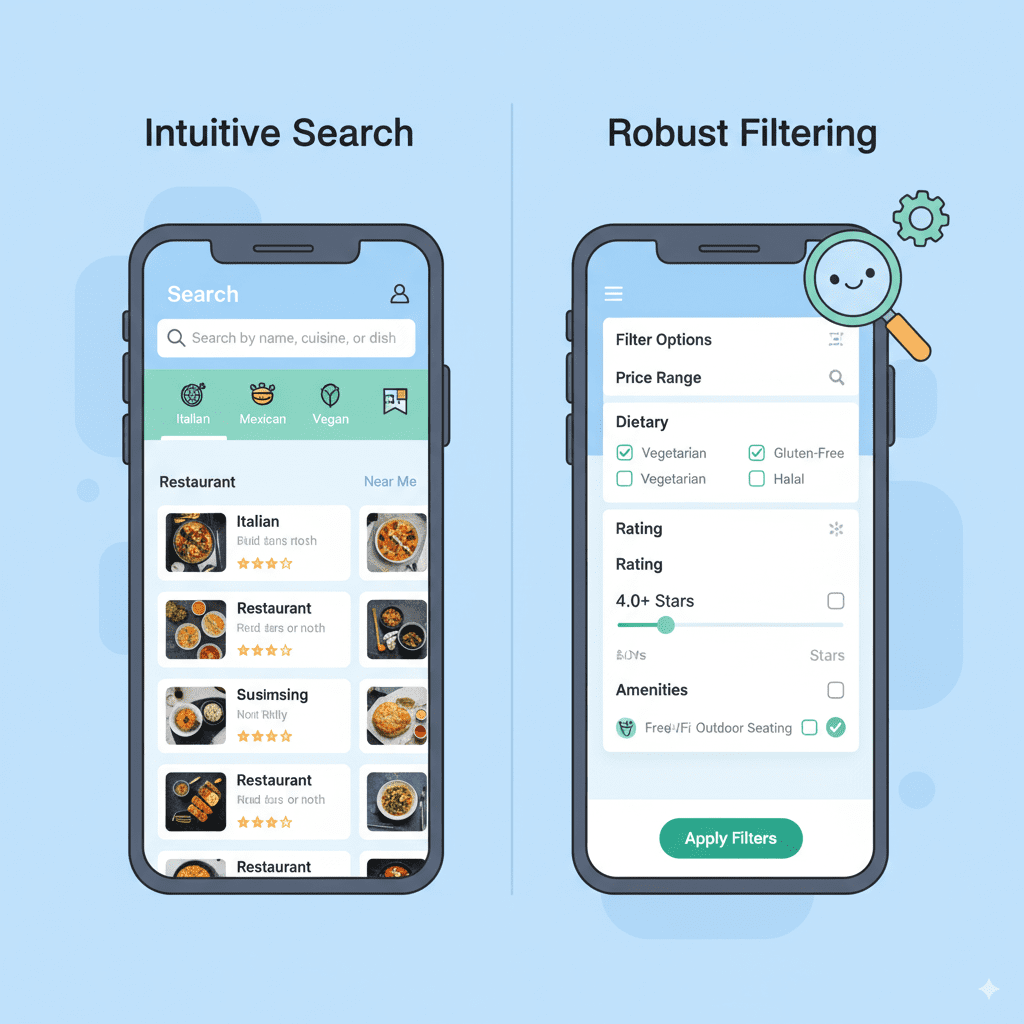
Essential Features to Consider When Building a Restaurant Search App

Introduction In an era where convenience and instant gratification drive customer choices, a restaurant search app can be a game-changer for food lovers and businesses alike. These apps help users discover the best dining options nearby or in a specific location, review menus, make reservations, and place orders—all at their fingertips. However, creating a restaurant search app that stands out and provides exceptional user experience requires thoughtful planning and inclusion of critical features tailored to user needs. This blog outlines the essential features to consider when building a restaurant search app, from intuitive search functionality to personalized user experiences. Leveraging advanced technologies like AI and predictive analytics can enhance these features, making the app smarter and more engaging. For insights on how AI and modern technologies transform app development and business processes, explore TechOTD’s AI solutions and their extensive tech blog. Key Features to Build a Successful Restaurant Search App 1. Accurate and Intuitive Search and Filters Location-based search: Use GPS to find nearby restaurants instantly. Category filters: Allow filtering by cuisine, price range, ratings, dietary preferences, or opening hours. Advanced keyword search: Enable users to find restaurants by dish names, ambiance, or specific attributes. 2. Detailed Restaurant Profiles Menus with pricing and pictures Opening hours and contact information User reviews and ratings Special offers or events 3. User Reviews and Ratings System Allow users to post feedback, rate their dining experience, and share photos. Incorporate machine learning models to detect fake or spam reviews, enhancing trustworthiness. Explore more on AI in sentiment analysis in customer reviews: Seamless Customer Journeys with AI. 4. Real-Time Table Availability and Reservation System Integration with restaurant booking systems Instant confirmation and reminders Cancellation and modification options 5. Integration with Food Delivery and Takeout Options Direct users to place orders for delivery or pickup instantly within the app or via partner apps. 6. Interactive Maps and Directions Visual maps showing restaurant locations with step-by-step navigation and estimated travel times. 7. Personalized Recommendations Leverage AI to analyze user preferences, location history, and dining behavior to offer tailored restaurant suggestions. 8. Social Sharing and Loyalty Programs Allow users to share their favorite spots on social media and participate in loyalty schemes or rewards. 9. Secure Payment Gateway Include multiple payment methods with encryption and fraud protection to facilitate smooth in-app purchases or deposits for reservations. 10. Multi-Platform Support and Offline Mode Develop apps compatible with iOS, Android, and web browsers and enable offline viewing of saved restaurants and previous searches. Leveraging Predictive Analytics in Restaurant Search Apps Incorporating predictive analytics can optimize user experience by: Forecasting peak dining times and suggesting less crowded slots Anticipating user cravings or preferred cuisines based on past behavior Preemptively managing restaurant capacity and promotions Learn about predictive analytics and its business benefits here: Predictive Analytics Software Development. The Role of Technology Partners in Building Your App Partnering with technology and AI solution experts like TechOTD ensures your restaurant search app is designed with scalable architecture, real-time features, secure integrations, and ongoing maintenance. Their agile development and AI-driven insights can accelerate your product launch and market fit. Get insights on choosing the right development framework: React Native vs Swift. Conclusion A restaurant search app offers immense value in today’s fast-paced lifestyle but demands careful inclusion of user-centric features to succeed. From accurate search tools to personalized recommendations, each feature must be seamlessly integrated and well-optimized for performance and security. Incorporating AI and predictive analytics enhances the app’s competitive edge. To start building your restaurant search app with cutting-edge features and robust technology, consider consulting with expert developers like TechOTD for a tailored approach and agile delivery. Explore their innovative digital services and latest industry insights at TechOTD Blog. FAQs Q1: What is the most important feature in a restaurant search app? Intuitive and accurate location-based search with rich filter options is essential for user satisfaction. Q2: How can personalization improve the app? Personalized restaurant suggestions based on user behavior increase engagement and conversion. Q3: Is it necessary to integrate delivery options? Yes, integration with delivery or takeout services adds convenience and increases user retention. Q4: How does AI help in restaurant search apps? AI enables sentiment analysis, personalized recommendations, and efficient data management. Q5: Should the app support offline mode? Offline support is valuable for users with limited connectivity, allowing access to saved data and favorites.

Mobile App Development

How Long Does It Take to Develop a Mobile App?

Introduction Developing a mobile app can take anywhere from 2 months for a simple app to over a year for highly complex solutions, with most projects landing in the 4–9 month range depending on complexity, features, team experience, and client requirements. Below, a comprehensive 4000-word blog is outlined, providing a detailed look at the full journey—from conception to launch—of building a mobile app, including timelines, development phases, influencing factors, and tips for streamlining the process. How Long Does It Take to Develop a Mobile App? Building a successful mobile app is a multi-stage journey influenced by a range of variables. Estimates suggest a simple app may be developed in as little as 2–4 months, while more complex applications can take 9 months or longer. To understand these timelines, it’s vital to dive into each phase of the process, analyze what impacts duration at each stage, and consider the best practices for making the most of every development week. Understanding Mobile App Development Timelines Typical Timeframes Simple apps (e.g., calculators, notepads): 2–4 months. Average complexity apps (e.g., fitness trackers, booking apps): 4–7 months. Complex apps (e.g., social networks, real-time systems): 7–12+ months. These estimates reflect time from ideation through launch, including all core phases. Stages of Mobile App Development Every mobile app project passes through key phases, each of which shapes the overall timeline: 1. Product Discovery & Ideation This phase involves defining the app’s vision, conducting market research, identifying user personas, and setting clear business goals. Activities include: Brainstorming sessions. Market analysis. Feature prioritization. Creating user stories or a product canvas. Time estimate: 2–4 weeks for most projects. 2. Planning & Technical Feasibility Project scope is finalized along with timelines, budget, resource allocation, technical requirements (platform choice: iOS, Android, or cross-platform), and data flow diagrams. Time estimate: 2–4 weeks. 3. UX/UI Design Designers map out wireframes, user journeys, visual prototypes, and interactive mockups. Decisions made here greatly impact user adoption and app usability. Time estimate: 4–8 weeks, depending on screens/features. 4. Development This core phase covers building the app’s front-end, back-end, integrations, and server-side logic. Larger, feature-rich projects take longer and often proceed in multiple sprints: Simple MVPs may use pre-built templates, Complex apps require custom development, API integrations, and sometimes machine learning or AR. Time estimate: Simple: 1–2 months Medium: 2–4 months Complex: 5–9+ months. 5. Testing & Quality Assurance Every module is rigorously tested—unit, integration, usability, device compatibility, security, and performance. Expect multiple iterations of bug fixing and refinements. Time estimate: 3–6 weeks, though testing often overlaps with development. 6. Deployment & App Store Launch After QA, apps are prepared for launch. This involves final documentation, creating store listings, compiling the app for target platforms, and submitting for review (with iOS often taking longer due to approval times). Time estimate: 1–2 weeks. 7. Post-Launch Maintenance Launching the app is just the beginning. Maintenance includes monitoring, analytics, user feedback collection, and releasing patches or new features. Time estimate: Ongoing, but rapid updates often occur in the first 1–2 months post-launch. Key Factors Affecting Development Time App Complexity Feature count: More screens, user flows, or integrations extend timelines Back-end requirements: Real-time updates, cloud synchronization, or advanced user management require more work. Platform Choice Developing for iOS vs. Android, or building cross-platform, can affect both the timeline and the resources required. Third-Party Integrations Use of APIs (for payments, social logins, analytics) may speed up some functionality, but custom integrations often add time. Team Expertise & Size A larger, more experienced team can build faster, especially in parallel sprints and with robust project management systems. UI/UX Demands Highly interactive or animated user interfaces require more design and development time—simple designs accelerate progress. Testing Requirements Apps built for many device types and OS versions, with extensive compliance or security needs, require longer QA phases. Regulatory & Compliance Needs Apps in finance, healthcare, or those targeting specific geographies (GDPR, HIPAA, etc.) may require extra development for compliance. Detailed Timeline Examples App Type Discovery Design Development Testing Deployment Typical Total [months] Simple 2 weeks 2 weeks 4 weeks 3 weeks 1 weeks 2–4 Medium 3–4 weeks 4 weeks 8–16 weeks 4 weeks 1–2 weeks 4–7 Complex 4–6 weeks 6–8 weeks 20–36 weeks 6–10 weeks 2 weeks 7–12+ Tips for Speeding Up Mobile App Development Develop an MVP first: Start small, then iteratively add features. Utilize cross-platform frameworks: Flutter, React Native, or Xamarin reduce duplicated work. Automate testing: Use CI/CD pipelines and automated test suites to accelerate QA. Adopt agile project management: Regular sprints, daily standups, and clear backlog prioritization keep teams focused. Leverage open-source libraries and APIs: Don’t reinvent the wheel for standard features. Top Mistakes That Prolong Development Undefined requirements: Vague or shifting objectives waste development weeks. Poor communication: Gaps between the client, designers, and developers increase iteration cycles. Skipping QA early on: Postponing bug hunts can lead to major setbacks. Overly ambitious scope: Attempting everything at once stalls the project; start with a core set of features. The Developer’s Perspective Many developers report that the actual “coding” phase is rarely the bottleneck. Instead, most delays come from scope changes, unclear requirements, or slow approval cycles during design and testing. Real-world experience shows that even small projects can face setbacks if communication is poor or stakeholders change “must-have” features during sprints. Case Studies Simple App: To-Do List Features: Add, delete, edit tasks, mark as completed. Platform: Android and iOS (with Flutter). Estimated timeline: 2–3 months from idea to launch, including a week of post-launch bug fixes. Medium Complexity: Fitness Tracker Features: Use device sensors, integrate with wearables/APIs, push notifications, social login. Platform: Both major OS (React Native for speed). Estimated timeline: 5–6 months including QA and store approvals. Complex App: Social Networking Platform Features: Real-time chat, media uploads, advanced search, robust moderation, scalable server infrastructure. Platform: iOS, Android, web. Estimated timeline: 9–12+ months; may be released in iterative phases or with a core MVP first. Client Checklist for a Smoother Process To help keep a project on track: Define business goals and key features upfront. Prioritize features into must-have, nice-to-have, and later releases. Approve wireframes and designs quickly and decisively. Assign a project owner for fast feedback to dev queries. Plan for

Education app developement

how much does duolingo like app development cost?

Introduction Developing a language learning app like Duolingo involves various factors that impact the overall cost, ranging on average from around $25,000 to over $300,000 depending on complexity, features, platforms, and technologies used. This blog provides a detailed exploration of the estimated development cost, key features, stages of development, and strategic considerations to help businesses plan effectively for a Duolingo-like app.   In the growing edtech landscape, language learning apps have become immensely popular, with Duolingo leading the pack backed by advanced gamification, AI, and personalized user experiences. Building a similar app requires careful planning and investment in technology, design, and quality assurance. Learn about leveraging AI for educational apps and digital transformation at TechOTD AI Solutions. Factors Influencing Development Cost Platform Choice Single platform (Android or iOS): $25,000 – $100,000 Cross-platform/hybrid development: $80,000 – $150,000+ Web version (optional): Additional $10,000 – $20,000 App Complexity and Feature Set Basic: User registration, simple lessons, progress tracking — $50,000 – $100,000 Average: Gamification, AI-driven content suggestions, community features — $100,000 – $200,000 Advanced: Offline mode, live tutoring, advanced AI (speech recognition, personalization) — $200,000 – $300,000+ Explore AI-driven personalization and automation technologies at TechOTD Predictive Analytics. Key Features of a Duolingo-like App User Features Interactive lessons tailored to different skill levels Gamification elements: badges, points, leaderboards Multimedia content: audio, video, images for immersive learning Progress tracking, daily goals, and reminders AI-based adaptive learning paths and pronunciation feedback Admin and Backend Course management and content updates User analytics and performance dashboards AI/ML integration for personalization and scalability Secure authentication and data privacy compliance Development Stages and Cost Breakdown Stage Estimated Cost Range (USD) Description Market Research & Planning $5,000 – $10,000 Define goals, target audience, competitive analysis UI/UX Design $10,000 – $20,000 Design intuitive, engaging user experiences Frontend Development $20,000 – $40,000 Building the user interface on chosen platform(s) Backend Development $20,000 – $40,000 Server-side logic, database, APIs AI & Machine Learning $15,000 – $30,000 Custom algorithms for adaptive learning and feedback Testing & QA $5,000 – $10,000 Functional and performance testing Launch & Marketing $10,000 – $20,000 Deployment, user acquisition, promotion Technology and Tools Used Employing the right tech stack ensures scalability, performance, and maintainability. Frontend: Swift, Kotlin, React Native or Flutter Backend: Node.js, Python, Django, Ruby on Rails Database: PostgreSQL, MongoDB AI & ML Libraries: TensorFlow, OpenCV, Scikit-learn Cloud Platforms: AWS, Azure, Google Cloud Analytics and Monitoring: Grafana, Tableau Learn more about tech adoption and AI in education at TechOTD Education Impact Guide. Cost Optimization Strategies Start with a Minimum Viable Product (MVP) to test market response and reduce upfront costs Outsource development to cost-effective regions while maintaining quality Use open-source AI libraries and existing frameworks Implement phased feature rollouts based on user feedback Monetization and Growth Potential Language learning apps typically use a freemium model: Free access to basic content Premium subscriptions for advanced lessons, live tutoring, and ad-free experiences In-app purchases for certificates or special courses For strategic growth and customer journey optimization, visit TechOTD Customer Journey with AI. Closing Thoughts Building a Duolingo-like app is a significant but rewarding investment that combines technology, education expertise, and user-centric design. With AI and advanced analytics, such an app can deliver customized, engaging, and effective language learning experiences globally. For tailored development services and consulting, explore TechOTD Development Services and browse expert insights on the TechOTD Blog. Conclusion Developing a Duolingo-like language learning app is a significant investment, typically ranging from $80,000 to $300,000+, depending on features, platform, AI integration, and complexity. A phased approach starting with MVP ensures risk mitigation and better budget control.

React native doveploment

A Comprehensive Guide on React Native for Mobile App Development

Introduction In today’s digital-first world, mobile applications are no longer a luxury—they’re a necessity for businesses to connect with their customers. Choosing the right framework for mobile app development can determine the success of your app in terms of performance, scalability, and user experience. Among the many frameworks available, React Native has emerged as one of the most popular and powerful tools for building cross-platform apps with native-like performance. This guide will take you through everything you need to know about React Native, from what it is and why it’s popular, to its benefits, use cases, challenges, and the future of the framework. What is React Native? React Native is an open-source mobile app development framework created by Meta (Facebook) in 2015. It allows developers to build cross-platform mobile apps using JavaScript and React, while rendering user interfaces with native components. This means that a single codebase can be used to build apps for both iOS and Android, significantly reducing development time and cost. Why React Native is Popular Cross-Platform Development – Write once, run on both iOS and Android. Native Performance – Uses native components for smooth performance. Strong Community Support – Backed by Meta and an active developer community. Faster Time-to-Market – Saves time with reusable components and pre-built libraries. Hot Reloading – Developers can instantly see the impact of code changes. Key Features of React Native Cross-Platform Compatibility Hot Reloading and Fast Refresh Third-Party Plugin Support Large Ecosystem of Libraries Reusable UI Components Integration with Native Code (Java, Swift, Objective-C, Kotlin) Benefits of Using React Native for Mobile App Development Benefit Description Cost Efficiency One codebase for two platforms saves resources. Faster Development Shared code reduces development time. Strong Community Large developer community ensures constant updates and support. Native Performance Uses real native components for high performance. Scalability Suitable for small startups and large enterprises. Easy Maintenance Updates and bug fixes are easier with a shared codebase. Use Cases of React Native React Native is versatile and is used by both startups and global enterprises. Some popular companies that use React Native include: Facebook (Marketplace, Ads Manager) Instagram Uber Eats Airbnb (initially) Tesla Walmart Discord Real-World Use Cases E-Commerce Apps – Faster shopping experiences with cross-platform functionality. On-Demand Delivery Apps – Food delivery, taxi booking apps benefit from native-like performance. Social Media Apps – High responsiveness and seamless integration with device features. Business Apps – Helps companies manage users and clients across platforms. Educational Apps – Gamified learning platforms and video-based e-learning solutions. React Native vs Other Frameworks Feature React Native Flutter Xamarin Language JavaScript + React Dart C# Performance Near-native High (Skia engine) Moderate Community Very large Growing fast Limited UI Flexibility High Very High Moderate Learning Curve Easy for React devs Moderate Higher Challenges of React Native Performance Gaps in highly complex apps. Dependency on Third-Party Libraries (sometimes outdated). Native Modules Required for advanced functionalities. UI Consistency Issues between iOS and Android. Best Practices for React Native Development Use TypeScript for type safety. Optimize Images and Assets for performance. Break Components into Smaller Units for reusability. Follow Modular Architecture to manage large projects. Keep Dependencies Updated to avoid security risks. Future of React Native React Native continues to evolve with regular updates from Meta and the community. Upcoming improvements include: Better performance with Hermes Engine (lightweight JavaScript engine). New Architecture (Fabric, TurboModules, JSI) for faster rendering. Integration with AI and Machine Learning SDKs. Stronger community-driven ecosystem. FAQs on React Native Q1: Is React Native good for startups?Yes, it reduces cost and time-to-market, making it ideal for startups. Q2: Can React Native handle large-scale apps?Yes, companies like Walmart and Tesla use it for enterprise-scale apps. Q3: Does React Native support offline apps?Yes, with the help of libraries like Redux-Persist and SQLite. Q4: What skills do developers need?JavaScript, React, and some native development knowledge (Swift, Java, Kotlin). Q5: Is React Native better than Flutter?Both have pros and cons—React Native is easier for React/JS developers, while Flutter offers better UI flexibility. Key Takeaways React Native allows businesses to develop cost-effective, cross-platform mobile apps. It provides near-native performance, faster development cycles, and a strong ecosystem. Best suited for startups, SMEs, and enterprises across industries. Despite minor limitations, its future looks strong with ongoing improvements. Conclusion React Native has established itself as a powerful framework for building modern, cross-platform mobile applications. By combining the ease of JavaScript with native component rendering, it offers the perfect balance between cost efficiency, scalability, and performance. Whether you’re a startup aiming for faster market entry or an enterprise looking to streamline development, React Native is an investment worth considering.

Scroll to Top