DevOps

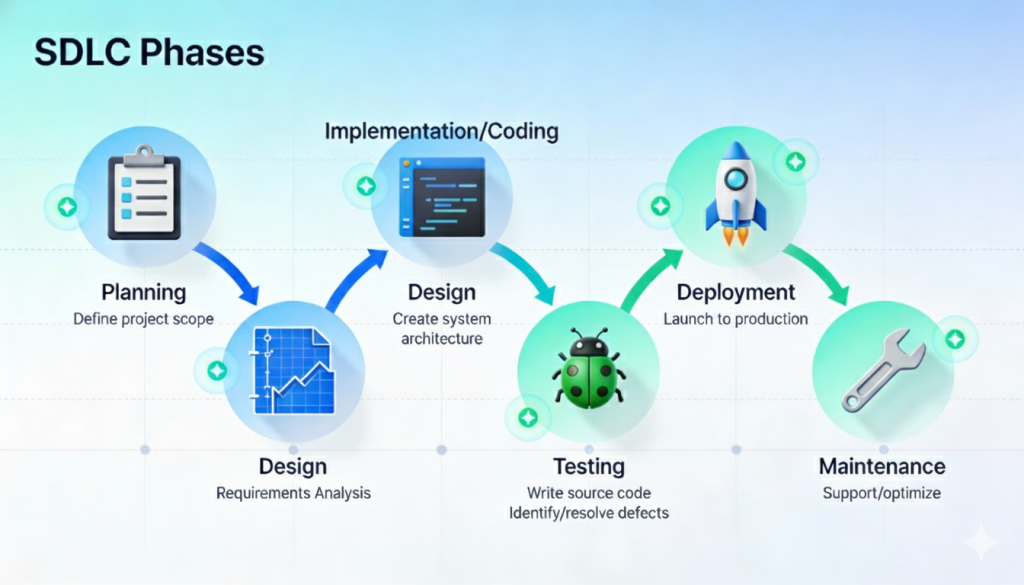
Software development lifecycle phases from planning to maintenance
Uncategorized

Software Development Lifecycle (SDLC): A Step-by-Step Guide to Building Reliable Software

Introduction Building high-quality software requires more than just writing code. Successful applications are the result of a structured and disciplined approach that ensures efficiency, reliability, and scalability. This structured approach is known as the Software Development Lifecycle (SDLC). The SDLC defines a series of phases that guide software teams from the initial idea to final deployment and ongoing maintenance. By following a well-defined lifecycle, organizations can reduce risks, control costs, improve quality, and deliver software that meets user expectations. In this blog, we will explore the software development lifecycle in detail, understand each phase, examine popular SDLC models, and learn why SDLC is essential for modern software development. What Is the Software Development Lifecycle (SDLC)? The Software Development Lifecycle is a systematic process used to develop software applications. It outlines the steps required to design, build, test, deploy, and maintain software efficiently. The main goals of SDLC are to: Deliver high-quality software Meet customer requirements Reduce project risks Ensure predictable timelines and budgets SDLC provides a clear roadmap for developers, designers, testers, and stakeholders. Why Is SDLC Important? Following the SDLC helps organizations: Improve project planning and management Detect issues early in development Enhance communication among teams Deliver consistent and reliable software Without a structured lifecycle, projects are more likely to face delays, budget overruns, and quality issues. Phases of the Software Development Lifecycle The SDLC typically consists of six to seven key phases. 1. Requirement Analysis This is the foundation of the entire development process. Key Activities Gathering business requirements Understanding user needs Defining functional and non-functional requirements Documenting requirements Clear and accurate requirements prevent costly changes later in the project. 2. Planning In the planning phase, teams define how the project will be executed. Key Activities Estimating timelines and costs Allocating resources Defining milestones and deliverables Risk assessment Effective planning ensures smooth project execution. 3. System Design The design phase focuses on how the software will work. Types of Design High-Level Design (HLD): Overall architecture and system components Low-Level Design (LLD): Detailed logic, data structures, and workflows This phase translates requirements into a technical blueprint. 4. Development (Implementation) This is where actual coding takes place. Key Activities Writing source code Code reviews Integrating components Developers follow coding standards and best practices to ensure maintainability and performance. 5. Testing Testing ensures the software works as intended. Types of Testing Unit testing Integration testing System testing User acceptance testing (UAT) Testing identifies bugs, security vulnerabilities, and performance issues before release. 6. Deployment In this phase, the software is released to users. Deployment Methods Manual deployment Continuous integration and continuous deployment (CI/CD) Proper deployment strategies minimize downtime and risks. 7. Maintenance and Support After deployment, the software enters the maintenance phase. Key Activities Bug fixes Performance optimization Feature enhancements Security updates Maintenance ensures long-term software reliability. Popular SDLC Models Different projects use different SDLC models based on requirements. 1. Waterfall Model A linear and sequential approach suitable for projects with fixed requirements. 2. Agile Model An iterative approach that emphasizes flexibility, collaboration, and continuous delivery. 3. Scrum A popular Agile framework using short development cycles called sprints. 4. DevOps Model Combines development and operations to enable faster and more reliable releases. Choosing the Right SDLC Model The right SDLC model depends on: Project size and complexity Requirement stability Team structure Timeline and budget Choosing the correct model improves project outcomes. SDLC in Modern Software Development Modern development practices often blend SDLC with Agile and DevOps principles. Automation, cloud platforms, and continuous testing have transformed traditional lifecycle models into more flexible and efficient processes. Conclusion The Software Development Lifecycle is a critical framework that ensures software projects are delivered successfully. By understanding and following SDLC phases, organizations can build reliable, scalable, and secure applications. Whether you are developing a small application or a large enterprise system, SDLC provides the structure needed to achieve consistent results. Frequently Asked Questions (FAQs) 1. What is SDLC in software development? SDLC is a structured process that defines the stages involved in building, deploying, and maintaining software. 2. How many phases are in the SDLC? Typically, SDLC consists of six to seven phases, including requirements, design, development, testing, deployment, and maintenance. 3. Which SDLC model is best? There is no single best model. Agile is best for flexible projects, while Waterfall suits projects with fixed requirements. 4. Why is testing important in SDLC? Testing ensures software quality, reliability, and security before release. 5. Can SDLC be combined with Agile? Yes, modern development often integrates SDLC principles with Agile and DevOps practices. 6. Does SDLC apply to all software projects? Yes, SDLC can be adapted to projects of all sizes and complexities. Contact with us: https://www.facebook.com/profile.php?id=61555452386126

DevOps workflows for faster and reliable delivery
DEVOPs

The Importance of Automation in DevOps Workflows: Boosting Efficiency and Reliability

Introduction In the fast-paced world of software development, automation is the engine that powers DevOps. It’s the secret ingredient that allows teams to move quickly, deliver consistently, and maintain reliability across the entire software lifecycle. Without automation, DevOps would be incomplete — manual interventions would slow processes and introduce human errors. From code integration to testing, deployment, and monitoring, automation ensures that every stage of development runs smoothly and predictably. What is DevOps Automation? DevOps automation refers to the use of technology and tools to perform repetitive, time-consuming tasks without manual intervention. The goal is to increase efficiency, consistency, and reliability in the software development and deployment process. Automation enables teams to focus on innovation and problem-solving instead of manual operations, while also ensuring that software updates are delivered faster and with higher quality. Why Automation Matters in DevOps 1. Faster Software Delivery Manual processes slow down the delivery pipeline. Automation eliminates delays by executing build, test, and deployment tasks continuously and without human intervention. 2. Fewer Human Errors Even experienced developers can make mistakes during manual deployments. Automation reduces this risk by applying consistent, repeatable scripts and configurations. 3. Better Collaboration Between Teams Automation bridges the gap between development and operations. When tasks are automated, developers and IT teams can work in harmony — leading to smoother deployments and fewer misunderstandings. 4. Improved Scalability Automation allows organizations to handle multiple deployments simultaneously. Whether it’s deploying across multiple regions or environments, automation makes scaling easy and error-free. 5. Consistent Results Automated workflows ensure that every build and deployment follows the same process, producing predictable outcomes every time. Key Areas of Automation in DevOps Continuous Integration and Continuous Delivery (CI/CD) CI/CD pipelines automate the process of integrating code, testing, and deploying it to production. Tools like Jenkins, GitLab CI, and CircleCI handle these steps automatically, reducing turnaround times. Infrastructure as Code (IaC) IaC tools like Terraform, Ansible, and AWS CloudFormation enable developers to create and manage infrastructure using code, ensuring consistency across environments. Automated Testing Testing is one of the most critical areas to automate. With tools like Selenium, JUnit, and TestNG, teams can automatically verify new code, reducing bugs before deployment. Configuration Management Configuration automation ensures that servers and environments are set up correctly every time. Tools like Chef, Puppet, and Ansible make this process fast and reliable. Monitoring and Alerts Automation in monitoring tools like Prometheus, Grafana, and ELK Stack helps track performance metrics and send real-time alerts to detect and fix issues early. Benefits of DevOps Automation Accelerated Delivery: Automating repetitive tasks speeds up releases. Enhanced Quality: Automated testing ensures each release meets quality standards. Reduced Downtime: Quick detection and rollback mechanisms prevent long outages. Cost Savings: Less manual work means reduced operational costs. Increased Productivity: Developers spend more time coding and innovating instead of handling repetitive tasks. Challenges in Implementing Automation Despite its advantages, implementing automation in DevOps can be challenging: Tool Overload: Choosing the right tools can be confusing with so many options. Initial Setup Costs: Automation requires time and resources to implement correctly. Skill Gaps: Teams may lack the technical expertise for advanced automation. Security Concerns: Automated scripts, if misconfigured, can expose vulnerabilities. To overcome these, businesses should start small, train teams, and gradually scale automation. Best Practices for DevOps Automation Automate Incrementally: Begin with the most repetitive and error-prone tasks. Use Version Control: Store all automation scripts in repositories like Git. Monitor Continuously: Track automation performance and fix issues proactively. Integrate Security Early: Combine automation with DevSecOps principles for secure pipelines. Keep Documentation Updated: Ensure that automated workflows are well-documented for easy maintenance. Real-World Example: Amazon’s DevOps Automation Amazon uses advanced automation in its DevOps pipelines to deploy thousands of updates daily. Through continuous delivery and infrastructure automation, the company achieves near-zero downtime and rapid innovation. This example proves that with proper automation, large-scale operations can maintain speed and reliability simultaneously. Conclusion Automation is the lifeblood of DevOps. It reduces human dependency, accelerates release cycles, and ensures that every deployment is consistent and reliable. By automating infrastructure, testing, and delivery, organizations can achieve the full potential of DevOps — delivering faster, smarter, and better-quality software to users around the world. In 2025 and beyond, automation will continue to evolve with AI, machine learning, and predictive analytics, making DevOps even more intelligent and efficient. FAQs 1. What is DevOps automation?It’s the use of tools and scripts to automate repetitive DevOps tasks like building, testing, and deploying software. 2. How does automation help in DevOps?Automation reduces manual work, speeds up deployment, and ensures consistency across environments. 3. What are the best tools for DevOps automation?Jenkins, Ansible, Terraform, Docker, and GitLab CI are some of the most popular automation tools. 4. Is automation suitable for small teams?Yes, small teams benefit greatly from automation because it saves time and reduces errors. 5. What is the difference between DevOps and automation?DevOps is a culture and methodology, while automation is a key practice that enables DevOps efficiency. 6. What is the future of automation in DevOps?The future lies in AI-driven automation (AIOps), where systems can self-correct and optimize without human intervention. Connect with us.

Continuous Integration and Continuous Delivery in DevOps
DEVOPs

Continuous Integration and Continuous Delivery (CI/CD): The Heart of DevOps Success

Introduction The core of any successful DevOps implementation lies in Continuous Integration (CI) and Continuous Delivery (CD) — collectively known as CI/CD. These practices automate the software lifecycle from code development to deployment, ensuring that new features reach users faster and with fewer errors. In today’s world, where software updates are expected weekly or even daily, CI/CD pipelines make it possible to release stable, high-quality applications continuously. What is Continuous Integration (CI)? Continuous Integration is the practice of merging all developers’ working copies to a shared mainline several times a day. It ensures that every code change is automatically built, tested, and verified before integration. This process helps detect bugs early, prevents integration conflicts, and maintains a high level of code quality. Key goals of CI include: Detecting integration issues early Automating build and testing Maintaining a consistent codebase Reducing manual testing time Popular CI tools include Jenkins, GitHub Actions, GitLab CI/CD, CircleCI, and Travis CI. What is Continuous Delivery (CD)? Continuous Delivery extends CI by automating the release process, ensuring that applications can be deployed to production at any time. Once code passes testing in CI, CD pipelines handle staging, deployment, and post-deployment verification. This makes deployment faster, more reliable, and less risky. Key goals of CD include: Automating deployment processes Maintaining a ready-to-release codebase Reducing manual intervention Ensuring smooth rollbacks when issues occur How CI/CD Works in a DevOps Pipeline Code Commit: Developers write and push code to a shared repository (like Git). Build Stage: The CI system automatically builds the code to check for errors. Automated Testing: The pipeline runs unit, integration, and regression tests. Artifact Creation: If the build and tests pass, the application artifact (Docker image, binary, etc.) is generated. Deployment Stage: The artifact is deployed to staging or production environments using CD tools. Monitoring: Logs and metrics are analyzed post-deployment to ensure stability. Benefits of CI/CD in DevOps Faster Development Cycles: Automated builds and tests reduce release times. Early Bug Detection: Problems are caught before they reach production. Improved Collaboration: Developers, testers, and operations work in sync. Consistent Quality: Automated testing ensures stability across releases. Reduced Deployment Risks: Incremental updates minimize large-scale failures. CI/CD Tools That Power DevOps Jenkins: Open-source automation server with thousands of plugins. GitLab CI/CD: Built-in CI/CD feature for GitLab users. CircleCI: Known for performance and scalability. Travis CI: Great for open-source projects. Azure DevOps: Microsoft’s end-to-end DevOps suite. AWS CodePipeline: Automates build, test, and deploy for AWS applications. Challenges in Implementing CI/CD While CI/CD improves speed and reliability, it also introduces challenges: Complex pipeline setup and maintenance Integration with legacy systems Security concerns during automated deployments Insufficient test coverage causing false positives or missed bugs To overcome these, teams must adopt proper automation strategies, security testing, and continuous monitoring practices. Best Practices for Successful CI/CD Implementation Start Small: Begin with automating builds and unit tests before full deployment automation. Use Version Control: Ensure all configurations and scripts are versioned. Automate Everything: From code commit to release validation. Integrate Security Early: Adopt “DevSecOps” for secure CI/CD pipelines. Monitor Continuously: Use dashboards and alerts for real-time insights. Real-World Example: Spotify’s CI/CD Culture Spotify’s engineering teams use CI/CD to deploy updates frequently — sometimes multiple times per day. The automation ensures that new features roll out seamlessly without affecting user experience. This DevOps-driven agility has been a key factor behind Spotify’s continuous innovation and reliability. Conclusion Continuous Integration and Continuous Delivery form the foundation of modern DevOps. They eliminate manual bottlenecks, ensure code quality, and enable rapid deployment — turning software delivery into a smooth, automated process. As businesses continue to evolve, mastering CI/CD will be crucial for maintaining agility, reliability, and innovation in 2025 and beyond. FAQs 1. What is the main difference between CI and CD?CI automates code integration and testing, while CD automates deployment and release to production. 2. Why is CI/CD important in DevOps?It ensures faster, reliable, and more frequent releases, improving collaboration and product quality. 3. Which CI/CD tool is best for beginners?Jenkins and GitHub Actions are ideal for beginners due to community support and easy setup. 4. What challenges can arise with CI/CD?Pipeline complexity, security risks, and maintenance overhead are common challenges. 5. Can small businesses implement CI/CD?Yes, cloud platforms like GitHub and GitLab provide affordable CI/CD solutions. 6. What’s next for CI/CD in the future?Integration with AI-driven DevOps (AIOps) will automate failure detection, optimize testing, and improve deployment accuracy. Connect with us.

DevOps lifecycle and workflow stages
DEVOPs

The DevOps Lifecycle Explained – Stages, Benefits, and Best Practices

Introduction The DevOps approach has become the foundation for modern software development. It’s not just a set of tools or techniques — it’s a continuous cycle of collaboration, automation, and delivery that bridges the gap between developers and operations teams. The DevOps lifecycle represents this entire journey — from writing code to deploying and maintaining applications in production. Each stage plays a crucial role in ensuring fast delivery, reliability, and continuous improvement. Let’s dive into the complete DevOps lifecycle, its stages, benefits, and best practices every developer should know in 2025. Understanding the DevOps Lifecycle The DevOps lifecycle is a circular process that emphasizes continuous integration, testing, deployment, and feedback. Unlike traditional development, which follows a linear model, DevOps relies on continuous loops that allow teams to iterate quickly and adapt to change. There are generally eight main stages in the DevOps lifecycle: plan, code, build, test, release, deploy, operate, and monitor. Together, these create a continuous feedback loop that drives innovation and efficiency. 1. Planning – Laying the Foundation The first stage of the DevOps lifecycle begins with planning. Teams define goals, outline project scope, and determine the technical requirements for development and deployment. Using tools like Jira, Trello, or Asana, developers and project managers collaborate to create a roadmap and assign responsibilities. A well-structured plan sets the tone for smooth collaboration and ensures that both development and operations teams work toward the same objectives. 2. Coding – Building the Core In the coding stage, developers start writing the application’s core functionality using programming languages and frameworks. Collaboration tools like Git and GitHub are used for version control, enabling developers to work together seamlessly on different parts of the codebase. Following best coding practices, code reviews, and maintaining proper documentation are key to ensuring quality and maintainability. This phase also emphasizes modularity and reusability, making it easier to integrate changes later. 3. Building – Continuous Integration Begins Once the code is ready, it moves to the build stage, where it’s compiled and packaged for testing and deployment. Using tools like Jenkins, Maven, or Gradle, teams automate the build process, ensuring faster delivery and error detection. Continuous Integration (CI) pipelines automatically merge and test new code to prevent conflicts. This stage ensures that every code change integrates smoothly into the main application, maintaining system stability and consistency. 4. Testing – Ensuring Quality and Reliability In this stage, testing is automated to validate the functionality, performance, and security of the code. Tools such as Selenium, JUnit, or TestNG are used to run automated test scripts that check for bugs or performance issues. Continuous Testing ensures that every update or new feature meets quality standards before deployment. The goal is to detect and fix issues early, reducing post-release problems and maintaining user satisfaction. 5. Release – Preparing for Deployment Once the code passes testing, it moves to the release stage, where it’s prepared for deployment. Configuration management tools like Ansible, Puppet, or Chef help automate this process by defining environments and dependencies. At this point, the team ensures version control and rollback mechanisms are in place, allowing safe and smooth transitions to production. 6. Deployment – Going Live Deployment marks the transition from development to production. Using CI/CD pipelines (Continuous Integration and Continuous Deployment), code is automatically deployed without human intervention. Tools like Docker and Kubernetes make this process seamless by managing containers and orchestrating deployments across multiple environments. This ensures faster releases and consistent delivery, regardless of the infrastructure. 7. Operation – Maintaining Stability Once deployed, the application moves into the operation phase, where it is actively managed and maintained. Operations teams ensure that the application is available, stable, and performing as expected. Tools like AWS CloudWatch, Nagios, or Datadog help monitor system resources and server health. Any performance degradation or anomalies are addressed immediately to minimize downtime. 8. Monitoring – Continuous Feedback and Improvement The final stage of the DevOps lifecycle focuses on monitoring performance, gathering user feedback, and identifying areas for improvement. Monitoring tools such as Prometheus, Grafana, or Splunk help visualize real-time data, giving teams actionable insights into system behavior. Continuous monitoring not only ensures reliability but also drives future innovation and system optimization. Key Benefits of the DevOps Lifecycle Implementing the DevOps lifecycle offers numerous advantages for organizations: Faster Delivery: Automation and continuous integration accelerate software releases. Improved Quality: Frequent testing ensures high-quality and bug-free releases. Enhanced Collaboration: Cross-functional teams work more efficiently together. Reduced Downtime: Automated monitoring minimizes disruptions and improves reliability. Scalability: DevOps supports dynamic scaling to handle changing workloads. These benefits make DevOps indispensable for modern software development. Best Practices for an Effective DevOps Lifecycle To maximize the value of DevOps, organizations should follow these best practices: Automate everything — from code integration to monitoring. Foster open communication between development and operations. Continuously measure performance using KPIs and metrics. Integrate security at every stage (DevSecOps). Encourage feedback loops for constant improvement. Following these guidelines ensures a stable, efficient, and scalable DevOps workflow. Conclusion The DevOps lifecycle is a continuous loop that connects development, testing, deployment, and feedback in an agile and automated way. Each stage plays a critical role in delivering quality software faster and more reliably. By adopting the DevOps lifecycle, organizations can bridge the gap between development and operations, reduce costs, and enhance innovation. In 2025 and beyond, companies that master these principles will stay ahead in the ever-evolving digital landscape. FAQs 1. What is the DevOps lifecycle?It’s a continuous process that includes planning, coding, building, testing, deploying, operating, and monitoring software applications. 2. Why is the DevOps lifecycle important?It enables faster, more reliable software delivery and promotes collaboration across teams. 3. What tools are used in the DevOps lifecycle?Popular tools include Jenkins, Docker, Kubernetes, Ansible, Git, and Prometheus. 4. What is Continuous Integration in DevOps?Continuous Integration automatically merges and tests code changes to detect issues early. 5. How does DevOps improve product quality?Through automation and continuous feedback, it ensures consistent performance and reliability. 6. Is DevOps suitable for all industries?Yes,

Computer screen showing code and DevOps automation tools
DEVOPs, Uncategorized

Top 10 DevOps Tools Every Developer Should Know.

Introduction The DevOps revolution continues to transform the software industry in 2025. Businesses across the world are shifting from traditional development methods to agile, automated, and collaborative DevOps workflows. At the heart of this transformation lie DevOps tools — powerful solutions that automate tasks, enhance collaboration, and streamline software delivery. Whether you’re a developer, tester, or system administrator, mastering these tools can significantly improve your efficiency and project outcomes. Let’s explore the top 10 DevOps tools that are shaping the future of modern software development. Jenkins – The Automation Powerhouse Jenkins remains one of the most widely used open-source automation servers for building, testing, and deploying software. With over 1,800 plugins, Jenkins integrates seamlessly with various technologies, making it perfect for continuous integration (CI) and continuous delivery (CD). Developers can automate everything—from code compilation to deployment—without manual intervention. Why it’s essential: Jenkins provides flexibility, scalability, and complete pipeline automation for DevOps teams. Docker – Simplifying Containerization Docker revolutionized software development by introducing lightweight, portable containers that work across different environments. With Docker, developers can package applications and dependencies into containers that run consistently across development, testing, and production environments. This ensures reliability and faster deployment cycles. Why it’s essential: Docker minimizes compatibility issues, improves scalability, and simplifies deployment processes. Kubernetes – The Container Orchestrator While Docker manages containers, Kubernetes (K8s) orchestrates them. It automates deployment, scaling, and management of containerized applications. Kubernetes ensures high availability by distributing workloads across clusters and automatically recovering failed containers. Why it’s essential: Kubernetes helps businesses manage complex, large-scale applications effortlessly in cloud and hybrid environments. Git and GitHub – Version Control and Collaboration No DevOps workflow is complete without Git and GitHub. Git provides a version control system that tracks code changes, while GitHub offers a collaborative platform for developers to manage projects and pull requests. Why it’s essential: These tools improve teamwork, maintain code quality, and make collaboration across distributed teams seamless. Terraform – Infrastructure as Code (IaC) Terraform, developed by HashiCorp, is a popular Infrastructure as Code (IaC) tool that allows developers to define infrastructure using configuration files. It supports multiple cloud providers like AWS, Azure, and Google Cloud, enabling consistent infrastructure setup across environments. Why it’s essential: Terraform simplifies cloud resource management and automates infrastructure provisioning efficiently. Ansible – Configuration Management Simplified Ansible, an open-source automation tool by Red Hat, is used for configuration management, application deployment, and task automation. It’s agentless, meaning it doesn’t require software to be installed on target nodes, making it simple and secure to manage large environments. Why it’s essential: Ansible improves deployment speed and ensures consistent configurations across multiple servers. Prometheus – Monitoring and Alerting Prometheus is a leading open-source monitoring tool that collects metrics, stores time-series data, and generates alerts for performance issues. It integrates easily with Grafana to visualize metrics through interactive dashboards. Why it’s essential: Prometheus helps DevOps teams track application health, performance, and uptime in real time. Nagios – System Monitoring and Incident Detection Nagios is a robust tool for monitoring networks, servers, and applications. It provides detailed reports on uptime, response time, and security vulnerabilities. Why it’s essential: Nagios ensures proactive incident detection and quick issue resolution, minimizing downtime. ELK Stack (Elasticsearch, Logstash, Kibana) – Centralized Logging The ELK Stack is a powerful combination of tools for log management. Elasticsearch stores and searches large volumes of data. Logstash processes and collects logs from multiple sources. Kibana visualizes the data through dashboards. Why it’s essential: ELK helps organizations gain real-time insights and troubleshoot system issues efficiently. Chef – Automating Infrastructure Management Chef uses code to manage and automate infrastructure. It helps DevOps teams define server configurations and ensure consistent deployment across environments. Why it’s essential: Chef enables continuous delivery of infrastructure, reducing manual effort and configuration drift. Benefits of Using DevOps Tools Adopting the right DevOps tools provides immense benefits: Automation: Reduces repetitive tasks and increases productivity. Speed: Enables faster delivery through CI/CD pipelines. Reliability: Ensures consistent environments and fewer deployment failures. Scalability: Supports dynamic scaling in cloud environments. Collaboration: Enhances communication between developers and operations teams. These tools empower businesses to innovate quickly while maintaining stability and efficiency. Choosing the Right Tool for Your Business There’s no one-size-fits-all approach to DevOps tools. The best combination depends on your project’s complexity, infrastructure, and team expertise. Start with essential tools like Git, Jenkins, and Docker. Gradually integrate advanced solutions such as Kubernetes, Terraform, and Prometheus to optimize automation and scalability. Conclusion The DevOps ecosystem is vast, but mastering the top 10 tools listed above can drastically improve your team’s agility, speed, and collaboration. In 2025, automation, cloud-native development, and continuous delivery are no longer luxuries—they are business necessities. By adopting these DevOps tools, developers and organizations can stay ahead of the curve and deliver reliable, scalable, and high-performing applications faster than ever. DevOps isn’t just a methodology; it’s a mindset. And these tools are the engines that power it. FAQs 1. What are DevOps tools used for?They help automate, monitor, and streamline the software development and deployment process. 2. Which DevOps tool is best for automation?Jenkins and Ansible are top choices for automation in DevOps workflows. 3. What is the difference between Docker and Kubernetes?Docker creates containers, while Kubernetes manages and orchestrates them. 4. Can small companies use DevOps tools?Yes, most tools like Git, Jenkins, and Docker are open source and ideal for startups too. 5. What is Infrastructure as Code (IaC)?IaC tools like Terraform manage infrastructure using code, ensuring consistent and automated setup. 6. Are DevOps tools difficult to learn?Some have a learning curve, but extensive documentation and community support make them beginner-friendly. Connect with us.

Team collaborating on DevOps workflow with automation tools
DEVOPs

What Is DevOps and Why It Matters in 2025

Introduction In the fast-paced world of software development, agility and reliability are critical for success. As businesses race to deliver software faster without compromising quality, a modern methodology called DevOps has become the cornerstone of innovation. DevOps combines “Development” and “Operations” — breaking the traditional silos between software engineers and IT teams. This collaboration allows organizations to deliver updates quickly, respond to user needs faster, and maintain high performance across systems. But what exactly is DevOps, and why has it become essential in 2025? Let’s explore. What Is DevOps? DevOps is a cultural and technical approach that unites software development and IT operations to achieve continuous integration, delivery, and improvement. The goal is simple: shorten the software development lifecycle while maintaining quality and stability. Instead of working separately, developers, testers, and system administrators collaborate using automation tools, shared metrics, and continuous feedback loops. This promotes faster releases, fewer bugs, and better customer satisfaction. In short, DevOps isn’t just about tools—it’s about teamwork, automation, and a culture of continuous improvement. The Core Principles of DevOps DevOps is built on a few key principles that guide how teams work together: Collaboration and Communication – DevOps breaks down barriers between developers and operations teams, promoting transparency and shared responsibility. Automation – From testing to deployment, automation reduces manual errors and speeds up delivery. Continuous Integration and Continuous Deployment (CI/CD) – Regularly merging and deploying code ensures faster releases and immediate bug detection. Monitoring and Feedback – Constant monitoring allows teams to detect issues early and improve system performance. Security Integration (DevSecOps) – Security is embedded into every stage of development rather than being added at the end. These principles enable organizations to innovate faster while maintaining system reliability and security. The DevOps Lifecycle The DevOps lifecycle represents the continuous loop of development, integration, deployment, and monitoring. It typically includes the following stages: Plan – Teams collaborate to define requirements and goals. Code – Developers write and review code collaboratively. Build – Code is compiled, tested, and packaged for deployment. Test – Automated testing ensures code quality and reliability. Release – Approved builds are deployed to production environments. Deploy – Software is automatically deployed using pipelines. Operate – Systems are monitored for performance and availability. Monitor – Real-time feedback is collected for continuous improvement. This cyclical process ensures faster delivery and consistent software quality. Benefits of Adopting DevOps Implementing DevOps brings a wide range of business and technical advantages: Faster Software Delivery – Automated workflows and CI/CD pipelines speed up deployment cycles. Improved Collaboration – Cross-functional teams communicate better, reducing bottlenecks. Higher Quality Software – Continuous testing ensures fewer bugs and more stable releases. Greater Customer Satisfaction – Quick updates and reliable performance improve user experience. Increased Efficiency – Automation reduces repetitive manual tasks. Scalability – DevOps practices enable businesses to scale applications quickly as demand grows. For modern organizations, these benefits translate into innovation, cost efficiency, and competitive advantage. Common DevOps Tools DevOps thrives on the right set of tools that support integration, automation, and monitoring. Some of the most popular tools include: Jenkins – Automates CI/CD pipelines. Docker – Simplifies containerization and application deployment. Kubernetes – Manages container orchestration. Git & GitHub – Enables version control and team collaboration. Ansible & Puppet – Automate infrastructure configuration. Prometheus & Grafana – Provide system monitoring and alerting. These tools empower teams to build, test, and deploy faster while maintaining reliability and visibility. DevOps in 2025: Emerging Trends As technology evolves, DevOps continues to adapt. Here are the top trends shaping DevOps in 2025: AI-Driven DevOps (AIOps) – Artificial intelligence helps automate decision-making, detect anomalies, and predict failures. GitOps – Managing infrastructure through Git repositories for versioned and auditable automation. Serverless Architectures – Enabling faster, cost-effective deployment without server management. DevSecOps Expansion – Integrating security into every step of development. Cloud-Native Development – Leveraging multi-cloud strategies for scalability and flexibility. These trends are transforming DevOps into a more intelligent, automated, and secure approach to software delivery. Challenges in Implementing DevOps While DevOps offers immense benefits, implementation isn’t without challenges: Cultural Resistance – Teams may struggle to adapt to new collaborative models. Tool Overload – Choosing and managing too many tools can cause confusion. Skill Gaps – DevOps requires multidisciplinary expertise. Security Concerns – Faster deployments can introduce vulnerabilities if not managed properly. Organizations overcome these challenges through training, leadership support, and adopting DevOps gradually across teams. Conclusion DevOps is more than just a buzzword—it’s a fundamental shift in how software is built and delivered. By merging development, operations, and automation, organizations achieve agility, reliability, and continuous innovation. In 2025 and beyond, DevOps remains the foundation of digital success. Businesses that embrace it gain the agility to deliver faster, adapt to market changes, and meet customer expectations effortlessly. Whether you’re a startup or an enterprise, adopting DevOps today ensures you’re prepared for the digital challenges of tomorrow. FAQs 1. What is the main purpose of DevOps?To improve collaboration between development and operations teams and speed up software delivery cycles. 2. What are the key stages of the DevOps lifecycle?Planning, coding, building, testing, releasing, deploying, operating, and monitoring. 3. How does DevOps improve efficiency?Automation and CI/CD pipelines reduce manual effort, minimize errors, and accelerate deployments. 4. What is the difference between Agile and DevOps?Agile focuses on iterative software development, while DevOps extends it to include deployment and operations. 5. What are common DevOps tools?Jenkins, Docker, Kubernetes, Git, Ansible, and Prometheus. 6. Is DevOps relevant for non-tech companies?Yes, any organization that develops or uses software can benefit from DevOps to improve delivery and performance. Connect with us.

Digital cloud representing Amazon Web Services and global cloud infrastructure.
aws, Cloud Computing and Technology

AWS Explained: How Amazon Web Services Powers the Cloud in 2025

Introduction In a world where every app, website, and business runs on the cloud, one name stands out — Amazon Web Services (AWS). From startups to global enterprises, AWS has become the foundation for innovation, scalability, and performance. As of 2025, AWS powers over 30% of the global cloud market, offering everything from basic storage to advanced artificial intelligence. This blog explores what AWS is, how it works, and why it continues to lead the cloud revolution. What is AWS (Amazon Web Services)? AWS is a cloud computing platform developed by Amazon, offering on-demand computing services such as servers, storage, databases, and machine learning — all accessible over the internet. Key Features: Scalability: Expand resources as your business grows. Pay-as-you-go: Pay only for what you use. Global Infrastructure: Data centers in 32 regions worldwide. Reliability: 99.99% uptime backed by Amazon’s global network. Core AWS Services You Should Know AWS provides over 200 services across computing, storage, databases, networking, and more. Here are the essentials: Category Service Description Compute EC2 Virtual servers for running applications Storage S3 Object storage for files, backups, and data lakes Database RDS Managed relational database service Networking VPC Isolated network for secure cloud deployment Serverless Lambda Run code without managing servers AI/ML SageMaker Build, train, and deploy machine learning models Security IAM Manage user access and permissions securely Why AWS Dominates the Cloud Market Here’s why AWS remains the top choice for developers and businesses: Massive Ecosystem: From gaming to AI to IoT, AWS supports every industry. Global Reach: 99 Availability Zones across 32 regions. Cost Efficiency: Pay-as-you-go model saves infrastructure costs. Innovation: Continuous updates with AI, blockchain, and edge computing. Security: End-to-end encryption, compliance, and monitoring tools. AWS Security and Compliance Security is AWS’s top priority. Identity & Access Management (IAM): Role-based control for users. Encryption: Protect data in transit and at rest. Compliance: Meets ISO, GDPR, HIPAA, and DPDP standards. Monitoring: Tools like CloudTrail and GuardDuty track activities in real time. The Future of AWS: Trends in 2025 and Beyond AWS continues to lead innovation in: AI and Generative Models Quantum Computing (Braket) Sustainability with Green Data Centers Edge Computing for Faster IoT Cloud-Native Development with Kubernetes (EKS) The next phase of AWS is all about intelligent automation, zero-latency networks, and sustainable innovation. Conclusion AWS is more than just cloud storage — it’s the backbone of digital transformation. With its unmatched scalability, security, and global reach, it enables businesses to innovate faster and smarter. As cloud computing evolves, AWS continues to redefine how we build, deploy, and manage technology — one click at a time. “Build the future in the cloud — powered by AWS.” FAQ Section Q1. What is AWS mainly used for?AWS provides cloud infrastructure for hosting, computing, storage, and app development. Q2. Is AWS free for beginners?Yes, AWS offers a Free Tier with limited services for 12 months. Q3. Which companies use AWS?Netflix, Adobe, NASA, Airbnb, and many startups rely on AWS for scalable cloud solutions. Q4. How is AWS different from Azure or Google Cloud?AWS offers broader service coverage, global infrastructure, and earlier market dominance. Q5. Can I learn AWS without coding?Absolutely — many AWS tools (like S3 and RDS) require little or no programming knowledge.

Scroll to Top