Cloud Computing

App Development, DEVOPs, Software development

DevOps Automation Explained

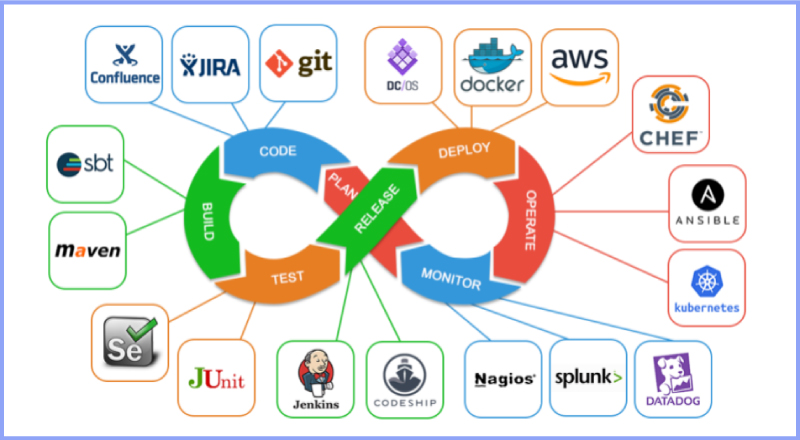
DevOps Automation Explained: The Ultimate Guide to Accelerating Software Delivery In the fast-paced world of modern software development, speed, agility, and reliability are no longer optional—they are critical to survival. If your team is still manually deploying code, configuring servers by hand, or running test scripts line by line, you are falling behind. Enter DevOps Automation. It’s the engine that powers high-performing engineering teams, transforming chaotic, siloed workflows into streamlined, automated delivery pipelines. But automation isn’t just about replacing human effort with scripts; it’s about shifting culture, breaking down traditional silos between developers and operations, and building a resilient ecosystem where software can be built, tested, and shipped at scale with minimal friction. Whether you are an engineering lead looking to scale your infrastructure, a developer tired of dealing with “it works on my machine” bugs, or a business leader aiming to outpace the competition, this comprehensive guide will break down everything you need to know about DevOps automation. 1. What is DevOps Automation? (Beyond the Buzzwords) To truly understand DevOps automation, we first need to strip away the marketing jargon. At its core, DevOps is a cultural and technical philosophy aimed at unifying software development (Dev) and IT operations (Ops). Historically, these two teams operated in complete isolation: Developers were incentivized to move fast, ship new features, and push boundaries. Operations teams were incentivized to maintain system stability, minimize downtime, and resist risky changes. This inherent tension created a massive bottleneck. Code would sit waiting for manual security reviews, server setups took weeks, and deployments were high-stress, late-night events prone to human error. +———————————–+ | Traditional Siloed Model | | [Dev Team] ——> [Ops Team] | | (Move Fast) Wall (Maintain) | | of Chaos | +———————————–+ VS +———————————–+ | DevOps Loop Model | | (Plan -> Build -> Test -> | | Deploy -> Monitor -> Feedback) | | Continuous & Automated | +———————————–+ DevOps automation is the practice of injecting technology across this entire lifecycle to automate repetitive, manual tasks. It bridges the gap between these teams, allowing software to flow from a developer’s laptop to production seamlessly, safely, and predictably. Why Automation is the Heart of DevOps Without automation, DevOps is just a nice idea. You can tell your teams to collaborate more, but if their tools and processes don’t support that collaboration, they will default to old habits. Automation provides the shared framework—the “single source of truth”—that allows both development and operations to achieve their goals simultaneously: speed and stability. 2. The Core Pillars of a DevOps Automation Framework A mature DevOps automation strategy isn’t built overnight. It spans across several distinct but interconnected phases, often referred to as the continuous delivery pipeline. Let’s break down these essential pillars. Continuous Integration (CI) Continuous Integration is the practice of automating the integration of code changes from multiple contributors into a single software project. Instead of developers working in isolation on massive feature branches for weeks, they merge their code back into a central repository (like GitHub or GitLab) frequently—often multiple times a day. Every time code is pushed, an automated CI server takes over. It automatically triggers: Code Compilation: Building the application to ensure there are no syntax or structural compilation errors. Automated Testing: Running unit tests and code linters to verify that the new changes don’t break existing functionality or violate code quality standards. By catching bugs early in the development cycle, CI prevents the dreaded “integration hell” that happens when teams try to merge massive amounts of conflicting code right before a major release. Continuous Delivery (CD) & Continuous Deployment While CI handles getting code into a stable, buildable state, Continuous Delivery and Continuous Deployment (often collectively called CD) handle getting that code into production. Continuous Delivery: In a CD workflow, every successful code change that passes the CI pipeline is automatically built and packaged. It is then automatically deployed to a staging or testing environment. However, the final push to the live production environment requires a manual human trigger (e.g., clicking a “Deploy” button). Continuous Deployment: This takes automation a step further. There is no manual intervention. If a code change passes every single automated test in the pipeline, it is automatically deployed directly to production. [ Code Change ] │ ▼ ┌────────────────────────┐ │ Continuous Integration │ -> Code Merged, Built, & Unit Tested └──────────┬─────────────┘ │ (Passes) ▼ ┌────────────────────────┐ │ Continuous Delivery │ -> Staging Deployment & Advanced Testing └──────────┬─────────────┘ │ ├─► (Manual Approval) ──► [ Production ] (Continuous Delivery) │ └─► (Automated Push) ──► [ Production ] (Continuous Deployment) Infrastructure as Code (IaC) Traditionally, provisioning servers, configuring networks, and setting up databases required operations teams to manually click through cloud consoles or run terminal commands on individual machines. This approach is slow, unscalable, and heavily prone to configuration drift (where environments that are supposed to be identical slowly become different over time). Infrastructure as Code solves this by treating your infrastructure exactly like software code. You define your servers, storage, networks, and configurations in descriptive configuration files (using formats like YAML or JSON). These files are stored in version control alongside your application code. When you need to spin up a new environment, an IaC tool reads the configuration and provisions the exact infrastructure automatically. This guarantees that your development, staging, and production environments are identical replicas, eliminating environment-specific bugs entirely. Continuous Monitoring and Logging Automation doesn’t stop once code is live in production. In fact, that’s where some of the most critical automation begins. Automated monitoring and logging tools constantly track the health, performance, and security of your applications and infrastructure in real-time. Instead of waiting for users to tweet about a crash or submit a support ticket, automated monitoring systems use predictive alerts to notify engineering teams the moment performance begins to degrade—such as spikes in CPU usage, memory leaks, or an unusual rise in 500 error codes. Advanced monitoring systems can even trigger automated remediation scripts, like spinning up additional cloud servers to handle unexpected traffic spikes or
Future trends shaping the software development industry
Software development

Future Trends in Software Development: What to Expect in the Coming Years

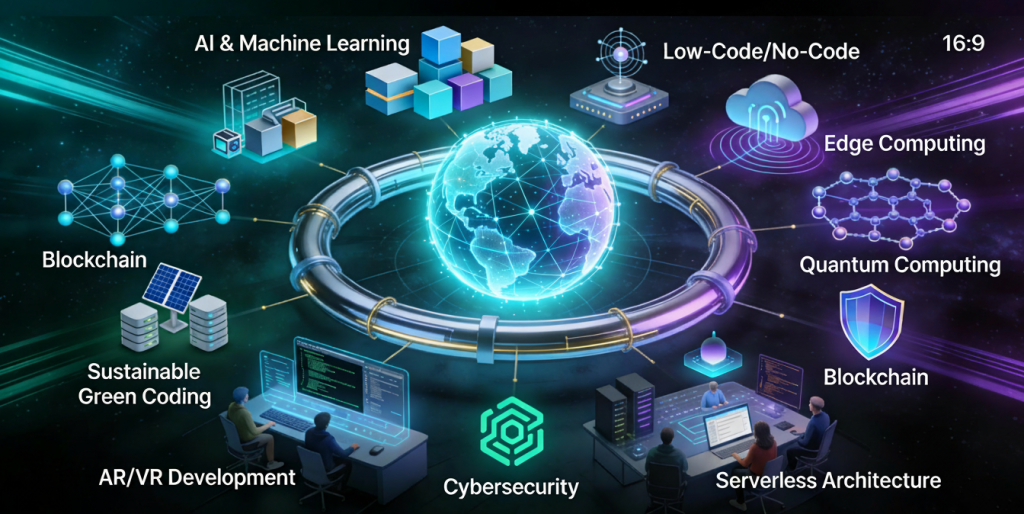
Introduction Software development is evolving at an unprecedented pace. Rapid advancements in artificial intelligence, cloud computing, automation, and development tools are reshaping how applications are built, deployed, and maintained. Organizations that fail to adapt risk falling behind in an increasingly competitive digital world. Understanding future trends in software development helps developers, businesses, and technology leaders prepare for upcoming challenges and opportunities. In this blog, we explore key trends that will define the future of software development and how they will impact the industry. Artificial Intelligence in Software Development AI is transforming every stage of the software development lifecycle. Key Applications AI-powered code generation Intelligent debugging Automated testing AI tools improve productivity and reduce human error. Low-Code and No-Code Development Low-code and no-code platforms enable faster application development with minimal coding. Benefits Faster time to market Reduced development costs Empowered non-technical users These platforms are ideal for rapid prototyping and internal tools. Cloud-Native Development Cloud-native applications are designed specifically for cloud environments. Key Technologies Containers Microservices Serverless computing Cloud-native development improves scalability and resilience. DevOps and Automation Automation continues to play a vital role in software development. Trends AI-driven CI/CD pipelines Automated infrastructure Continuous monitoring Automation enhances efficiency and reliability. Cybersecurity-First Development Security is becoming a core development priority. Emerging Practices Zero trust architecture DevSecOps Continuous security testing Security-first development protects applications from evolving threats. Microservices Architecture Microservices allow applications to be built as independent, scalable services. Advantages Better scalability Faster updates Improved fault isolation Microservices support modern, distributed systems. Edge Computing Edge computing processes data closer to the source. Use Cases IoT devices Real-time analytics Autonomous systems Edge computing reduces latency and improves performance. Remote and Distributed Development Teams Remote work is becoming the norm in software development. Benefits Access to global talent Improved flexibility Reduced operational costs Collaboration tools enable seamless teamwork. Sustainable Software Development Green software engineering focuses on energy-efficient applications. Key Goals Reduced carbon footprint Efficient resource usage Sustainability is becoming a strategic priority. Continuous Learning and Skill Evolution Developers must continuously update their skills to remain competitive. In-Demand Skills Cloud platforms AI and ML Cybersecurity Lifelong learning is essential in modern software development. Conclusion The future of software development is shaped by innovation, automation, and continuous improvement. AI, cloud-native technologies, security-first practices, and sustainability will define the next generation of applications. By embracing these trends, organizations and developers can stay competitive and build software that meets future demands. Frequently Asked Questions (FAQs) 1. What is the biggest trend in software development? AI and automation are the most impactful trends. 2. Will low-code platforms replace developers? No, they will complement developers by improving productivity. 3. Is cloud-native development the future? Yes, cloud-native approaches are becoming the industry standard. 4. How important is cybersecurity in future development? Cybersecurity is critical and must be integrated from the start. 5. Will DevOps continue to grow? Yes, DevOps will remain essential for modern software delivery. 6. How can developers prepare for the future? By continuously learning new technologies and adapting to change. Connect With Us:https://www.facebook.com/profile.php?id=61555452386126

DevOps and CI/CD pipeline in software development.
Software development

DevOps and CI/CD in Software Development: Accelerating Delivery and Quality

Introduction Modern software development demands speed, reliability, and continuous improvement. Traditional development approaches often struggled with slow releases, manual deployments, and communication gaps between development and operations teams. To overcome these challenges, organizations adopted DevOps and Continuous Integration/Continuous Deployment (CI/CD) practices. DevOps and CI/CD aim to automate workflows, improve collaboration, and deliver high-quality software faster. Together, they form the backbone of modern software engineering and cloud-native development. In this blog, we will explore DevOps and CI/CD, understand their importance, key concepts, tools, benefits, and how they transform software development. What Is DevOps? DevOps is a cultural and technical approach that integrates software development (Dev) and IT operations (Ops). It focuses on collaboration, automation, and continuous feedback. Core Principles of DevOps Collaboration between teams Automation of workflows Continuous monitoring and feedback Rapid delivery DevOps breaks down silos and improves efficiency across the development lifecycle. What Is CI/CD? CI/CD stands for Continuous Integration and Continuous Deployment (or Delivery). Continuous Integration (CI) CI involves frequently merging code changes into a shared repository and automatically testing them. Continuous Deployment (CD) CD automates the release of tested code into production. Together, CI/CD ensures faster and safer software releases. DevOps Lifecycle The DevOps lifecycle consists of several stages: Planning Development Integration Testing Deployment Monitoring Each stage is automated and continuously improved. Benefits of DevOps and CI/CD 1. Faster Time to Market Automation reduces manual work and accelerates releases. 2. Improved Software Quality Continuous testing detects issues early. 3. Enhanced Collaboration DevOps fosters teamwork across departments. 4. Reliable Deployments Automated pipelines reduce human errors. Popular DevOps and CI/CD Tools Version Control Git GitHub GitLab CI/CD Tools Jenkins GitHub Actions GitLab CI/CD Containerization Docker Kubernetes Monitoring Prometheus Grafana DevOps and Agile Relationship DevOps complements Agile by extending continuous delivery beyond development into operations. Together, they enable faster feedback loops and continuous improvement. Security in DevOps (DevSecOps) DevSecOps integrates security into the DevOps pipeline. Automated security testing ensures vulnerabilities are identified early. Challenges in Implementing DevOps Cultural resistance Tool complexity Skill gaps Overcoming these challenges requires training, leadership support, and gradual adoption. Future of DevOps DevOps continues to evolve with AI-driven automation, cloud-native technologies, and serverless computing. Conclusion DevOps and CI/CD are essential for modern software development. By automating workflows, improving collaboration, and enabling continuous delivery, organizations can build reliable and scalable applications faster than ever. Frequently Asked Questions (FAQs) 1. What is DevOps in simple terms? DevOps is a practice that improves collaboration between development and operations teams. 2. What is the difference between CI and CD? CI focuses on code integration, while CD focuses on deployment. 3. Is DevOps only for large companies? No, DevOps benefits organizations of all sizes. 4. Can DevOps be used without CI/CD? CI/CD is a core component of DevOps. 5. What skills are needed for DevOps? Automation, cloud computing, and scripting skills. 6. Is DevOps a tool or a methodology? DevOps is a culture supported by tools and practices. Connect with us: https://www.facebook.com/profile.php?id=61555452386126

Different types of software development applications and platforms
Software development

Types of Software Development: Understanding Different Development Approaches and Applications

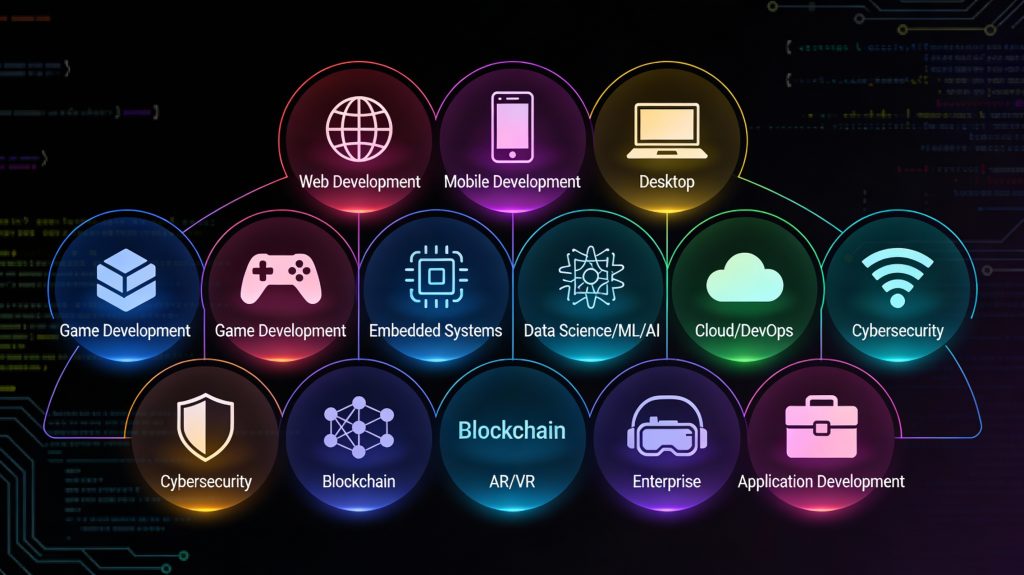
Introduction Software development is not a one-size-fits-all discipline. Depending on business goals, user needs, platforms, and technologies, software solutions are built in different ways. From websites and mobile apps to enterprise systems and embedded software, each type of software development serves a unique purpose. Understanding the types of software development helps businesses choose the right approach and enables developers to specialize in the areas that best align with their skills and career goals. As digital transformation accelerates across industries, the demand for diverse software solutions continues to grow. In this blog, we’ll explore the major types of software development, their characteristics, use cases, and how they contribute to modern technology ecosystems. Web Application Development Web development focuses on building applications that run in web browsers. These applications are accessible across devices without requiring installation. Key Characteristics Browser-based access Platform-independent Easy updates and maintenance Technologies Used Frontend: HTML, CSS, JavaScript, React, Angular Backend: Node.js, Python, Java, PHP Databases: MySQL, PostgreSQL, MongoDB Use Cases Business websites E-commerce platforms Content management systems Web portals Web development remains one of the most popular and in-demand software development types. Mobile Application Development Mobile software development involves creating applications for smartphones and tablets. Types of Mobile Development Native Development: Platform-specific (Swift for iOS, Kotlin for Android) Cross-Platform Development: Single codebase for multiple platforms (React Native, Flutter) Use Cases Social media apps Banking and fintech apps Fitness and healthcare apps On-demand services Mobile development focuses on performance, usability, and device-specific features. Desktop Software Development Desktop software development involves building applications that run on operating systems like Windows, macOS, and Linux. Key Features Offline functionality High performance Direct access to system resources Examples Productivity tools Graphic design software Accounting systems Although cloud and web apps are growing, desktop applications are still essential in many industries. Enterprise Software Development Enterprise software development focuses on building large-scale applications for organizations. Key Characteristics High scalability Complex workflows Integration with existing systems Examples ERP systems CRM platforms HR management software Enterprise software improves efficiency, data management, and operational control. Cloud Software Development Cloud development involves building applications designed to run on cloud infrastructure. Benefits Scalability on demand High availability Cost efficiency Popular Platforms Amazon Web Services (AWS) Microsoft Azure Google Cloud Platform Cloud-native development supports modern architectures like microservices and serverless computing. Embedded Software Development Embedded software runs on hardware devices rather than traditional computers. Examples IoT devices Automotive systems Medical equipment Smart appliances Embedded software must be efficient, reliable, and often real-time. Custom Software Development Custom software development involves building solutions tailored to specific business needs. Advantages Full control over features Better integration with business processes Competitive advantage Custom software is often preferred over off-the-shelf solutions for unique requirements. Game Development Game development combines software engineering with creativity. Technologies Used Game engines (Unity, Unreal Engine) Graphics and physics libraries Applications Mobile games Console games VR and AR experiences Game development emphasizes performance, graphics, and user engagement. AI and Machine Learning Software Development AI-driven software development focuses on intelligent systems. Use Cases Recommendation engines Chatbots Predictive analytics AI development requires specialized skills and data-driven approaches. Choosing the Right Type of Software Development Selecting the right development type depends on: Business goals Target users Budget and timeline Scalability requirements Making the right choice ensures long-term success. Conclusion Software development encompasses a wide range of approaches, each designed to solve specific problems. Understanding the different types of software development allows businesses to make informed decisions and developers to focus their skills effectively. As technology continues to evolve, the diversity of software development will only expand, offering endless opportunities for innovation. Frequently Asked Questions (FAQs) 1. What are the main types of software development? The main types include web, mobile, desktop, enterprise, cloud, embedded, and custom software development. 2. Which type of software development is most in demand? Web and mobile development are currently the most in-demand due to widespread digital adoption. 3. What is custom software development? Custom software development involves building applications tailored to specific business needs rather than generic solutions. 4. Is cloud software development different from web development? Yes, cloud development focuses on scalability and cloud infrastructure, while web development focuses on browser-based applications. 5. Which type of software development is best for startups? Web and cross-platform mobile development are often ideal for startups due to lower costs and faster time-to-market. 6. Can one project involve multiple types of software development? Yes, many modern projects combine web, mobile, cloud, and backend development. Connect with us: https://www.facebook.com/profile.php?id=61555452386126

Computer screen showing code and DevOps automation tools
DEVOPs, Uncategorized

Top 10 DevOps Tools Every Developer Should Know.

Introduction The DevOps revolution continues to transform the software industry in 2025. Businesses across the world are shifting from traditional development methods to agile, automated, and collaborative DevOps workflows. At the heart of this transformation lie DevOps tools — powerful solutions that automate tasks, enhance collaboration, and streamline software delivery. Whether you’re a developer, tester, or system administrator, mastering these tools can significantly improve your efficiency and project outcomes. Let’s explore the top 10 DevOps tools that are shaping the future of modern software development. Jenkins – The Automation Powerhouse Jenkins remains one of the most widely used open-source automation servers for building, testing, and deploying software. With over 1,800 plugins, Jenkins integrates seamlessly with various technologies, making it perfect for continuous integration (CI) and continuous delivery (CD). Developers can automate everything—from code compilation to deployment—without manual intervention. Why it’s essential: Jenkins provides flexibility, scalability, and complete pipeline automation for DevOps teams. Docker – Simplifying Containerization Docker revolutionized software development by introducing lightweight, portable containers that work across different environments. With Docker, developers can package applications and dependencies into containers that run consistently across development, testing, and production environments. This ensures reliability and faster deployment cycles. Why it’s essential: Docker minimizes compatibility issues, improves scalability, and simplifies deployment processes. Kubernetes – The Container Orchestrator While Docker manages containers, Kubernetes (K8s) orchestrates them. It automates deployment, scaling, and management of containerized applications. Kubernetes ensures high availability by distributing workloads across clusters and automatically recovering failed containers. Why it’s essential: Kubernetes helps businesses manage complex, large-scale applications effortlessly in cloud and hybrid environments. Git and GitHub – Version Control and Collaboration No DevOps workflow is complete without Git and GitHub. Git provides a version control system that tracks code changes, while GitHub offers a collaborative platform for developers to manage projects and pull requests. Why it’s essential: These tools improve teamwork, maintain code quality, and make collaboration across distributed teams seamless. Terraform – Infrastructure as Code (IaC) Terraform, developed by HashiCorp, is a popular Infrastructure as Code (IaC) tool that allows developers to define infrastructure using configuration files. It supports multiple cloud providers like AWS, Azure, and Google Cloud, enabling consistent infrastructure setup across environments. Why it’s essential: Terraform simplifies cloud resource management and automates infrastructure provisioning efficiently. Ansible – Configuration Management Simplified Ansible, an open-source automation tool by Red Hat, is used for configuration management, application deployment, and task automation. It’s agentless, meaning it doesn’t require software to be installed on target nodes, making it simple and secure to manage large environments. Why it’s essential: Ansible improves deployment speed and ensures consistent configurations across multiple servers. Prometheus – Monitoring and Alerting Prometheus is a leading open-source monitoring tool that collects metrics, stores time-series data, and generates alerts for performance issues. It integrates easily with Grafana to visualize metrics through interactive dashboards. Why it’s essential: Prometheus helps DevOps teams track application health, performance, and uptime in real time. Nagios – System Monitoring and Incident Detection Nagios is a robust tool for monitoring networks, servers, and applications. It provides detailed reports on uptime, response time, and security vulnerabilities. Why it’s essential: Nagios ensures proactive incident detection and quick issue resolution, minimizing downtime. ELK Stack (Elasticsearch, Logstash, Kibana) – Centralized Logging The ELK Stack is a powerful combination of tools for log management. Elasticsearch stores and searches large volumes of data. Logstash processes and collects logs from multiple sources. Kibana visualizes the data through dashboards. Why it’s essential: ELK helps organizations gain real-time insights and troubleshoot system issues efficiently. Chef – Automating Infrastructure Management Chef uses code to manage and automate infrastructure. It helps DevOps teams define server configurations and ensure consistent deployment across environments. Why it’s essential: Chef enables continuous delivery of infrastructure, reducing manual effort and configuration drift. Benefits of Using DevOps Tools Adopting the right DevOps tools provides immense benefits: Automation: Reduces repetitive tasks and increases productivity. Speed: Enables faster delivery through CI/CD pipelines. Reliability: Ensures consistent environments and fewer deployment failures. Scalability: Supports dynamic scaling in cloud environments. Collaboration: Enhances communication between developers and operations teams. These tools empower businesses to innovate quickly while maintaining stability and efficiency. Choosing the Right Tool for Your Business There’s no one-size-fits-all approach to DevOps tools. The best combination depends on your project’s complexity, infrastructure, and team expertise. Start with essential tools like Git, Jenkins, and Docker. Gradually integrate advanced solutions such as Kubernetes, Terraform, and Prometheus to optimize automation and scalability. Conclusion The DevOps ecosystem is vast, but mastering the top 10 tools listed above can drastically improve your team’s agility, speed, and collaboration. In 2025, automation, cloud-native development, and continuous delivery are no longer luxuries—they are business necessities. By adopting these DevOps tools, developers and organizations can stay ahead of the curve and deliver reliable, scalable, and high-performing applications faster than ever. DevOps isn’t just a methodology; it’s a mindset. And these tools are the engines that power it. FAQs 1. What are DevOps tools used for?They help automate, monitor, and streamline the software development and deployment process. 2. Which DevOps tool is best for automation?Jenkins and Ansible are top choices for automation in DevOps workflows. 3. What is the difference between Docker and Kubernetes?Docker creates containers, while Kubernetes manages and orchestrates them. 4. Can small companies use DevOps tools?Yes, most tools like Git, Jenkins, and Docker are open source and ideal for startups too. 5. What is Infrastructure as Code (IaC)?IaC tools like Terraform manage infrastructure using code, ensuring consistent and automated setup. 6. Are DevOps tools difficult to learn?Some have a learning curve, but extensive documentation and community support make them beginner-friendly. Connect with us.

Team collaborating on DevOps workflow with automation tools
DEVOPs

What Is DevOps and Why It Matters in 2025

Introduction In the fast-paced world of software development, agility and reliability are critical for success. As businesses race to deliver software faster without compromising quality, a modern methodology called DevOps has become the cornerstone of innovation. DevOps combines “Development” and “Operations” — breaking the traditional silos between software engineers and IT teams. This collaboration allows organizations to deliver updates quickly, respond to user needs faster, and maintain high performance across systems. But what exactly is DevOps, and why has it become essential in 2025? Let’s explore. What Is DevOps? DevOps is a cultural and technical approach that unites software development and IT operations to achieve continuous integration, delivery, and improvement. The goal is simple: shorten the software development lifecycle while maintaining quality and stability. Instead of working separately, developers, testers, and system administrators collaborate using automation tools, shared metrics, and continuous feedback loops. This promotes faster releases, fewer bugs, and better customer satisfaction. In short, DevOps isn’t just about tools—it’s about teamwork, automation, and a culture of continuous improvement. The Core Principles of DevOps DevOps is built on a few key principles that guide how teams work together: Collaboration and Communication – DevOps breaks down barriers between developers and operations teams, promoting transparency and shared responsibility. Automation – From testing to deployment, automation reduces manual errors and speeds up delivery. Continuous Integration and Continuous Deployment (CI/CD) – Regularly merging and deploying code ensures faster releases and immediate bug detection. Monitoring and Feedback – Constant monitoring allows teams to detect issues early and improve system performance. Security Integration (DevSecOps) – Security is embedded into every stage of development rather than being added at the end. These principles enable organizations to innovate faster while maintaining system reliability and security. The DevOps Lifecycle The DevOps lifecycle represents the continuous loop of development, integration, deployment, and monitoring. It typically includes the following stages: Plan – Teams collaborate to define requirements and goals. Code – Developers write and review code collaboratively. Build – Code is compiled, tested, and packaged for deployment. Test – Automated testing ensures code quality and reliability. Release – Approved builds are deployed to production environments. Deploy – Software is automatically deployed using pipelines. Operate – Systems are monitored for performance and availability. Monitor – Real-time feedback is collected for continuous improvement. This cyclical process ensures faster delivery and consistent software quality. Benefits of Adopting DevOps Implementing DevOps brings a wide range of business and technical advantages: Faster Software Delivery – Automated workflows and CI/CD pipelines speed up deployment cycles. Improved Collaboration – Cross-functional teams communicate better, reducing bottlenecks. Higher Quality Software – Continuous testing ensures fewer bugs and more stable releases. Greater Customer Satisfaction – Quick updates and reliable performance improve user experience. Increased Efficiency – Automation reduces repetitive manual tasks. Scalability – DevOps practices enable businesses to scale applications quickly as demand grows. For modern organizations, these benefits translate into innovation, cost efficiency, and competitive advantage. Common DevOps Tools DevOps thrives on the right set of tools that support integration, automation, and monitoring. Some of the most popular tools include: Jenkins – Automates CI/CD pipelines. Docker – Simplifies containerization and application deployment. Kubernetes – Manages container orchestration. Git & GitHub – Enables version control and team collaboration. Ansible & Puppet – Automate infrastructure configuration. Prometheus & Grafana – Provide system monitoring and alerting. These tools empower teams to build, test, and deploy faster while maintaining reliability and visibility. DevOps in 2025: Emerging Trends As technology evolves, DevOps continues to adapt. Here are the top trends shaping DevOps in 2025: AI-Driven DevOps (AIOps) – Artificial intelligence helps automate decision-making, detect anomalies, and predict failures. GitOps – Managing infrastructure through Git repositories for versioned and auditable automation. Serverless Architectures – Enabling faster, cost-effective deployment without server management. DevSecOps Expansion – Integrating security into every step of development. Cloud-Native Development – Leveraging multi-cloud strategies for scalability and flexibility. These trends are transforming DevOps into a more intelligent, automated, and secure approach to software delivery. Challenges in Implementing DevOps While DevOps offers immense benefits, implementation isn’t without challenges: Cultural Resistance – Teams may struggle to adapt to new collaborative models. Tool Overload – Choosing and managing too many tools can cause confusion. Skill Gaps – DevOps requires multidisciplinary expertise. Security Concerns – Faster deployments can introduce vulnerabilities if not managed properly. Organizations overcome these challenges through training, leadership support, and adopting DevOps gradually across teams. Conclusion DevOps is more than just a buzzword—it’s a fundamental shift in how software is built and delivered. By merging development, operations, and automation, organizations achieve agility, reliability, and continuous innovation. In 2025 and beyond, DevOps remains the foundation of digital success. Businesses that embrace it gain the agility to deliver faster, adapt to market changes, and meet customer expectations effortlessly. Whether you’re a startup or an enterprise, adopting DevOps today ensures you’re prepared for the digital challenges of tomorrow. FAQs 1. What is the main purpose of DevOps?To improve collaboration between development and operations teams and speed up software delivery cycles. 2. What are the key stages of the DevOps lifecycle?Planning, coding, building, testing, releasing, deploying, operating, and monitoring. 3. How does DevOps improve efficiency?Automation and CI/CD pipelines reduce manual effort, minimize errors, and accelerate deployments. 4. What is the difference between Agile and DevOps?Agile focuses on iterative software development, while DevOps extends it to include deployment and operations. 5. What are common DevOps tools?Jenkins, Docker, Kubernetes, Git, Ansible, and Prometheus. 6. Is DevOps relevant for non-tech companies?Yes, any organization that develops or uses software can benefit from DevOps to improve delivery and performance. Connect with us.

Business leaders discussing strategy with IT consulting professionals
IT consulting

Why Every Business Needs a Strategic IT Consulting Partner

Why Every Business Needs a Strategic IT Consulting Partner In today’s rapidly evolving digital world, technology is the foundation of every successful organization. However, managing IT infrastructure, security, and innovation in-house can be complex and expensive. This is where a strategic IT consulting partner becomes invaluable. Whether it’s developing long-term technology roadmaps, optimizing processes, or securing data, IT consultants bring specialized knowledge that helps businesses achieve efficiency and scalability. Let’s explore why every modern business needs a strategic IT consulting partner in 2025. The Value of Strategic IT Partnerships A strategic IT consulting partner acts as an extension of your team, aligning technology initiatives with business goals. Rather than offering one-time solutions, these partners focus on long-term growth and adaptability. They analyze your existing systems, identify gaps, and design custom strategies that enhance productivity, reduce costs, and support innovation. The key difference between a vendor and a strategic IT partner lies in collaboration—consultants work closely with management teams to make technology decisions that drive business success. For small and mid-sized businesses, strategic IT partnerships provide enterprise-level expertise without the overhead of a full-time IT department. Aligning IT with Business Objectives One of the biggest challenges companies face is bridging the gap between business strategy and IT execution. A strategic IT consulting partner ensures that technology investments align with business objectives, not just technical requirements. For example, if your company aims to expand internationally, consultants can recommend cloud-based systems that support global operations. If improving customer experience is your focus, they might help implement CRM platforms and automation tools. By aligning IT with business goals, organizations gain agility, efficiency, and measurable ROI from their technology decisions. Driving Innovation and Digital Transformation Digital transformation is no longer optional—it’s a competitive necessity. Strategic IT consultants help organizations identify opportunities to innovate through automation, artificial intelligence (AI), and data-driven insights. They assess which emerging technologies can deliver real value, whether it’s cloud migration, process automation, or IoT integration. Consultants also ensure smooth transitions by managing risk, change, and employee adaptation. Businesses that partner with IT consultants can stay ahead of the curve by continuously improving operations and delivering exceptional customer experiences through innovation. Strengthening Cybersecurity and Compliance Cybersecurity threats are evolving faster than ever. Without a strong defense, businesses risk losing sensitive data, money, and reputation. A strategic IT consulting partner provides expertise in developing and maintaining robust security frameworks. Consultants perform security audits, vulnerability assessments, and penetration testing to identify potential risks. They implement tools like multi-factor authentication (MFA), encryption, and network monitoring to ensure 24/7 protection. Moreover, IT consultants help companies stay compliant with data protection laws such as GDPR, HIPAA, or CCPA. This proactive approach to cybersecurity minimizes risks and builds customer trust. Enhancing Operational Efficiency A well-structured IT strategy improves workflows and reduces downtime. IT consulting partners introduce automation, integrate digital tools, and streamline processes across departments. For example, consultants may recommend project management platforms like Jira or Asana, or cloud-based ERP systems like SAP and Oracle NetSuite to enhance collaboration and data management. By simplifying complex systems, businesses save both time and resources—allowing employees to focus on innovation and customer satisfaction instead of repetitive manual tasks. Cost Optimization and Resource Management Many companies overspend on technology due to poor planning or redundant systems. Strategic IT consultants perform cost analysis to identify areas where expenses can be reduced without compromising performance. They negotiate software licenses, recommend open-source alternatives, and implement scalable solutions that grow with the business. By optimizing cloud usage, consultants also help reduce monthly operational costs. This financial transparency enables companies to allocate resources more effectively, improving profitability and long-term sustainability. Building Long-Term Resilience In the digital era, resilience is key. A strategic IT consulting partner prepares businesses for unexpected challenges such as system failures, data breaches, or market disruptions. Through disaster recovery planning and business continuity strategies, consultants ensure that your organization can quickly recover and maintain operations even during crises. They also focus on scalability—ensuring that IT systems evolve alongside business growth. This proactive, forward-thinking approach helps companies remain competitive in any market condition. Fostering a Culture of Continuous Improvement Technology evolves rapidly, and staying updated is crucial. IT consulting partners foster a culture of continuous improvement by regularly reviewing performance, updating tools, and introducing innovation opportunities. They provide ongoing employee training to ensure teams can use new technologies efficiently. This commitment to growth ensures that businesses stay ahead of technological disruptions and remain future-ready. Conclusion A strategic IT consulting partner is not just a service provider—it’s a growth enabler. By aligning technology with business objectives, driving innovation, ensuring cybersecurity, and optimizing costs, IT consultants empower companies to thrive in a digital-first economy. As businesses navigate 2025 and beyond, partnering with an experienced IT consulting firm can mean the difference between merely surviving and truly succeeding. When strategy, technology, and execution come together, digital transformation becomes a sustainable reality. FAQs 1. What does a strategic IT consulting partner do?They provide expert guidance to align technology with business goals, improve efficiency, and drive digital transformation. 2. How can IT consulting improve business performance?Consultants streamline operations, enhance security, and implement technologies that support innovation and growth. 3. Is IT consulting only for large companies?No, small and medium-sized businesses also benefit from IT consulting to scale efficiently without high costs. 4. How does an IT consulting partner help with cybersecurity?They perform security audits, deploy protective tools, and ensure compliance with international data protection laws. 5. Why is long-term IT strategy important for businesses?A long-term IT strategy ensures technology investments support ongoing growth, resilience, and competitive advantage. Connect with us.

Startup founders discussing IT consulting strategies for business scalability
IT consulting

IT Consulting for Startups — Turning Ideas into Scalable Businesses

IT Consulting for Startups — Turning Ideas into Scalable Businesses Launching a startup is exciting — but turning an idea into a successful, scalable business requires more than passion. It demands the right technology, strategy, and execution. That’s where IT consulting for startups plays a crucial role. IT consultants help new businesses build a strong technological foundation, optimize operations, and make smart digital investments. This blog explores how IT consulting empowers startups to grow efficiently and sustainably. Building a Scalable Tech Foundation Every successful startup begins with a solid technical foundation. IT consultants assess the startup’s goals, budget, and business model to design a robust IT infrastructure that supports growth. For example, instead of relying on outdated systems or fragmented tools, consultants help implement cloud-based and modular architectures that scale with the business. They ensure that servers, databases, and software applications are aligned with long-term expansion plans. A well-designed tech foundation not only reduces future upgrade costs but also prevents downtime and performance bottlenecks. Whether it’s an e-commerce startup, fintech app, or SaaS product, IT consulting ensures the technology backbone is reliable, secure, and scalable from day one. Choosing the Right Technology Stack Selecting the right technology stack (frontend, backend, databases, and frameworks) is one of the most critical decisions for any startup. Poor tech choices can lead to integration issues, security risks, and limited scalability. IT consultants evaluate factors such as performance, flexibility, team expertise, and maintenance requirements before recommending a tech stack. For example: For web startups, they might suggest React.js, Node.js, or Qwik for high performance. For app-based startups, frameworks like Flutter or React Native offer cross-platform efficiency. For backend and database management, consultants may recommend AWS, MongoDB, or Firebase depending on the use case. By choosing wisely early on, startups save both time and money while ensuring their products evolve smoothly as they grow. Cost-Effective Cloud Solutions Cloud computing is a game-changer for startups with limited budgets. IT consultants guide entrepreneurs in adopting cloud-first solutions that minimize upfront hardware costs and provide flexibility. Using platforms like Amazon Web Services (AWS), Google Cloud, or Microsoft Azure, startups can host their applications, store data, and deploy services on-demand. Consultants ensure the cloud setup includes backup systems, data redundancy, and cost optimization. Moreover, cloud-based tools enable startups to collaborate efficiently with remote teams and scale instantly when demand rises — a vital feature for fast-growing companies. Consultants also monitor usage patterns to prevent unnecessary expenses, ensuring startups get maximum value from every cloud investment. Ensuring Security and Compliance Startups often overlook cybersecurity until it’s too late. Data breaches or cyberattacks can destroy brand reputation and customer trust. That’s why IT consultants prioritize security from the start. They perform risk assessments, identify vulnerabilities, and implement strong defense mechanisms like firewalls, encryption, and access control. Consultants also ensure compliance with data protection regulations (such as GDPR or CCPA) to avoid legal risks. Additionally, security training for employees helps prevent phishing and insider threats — common weak points for startups. By integrating cybersecurity into every stage of business development, consultants safeguard the company’s digital assets and ensure customer data remains protected. Streamlining Operations with Automation Automation is a major advantage that IT consulting brings to startups. By integrating automated workflows, startups can reduce manual errors, save time, and focus on growth. IT consultants deploy automation tools for project management, customer onboarding, data entry, and marketing campaigns. CRM systems like HubSpot or Salesforce, and workflow tools like Zapier or Asana, are often implemented to streamline repetitive processes. Automation not only improves efficiency but also enhances consistency and customer satisfaction — key ingredients for scaling successfully. Developing Scalable Digital Strategies Beyond technology, IT consultants help startups craft digital growth strategies aligned with market trends and business objectives. This includes everything from building online presence and digital marketing integration to analyzing data for informed decision-making. Consultants often provide digital transformation roadmaps, guiding startups through product evolution, customer engagement, and market expansion. This strategic partnership ensures startups can adapt quickly and sustain growth in competitive industries. Providing Ongoing Support and IT Maintenance IT consulting doesn’t end after setup. Ongoing support is crucial for startups to remain efficient and secure. Consultants provide continuous monitoring, system updates, and performance optimization. Whether it’s troubleshooting software bugs or scaling up infrastructure during rapid growth phases, consultants ensure technology never becomes a barrier to innovation. Many also offer managed IT services that provide startups with enterprise-level reliability without the cost of an in-house team. Conclusion IT consulting is the backbone of modern startup success. By combining technology expertise with business insight, consultants help entrepreneurs turn ideas into profitable realities. From choosing the right tech stack and cloud solutions to ensuring security and scalability, IT consulting provides startups with the roadmap to thrive in a digital-first world. For startups looking to accelerate growth, collaborating with experienced IT consultants isn’t just an option — it’s a necessity for sustainable success. FAQs 1. Why do startups need IT consulting?Startups need IT consulting to build scalable infrastructure, choose the right technologies, and implement secure, cost-effective digital strategies. 2. What are the key benefits of IT consulting for startups?Key benefits include better technology decisions, reduced costs, enhanced security, and faster time-to-market. 3. How do IT consultants help with scalability?Consultants design flexible architectures and recommend cloud-based solutions that grow with your business needs. 4. Are IT consulting services expensive for startups?Not necessarily. Most consultants offer scalable pricing or project-based models suitable for startups with limited budgets. 5. Can IT consulting help improve cybersecurity for startups?Yes, consultants implement robust security frameworks, ensure data compliance, and provide employee training to protect sensitive information. Connect with us.

IT consultants analyzing future technology trends using data analytics dashboard
IT consulting

Top IT Consulting Trends Shaping the Future of Business

Top IT Consulting Trends Shaping the Future of Business In today’s rapidly evolving digital world, IT consulting plays a crucial role in helping organizations stay ahead of the competition. From automation to sustainability, consultants are guiding businesses through technological innovation and transformation. Let’s explore the key IT consulting trends shaping the future of business in 2025 and beyond. Artificial Intelligence and Automation Artificial Intelligence (AI) and automation are revolutionizing the IT consulting landscape. Consultants are helping businesses leverage AI to optimize operations, reduce manual workload, and enhance decision-making accuracy. AI-powered automation tools are being deployed in data management, cybersecurity, and customer service. Chatbots now handle 24/7 customer queries, predictive algorithms forecast sales trends, and AI-based analytics provide deep insights into consumer behavior. Moreover, automation in IT processes such as system updates, bug detection, and maintenance reduces downtime and improves reliability. By adopting AI, organizations can achieve smarter workflows, boost productivity, and make better business decisions in real time. Cloud-First Strategies The cloud-first approach has become a fundamental trend in IT consulting. With the rise of remote work and digital collaboration, businesses are migrating to cloud platforms for scalability, flexibility, and cost-effectiveness. IT consultants assist in designing and executing seamless cloud migration strategies while ensuring minimal disruption to daily operations. They evaluate whether a public, private, or hybrid cloud solution fits the company’s needs and security policies. Cloud computing also empowers global collaboration—employees can access data and applications anytime, anywhere. As cybersecurity risks increase, consultants play a crucial role in implementing encryption, identity management, and compliance standards across cloud infrastructures. Cybersecurity as a Priority As businesses embrace digital transformation, cybersecurity has become a top concern. With cyberattacks growing more sophisticated, IT consultants are focusing on proactive security planning and defense strategies. Modern IT consulting emphasizes risk management, real-time monitoring, and multi-layered security frameworks. Consultants perform penetration testing, vulnerability assessments, and employee security training to strengthen defenses. They also recommend Zero Trust Architecture (ZTA), ensuring that every device and user is verified before accessing any data. This trend demonstrates a significant shift from reactive security to preventive protection, where cybersecurity is embedded in every layer of the business ecosystem. Data-Driven Decision Making Data has become the new oil in today’s economy. Businesses that effectively utilize data can unlock insights to drive smarter decisions. IT consultants are helping organizations design data-driven frameworks that transform raw data into actionable strategies. Through advanced analytics and business intelligence tools like Power BI and Tableau, companies can measure performance, track customer preferences, and predict future trends. Consultants help establish data governance models, ensuring data integrity and compliance with privacy regulations like GDPR and CCPA. Predictive analytics, powered by AI, is enabling organizations to anticipate market shifts, optimize inventory, and personalize customer experiences. The ability to make data-backed decisions gives companies a competitive edge and improves overall operational efficiency. Sustainable IT Consulting Sustainability is no longer just a corporate buzzword—it’s a necessity. IT consulting is now embracing eco-friendly technologies to reduce environmental impact while maintaining performance. Consultants advise on optimizing energy consumption in data centers, implementing virtual infrastructure, and adopting cloud solutions that cut down hardware waste. They also perform Green IT audits to assess an organization’s carbon footprint and recommend eco-conscious practices. Sustainable IT consulting not only benefits the planet but also reduces operational costs and strengthens brand reputation. By investing in green technology, businesses appeal to environmentally conscious customers and investors alike. Emergence of Remote IT Consulting The global shift toward hybrid and remote work has opened new opportunities for remote IT consulting. Businesses can now access expertise from consultants across the world through virtual collaboration tools. This trend has reduced operational costs while increasing access to a broader talent pool. IT consultants can remotely perform tasks such as system audits, security analysis, and software deployment. As digital communication tools become more advanced, remote consulting will remain a key trend in the years ahead. Conclusion The IT consulting industry is at the forefront of technological change, helping businesses navigate complex challenges and embrace innovation. From artificial intelligence and cloud-first strategies to cybersecurity and sustainability, consultants are shaping the future of digital transformation. Organizations that stay informed about these trends and work with experienced IT consultants will not only enhance efficiency but also build long-term resilience in an ever-changing digital economy. By aligning technology with business goals, IT consulting ensures that companies remain agile, secure, and future-ready in 2025 and beyond. FAQs 1. What are the biggest IT consulting trends in 2025?The major trends include AI automation, cloud-first strategies, cybersecurity enhancement, data-driven insights, and sustainable IT solutions. 2. How does IT consulting help in business growth?IT consultants identify technology opportunities, streamline processes, and implement strategies that increase efficiency and reduce costs. 3. What role does cloud computing play in IT consulting?Cloud computing enables flexibility, scalability, and remote collaboration, making it a central component of IT consulting services. 4. Why is data-driven decision-making important?It allows organizations to make strategic choices based on real insights rather than assumptions, improving performance and customer satisfaction. 5. How does sustainability impact IT consulting?Sustainable IT consulting promotes eco-friendly technologies that lower energy consumption, reduce costs, and improve corporate responsibility. Connect with us

AWS cloud servers in a modern data center showcasing cloud infrastructure for enterprises.
aws

Real-World Applications

Introduction In today’s hyper-connected world, Amazon Web Services (AWS) is not just a technology platform — it’s the digital backbone that drives innovation across startups, enterprises, and even governments. From Netflix streaming billions of hours of content to Airbnb hosting millions of travelers, AWS quietly powers some of the most successful businesses in the world.Real-World Applications using AWS In this blog, we’ll explore how AWS helps modern businesses innovate, scale, and stay secure, with real-world examples and industry use cases. Why Businesses Choose AWS AWS is the global leader in cloud computing, offering: 200+ cloud services across compute, storage, AI, networking, and IoT. Global presence with 30+ regions and 100+ availability zones. Pay-as-you-go pricing — no upfront infrastructure costs. High reliability and security, trusted by Fortune 500 companies and startups alike. Simply put, AWS helps businesses reduce costs, increase agility, and accelerate innovation. Real-World Business Applications of AWS Let’s explore how organizations across different industries are using AWS to drive transformation: A. Entertainment & Media: Netflix Netflix, one of the biggest streaming platforms, runs almost its entire infrastructure on AWS. How AWS Helps: Amazon EC2 & S3 handle massive video storage and global streaming. AWS Lambda automates backend tasks. Amazon CloudFront delivers content with minimal buffering worldwide. Amazon Personalize enhances recommendations using AI. Impact: Netflix streams content to over 250 million users seamlessly across the globe. B. E-Commerce: Amazon & Flipkart AWS is the foundation of e-commerce scalability. Whether it’s Black Friday or Diwali sales, platforms like Amazon and Flipkart rely on AWS to manage unpredictable traffic. How AWS Helps: Elastic Load Balancing (ELB) distributes incoming traffic efficiently. Amazon DynamoDB handles real-time transactions. AWS Lambda supports serverless order processing. Amazon CloudWatch monitors system health. Impact: Businesses can serve millions of concurrent users without downtime. C. Banking & Finance: Capital One Capital One, a leading U.S. bank, uses AWS for secure data management and AI-driven fraud detection.  How AWS Helps: Amazon SageMaker trains AI models for fraud prevention. Amazon RDS and Redshift manage sensitive financial data. AWS KMS and IAM ensure security and compliance. Impact: Faster data insights, improved fraud detection, and reduced operational risk. D. Healthcare: Pfizer In healthcare, data privacy and scalability are crucial. Pfizer uses AWS to support vaccine research, testing, and supply chain operations. How AWS Helps: AWS High Performance Computing (HPC) accelerates research simulations. Amazon S3 stores medical data securely. Amazon SageMaker assists in predictive analysis and drug discovery. Impact: Accelerated vaccine development and real-time data collaboration globally. E. Smart Cities & IoT: Siemens Siemens, a leader in smart infrastructure, uses AWS IoT and analytics tools to build intelligent, connected cities. How AWS Helps: AWS IoT Core connects millions of sensors and devices. Amazon Kinesis processes streaming data in real-time. AWS Greengrass enables local computation on IoT devices. Impact: Reduced energy waste, smarter transportation, and predictive maintenance systems. Core Benefits for Businesses 1. Scalability AWS lets companies scale up or down based on demand — no hardware needed. 2. Cost Efficiency With AWS’s pay-per-use model, businesses pay only for resources they consume. 3. Security & Compliance AWS complies with global standards like ISO, GDPR, HIPAA, ensuring enterprise-grade security. 4. Innovation & Speed AWS tools for AI, ML, DevOps, and IoT help companies launch products faster. 5. Global Reach With data centers in every continent, AWS enables businesses to go global instantly. Emerging AWS Use Cases in 2025 Industry AWS Use Case Service Used Retail AI-driven product recommendations Amazon Personalize Education Online learning platforms AWS Amplify, CloudFront Manufacturing Predictive equipment maintenance AWS IoT Analytics Logistics Smart tracking systems AWS Lambda, DynamoDB Gaming Real-time multiplayer servers Amazon GameLift, EC2 How Startups Leverage AWS Startups often struggle with limited resources — AWS bridges that gap. AWS offers a Startup Program providing: $1,000–$100,000 in credits Technical mentorship Access to global startup communities From Zomato to Slack, countless startups have grown into unicorns using AWS’s flexible ecosystem. The Future of AWS in Business By 2025 and beyond, AWS is expected to focus more on: AI-driven automation Sustainable green data centers Quantum computing (Amazon Braket) Industry-specific cloud platforms This evolution ensures AWS remains the cornerstone of business technology innovation. Conclusion AWS isn’t just a hosting platform — it’s a complete digital ecosystem that empowers businesses to innovate, scale, and secure their operations. From Netflix’s streaming empire to Pfizer’s medical breakthroughs, AWS proves that cloud computing is the true engine of modern business growth. In the future, every industry — from education to space exploration — will likely run on the AWS cloud. FAQs Q1. Which companies use AWS in real life? Major companies like Netflix, Capital One, Pfizer, Airbnb, and Siemens rely on AWS for scalability, security, and global performance. Q2. How does AWS help startups? AWS provides free credits, mentorship, and tools to help startups build and scale cost-effectively through the AWS Activate Program. Q3. Why do enterprises prefer AWS over other cloud providers? Because AWS offers the widest range of services, stronger global infrastructure, and enterprise-grade security compliance. Q4. How does AWS ensure data security for businesses? AWS uses encryption, IAM policies, firewalls, and compliance frameworks like ISO and GDPR to protect data integrity and privacy. Q5. What’s the future of AWS in business? AWS will continue to lead innovations in AI, sustainability, and industry-specific cloud solutions, shaping how companies operate in the digital era.

Scroll to Top